



Greetings,
Recently I received a Macintosh Portable 5126, with backlit screen.
Problem One:
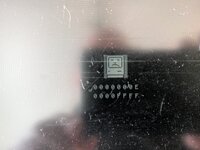
I get the SAD MAC error 0000000E 0000FFFF when I power it on.
I've recapped the motherboard and tested it with and without the RAM card installed.
No improvement, but same error.
Recapping went fine. I lifted one pad and had to do a fix near the left keyboard connector, but it checks out OK (aside from the small marks made in the plastic of the connector with my soldering iron. Yikes! that was a ridiculously narrow working area).
AI tells me RAM problems, data bus problems, broken traces, etc. can cause the error code, but I'm looking for a bit more focus.
Should the computer boot without the RAM card installed? I'd like to leave it uninstalled if it doesn't need it, because I have no idea if it is good.
Any ideas?
Problem Two:
The right hinge support is broken.
The only fix I see for the hinge is to find a new frame, or epoxy. I'm moving forward with epoxy.
Problem Three:
Screen is scratched and then scratched some more.
Does anyone have experience trying to buff out scratches on these screens?
I have some very gently plastic polishes used on acrylic and plastic watch crystals , but was curious about any success stories.
Problem Four:
Is my backlight working?
I don't see it come on. The screen brightens before it goes black with the error message, but it sure seems dark.
Does the backlight come one with power on or at some point later in the boot cycle?
Thanks for reading this and any suggestions would be appreciated.
Recently I received a Macintosh Portable 5126, with backlit screen.
Problem One:
I get the SAD MAC error 0000000E 0000FFFF when I power it on.
I've recapped the motherboard and tested it with and without the RAM card installed.
No improvement, but same error.
Recapping went fine. I lifted one pad and had to do a fix near the left keyboard connector, but it checks out OK (aside from the small marks made in the plastic of the connector with my soldering iron. Yikes! that was a ridiculously narrow working area).
AI tells me RAM problems, data bus problems, broken traces, etc. can cause the error code, but I'm looking for a bit more focus.
Should the computer boot without the RAM card installed? I'd like to leave it uninstalled if it doesn't need it, because I have no idea if it is good.
Any ideas?
Problem Two:
The right hinge support is broken.
The only fix I see for the hinge is to find a new frame, or epoxy. I'm moving forward with epoxy.
Problem Three:
Screen is scratched and then scratched some more.
Does anyone have experience trying to buff out scratches on these screens?
I have some very gently plastic polishes used on acrylic and plastic watch crystals , but was curious about any success stories.
Problem Four:
Is my backlight working?
I don't see it come on. The screen brightens before it goes black with the error message, but it sure seems dark.
Does the backlight come one with power on or at some point later in the boot cycle?
Thanks for reading this and any suggestions would be appreciated.

 . Deep clean around the replacement caps, and very close look around the Hybrid IC that is often taken out from corrosion. It has 1MB onboard so you can remove the RAM card for now.



