That was really painful but yes, that CPU is repaired. Had to cut away part of the exterior to get enough of the pin to solder onto. It's working, has the FPU, and I've overclocked it to 40 MHz and it's stable.
That was really painful but yes, that CPU is repaired. Had to cut away part of the exterior to get enough of the pin to solder onto. It's working, has the FPU, and I've overclocked it to 40 MHz and it's stable.
Oh well done. On that one where I fixed the two corner pins it was easier as there was more access, but I don't think I could have achieved an inline pin. I tried to repair a couple more chips after the one I sent you and I botched them both, it's very difficult to not cut too much ceramic away and then lose the exposed pin entirely. Or indeed to disturb adjacent pins which may also fall off.
Would like to know more about your methods, did you use hand tools or a machine?
I had bought one of those smaller handheld rotary tools (Fanttek F2) and used the smallest grinding bit and just went super slow. After I got about half a millimeter, I went for it and it took many attempts but finally got a bodge wire to hold tight. That was really painful.
Ran into a slight problem with the memory hack - the Viking card I have has a different layout. But it's working now. Overclock (40MHz), full 040 with FPU, and now 48MB of memory. Thanks to @croissantking!
You can see @croissantking's full instructions (super easy to follow) here:
A few months ago, I worked out how to run 48MB in a PowerBook 500 Series. Inspiration was taken from Toyoki's 64MB mod for PPC upgraded 500-Series notebooks. The concept is similar – tap into unused RAS lines on the memory controller to bump maximum RAM above 36MB.
So, how many RAS lines are unused? Let's look at the Dev Note:
DRAM_RAS_L[2–5] Row address select signals for up to four banks of DRAM. (The first two banks, selected by DRAM_RAS_L[1:0], reside on the CPU and memory module.)
That's six in total. RAS 2-5 go to the RAM connector, RAS 0 is connected to the...
Here's my attempt..
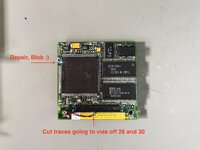
The CPU was a 33MHz L88M mask one I got from @croissantking a while back. It had one leg missing. I had to grind out about a 1mm deep by 2mm wide cutout in the ceramic. Found about 0.5mm of the missing leg left to solder onto. Took many tries but finally got it. Solder masked over it. The oscillator has been replaced with a 20MHz part which results in a 40MHz clock vs the stock 33MHz (using a 16.66MHz oscillator).
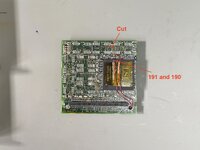
Followed @croissantking's instructions and cut traces to pins 28 and 30 on the connector, and then connected those pins to pins 190 and 191 on the memory IC. Also cut a trace heading out from pin 190. Removed all the existing memory chips as well (8 of them).
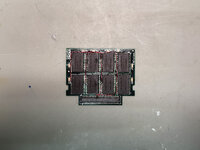
And here's the 32MB Viking memory card.. which is now 48MB.
The banks are interleaved.. so column 1 and column 3 go together, and column 2 and column 4 go together.
Everything seems to work and TattleTech reports 40MHz with FPU and 48MB of memory. I'm running it through MacBench and MacTest Pro to see how stable it is at 40MHz. My other machine has a 40MHz full 040 with FPU as well and it's been working great.
My other PB 540c with full 040 at 40MHz can keep running the MacBench pro tests and continues doing fine after many runs. I think you mentioned before you think it might be the memory IC that allows some to overclock and some to not be able to?
I think I'll keep the working overclocked one as is.
But I have one more CPU card and one last full 040 remaining. I'll try converting that one and see how that one does.
My other PB 540c with full 040 at 40MHz can keep running the MacBench pro tests and continues doing fine after many runs. I think you mentioned before you think it might be the memory IC that allows some to overclock and some to not be able to?
Yeah I think it's a bit of a silicon lottery with the Pratt. I've got one overclocked to 40MHz that's basically stable, but it will eventually fall down after repeated MacBench graphics tests. Probably gets too hot.
I think the 33MHz memory timings are too tight at 40MHz but unfortunately probably no way exists to loosen them. Maybe a slight voltage boost would help. I don't think your 60ns RAM is the issue.
Theres also the clock generator chip 88921 that's only rated to 33MHz so that could be something to consider. I tried to replace it with a 88916DW80 as we do on our LC475s, but when it failed to boot I realised it's not pin compatible.
Now I wonder if your other full 040 would keep going if loaded up with 48MB RAM, as the bus is being loaded more.
I used JB Plastic Weld to get the overall shape. Then after it cured, grinded it closer to shape with a dremel and then it was sanding the rest of the way.
This site uses cookies to help personalise content, tailor your experience and to keep you logged in if you register.
By continuing to use this site, you are consenting to our use of cookies.








 Looks like it's going back to stock speed.



