

• Hello MLAers! We've re-enabled auto-approval for accounts. If you are still waiting on account approval, please check this thread for more information.

Mac IIci with a working Quantum HD

I bought a Mac IIci with a surprisingly still-working Quantum 230 MB hard drive, and immediately made an image since it had MS Excel and MS Word installed.

I recapped the logic board except for the axial capacitors.

The PSU works fine and shows no bad capacitors, so I’m leaving it untouched. If it eventually fails, I’ll replace it with a 12 V supply, a pico-ATX unit, and the soft-power interface, as I did on another less fortunate IIci.
The programmer switch was missing, so I’ll 3D-print replacements; there are a couple of suitable models available.
I added a video card to free some RAM, and I’ll install a 10Base-T card as well.
It currently runs System 7.1, and I plan to upgrade to 7.5.5."
(you are welcome to decode the QRcode for details)

Any upgrade you can think of?
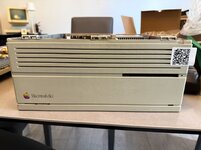
img_20251006_102525.jpg_compressed.jpeg
 
If it didn't come with one, a cache card noticeable improves performance.

That said, I still only run 7.1 on my 68030 based machines because 7.5.5 is just too slow for me on these machines. I run 7.6.1 on my 68040s.
 
A working 230MB drive isn't that rare. Out of the 10-15 I've had, only four really had issues. One was DOA, another had random media errors (one that came with a IIcx in 2013), a third had its controller board get fried in 2023, and the fourth was a parts drive for the one with the bad controller board.

An 80MB drive, then, yes, that'd be rare. I have one of those, likely pulled from a IIsi or a later IIci, in the Quadra 650 that I just picked up. I've usually had bad luck with them, even when the rubber bumper issue was not a thing. Yet this one seems fine.

Re: operating systems, I'd run plain 7.5. Strip out the Apple Guide and Launcher stuff, turning it into 7 Pro with some bug fixes.
 
If you have more than a minimal amount of RAM, an alternative ROM is a good idea to skip memory tests on boot that can take an age.
 
I agree with jmac about 7.1. 7.5 is okay to keep on hand for certain situations but 7.1 is where the machine shines best. 7.5 is best used on 68040 boxes, who don't particularly mind OS 8 if it's been trimmed out a bit, you have plenty of memory and it's a "faster" 68040 like a Q650 or something.
 
The most affordable upgrades would be a SCSI solid state drive, programmable ROM, and 128MBs of RAM.

I wholly recommend System 7 Pro. You get all the bells and whistles of 7.5, but you can remove the parts you don't want for a smaller footprint since they're not integrated like in 7.5.

Fortunately the IIci is the most upgradeable Mac in terms of the vast variety of CPU upgrades that were made for it. Unfortunately all the upgrades are now pretty expensive. However, an occasional deal pops up every now and then. There's also a chance Bolle may do another run of his upgrades, which are going to be the cheapest way to get one outside of being lucky and finding one inside a cheap machine.
 
I would be tempted to put a Daystar 040 in there (or equivalent).

Realistically a decent video card, 32MB RAM, OS 7.1, cache module (I have some 3rd party ones with more cache), and ethernet would be a must for me. The last slot you can stuff a DSP card, SCSI card, video capture, or something else that's fun into it.
 
@Unknown_K , a video card had been added, as well as a 10Base-T network card.
I'd love a cache, but as others mentioned they are pretty expensive and I've not found any reloaded projects.
 
The most affordable upgrades would be a SCSI solid state drive, programmable ROM, and 128MBs of RAM.

I wholly recommend System 7 Pro. You get all the bells and whistles of 7.5, but you can remove the parts you don't want for a smaller footprint since they're not integrated like in 7.5.

Fortunately the IIci is the most upgradeable Mac in terms of the vast variety of CPU upgrades that were made for it. Unfortunately all the upgrades are now pretty expensive. However, an occasional deal pops up every now and then. There's also a chance Bolle may do another run of his upgrades, which are going to be the cheapest way to get one outside of being lucky and finding one inside a cheap machine.
To me, as long as the hard drives keep working, I won’t add a SCSI solid-state drive. The more original, the better. I use BlueSCSI or ZuluSCSI only for Macs whose hard drives no longer work. The spinning sound of a hard drive is a pleasant reminder of the good old times.
 
I see a 128K IIci cache card on eBay listed for $99. You kind of need a cache card of some kind, so look out for a dead IIci that has one and hope it works.
 
I’ve never owned a IIci; I fell in love with the IIsi decades ago. More limited, yes, but that case is exquisite.

I’ve only ever run 6.0.8 on it. I picked up one of zigzagjoe’s 60Mhz Booster cards a while back and while I could now run 7.x on it, I’ve used 6.0.8 for so long I’m sticking with it.
 
I bought a Mac IIci with a surprisingly still-working Quantum 230 MB hard drive, and immediately made an image since it had MS Excel and MS Word installed.

I recapped the logic board except for the axial capacitors.

The PSU works fine and shows no bad capacitors, so I’m leaving it untouched. If it eventually fails, I’ll replace it with a 12 V supply, a pico-ATX unit, and the soft-power interface, as I did on another less fortunate IIci.
The programmer switch was missing, so I’ll 3D-print replacements; there are a couple of suitable models available.
I added a video card to free some RAM, and I’ll install a 10Base-T card as well.
It currently runs System 7.1, and I plan to upgrade to 7.5.5."
(you are welcome to decode the QRcode for details)

Any upgrade you can think of?

View attachment 92598
Just noticed your QR code on the machine. Looks like you had a similar Idea to mine for an inventory management system with asset tags in the form of QR codes that take you to the machine info. I also created a mobile app that does it with fewer steps that I use for most of my collection management. Did you build the system yourself?
 
Hi @wottle , yes, I created the system myself. I'm a software engineering guy, now doing hands-on only at home, 'cause at work I just "power point" :) .. or better :(
Anyhow, the system is very simple; not much development is involved, if any. For those who might be interested:
- a Synology NAS that does DHCP and DNS (yes, it's not the best place ... but it's ok)
- an internal FQDN configured
- DokuWiki installed in the NAS
- fixed IP and domain name registered
- second-level domain and reverse proxy to reach the wiki
- when I have a new "baby", I take the picture at the S/N, OCR from the mobile phone, paste it in an app the create the QR code (base path adding /SN as the suffix) and print the label, all from the mobile phone, stick to the case, or keyboard ...
- scan the QR code from the phone, a new blank page appears where I type in a minimal set of info to find later in the modern Mac to fill everything else in
- about pics ...I take pics and from the modern Mac I drag & drop them on the web page. I tried several ways to upload pics on the fly from the mobile phone, but all resulted in clumsy and brittle operations ...

In the wiki, I have set tags and tasks so I know what I need to do.

It's not perfect, but it works pretty ok to me.
I'd like to do the opposite: "Where is the Mac I see in the wiki??" But since the space is small, I often move them around, so I think it remains as it is.
I don't have a dedicated mobile App ... that'd be nice, but I prefer to spend my time on the restoration, my system fits me as it is now.
 
Hi @wottle , yes, I created the system myself. I'm a software engineering guy, now doing hands-on only at home, 'cause at work I just "power point" :) .. or better :(
Anyhow, the system is very simple; not much development is involved, if any. For those who might be interested:
- a Synology NAS that does DHCP and DNS (yes, it's not the best place ... but it's ok)
- an internal FQDN configured
- DokuWiki installed in the NAS
- fixed IP and domain name registered
- second-level domain and reverse proxy to reach the wiki
- when I have a new "baby", I take the picture at the S/N, OCR from the mobile phone, paste it in an app the create the QR code (base path adding /SN as the suffix) and print the label, all from the mobile phone, stick to the case, or keyboard ...
- scan the QR code from the phone, a new blank page appears where I type in a minimal set of info to find later in the modern Mac to fill everything else in
- about pics ...I take pics and from the modern Mac I drag & drop them on the web page. I tried several ways to upload pics on the fly from the mobile phone, but all resulted in clumsy and brittle operations ...

In the wiki, I have set tags and tasks so I know what I need to do.

It's not perfect, but it works pretty ok to me.
I'd like to do the opposite: "Where is the Mac I see in the wiki??" But since the space is small, I often move them around, so I think it remains as it is.
I don't have a dedicated mobile App ... that'd be nice, but I prefer to spend my time on the restoration, my system fits me as it is now.
Ha, very similar story for me - "become and architect" they said, "you'll get to drive the technical direction of the org", they said! :)

But I also enjoy the fixing, but I got so many devices it became overwhelming to keep track of what I had done. I also wanted a system my family could use to get the estimated value of machines in case something happened to me. As long as my NAS doesn't crap out at the same time as I do, they should be set!

The picture posting (and comment posting) was a big feature for me as I wanted it to be seamless. That mobile app gets me closer to the ideal experience (I'm not a UX designer, so the experience isn't as clean / polished as I'd like, but it is functional). I also tried to optimize for the things I do the most - one tap to set the last powered on date, add a note or photo. Auto-complete maintenance tasks that are common (recapped power supply, recapped analog board, retrobrighted case, etc). I hadn't done mobile development since the Objective C days, so I relied heavily on an AI coding assistant (Windsurf) to do the heavy lifting.

I'm hoping to release mine as open source at some point if I can clean it up a bit. There are some challenges I am trying to work through (like how to make the deep linking into the iOS app work for others, since you have to register the URL in the app for it to work, and I won't know the domains others will use. Also, trying to decide what data to show users who are logged in vs what details are publicly viewable.

Anyway, very cool to see another approach that was probably a much more efficient use of time!
 
Back
Top


