• Hello MLAers! We've re-enabled auto-approval for accounts. If you are still waiting on account approval, please check this thread for more information.

jmacz journey

You have to open it up and these are on the underside hidden under some ribbon cables. @3lectr1cPPC you might want to make a note of this.
Oh my goodness. Sneaky sneaky sneaky Toshiba! I will look more in to this when I'm home from college in about a week and will update the cap reference on MacDat ASAP! Thank you for letting me know about this!
 
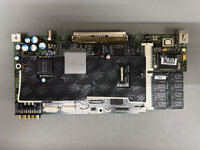
@3lectr1cPPC, got some pictures of the PowerBook Duo 2300c for your site. Note that for the logic board, you list one 33uf 25V. There could be up to two of them. I think I saw some boards with tantalums for these which wouldn't require replacing. But mine had two electrolytic caps. The rest of the caps are correct.

IMG_3010.JPG

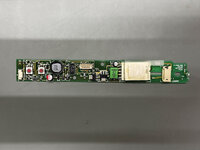
For the inverter board, there are two caps:
  • 1x 10uF 50V SMD 6mm Diameter
  • 1x 2.2uF 50V SMD 4mm Diameter
IMG_3009.JPG

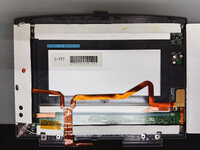
For the display, there are three caps:
  • 2x 68uF 10V SMD 6mm Diameter
  • 1x 47uF 6V SMD 5mm Diameter
IMG_3008.JPG

I replaced all the caps with polymer. I only have been using tantalums if I have the schematics and can verify the max voltage they will see so I can double it. In this case, I couldn't find schematics for the 2300c Duo so stuck with polymers.
 
The center clutch cover on the PowerBook Duos is listed as a disposable part that should be replaced when the PowerBook Duo is serviced. This is because the little clips on it break off easily when removing it. Unfortunately for us, these are no longer made. I have a few with broken clips.

Time for some modeling.

CenterClutchCoverDesign.PNG

3D printed with PLA.

IMG_3013.JPG

Removed the supports. This is prior to any finishing work.

IMG_3014.JPG

Test fitment. The below shot is just on the display housing but I also test fitted it against the body and it seems good.

IMG_3015.JPG

Need to test fit it again after I finish it and paint it. But once I confirm it's good with no other tweaks needed, I will provide the model on my Printables account like usual.

Now we can make these no problem.
 
I have three working PowerBook 500 series now.
  • PowerBook 540c with PowerPC CPU Card and 32MB memory module, 320MB HD, Hosiden LCD (Active)
  • PowerBook 540c with Full 68040 (w/FPU) overclocked to 40MHz and 32MB memory module, 160MB HD, Sharp LCD (Active)
  • PowerBook 520c with 8MB memory module, 160MB HD, Sharp LCD (Passive)
I have two working batteries but going to build another so all three have working batteries. They all have working PRAM batteries.
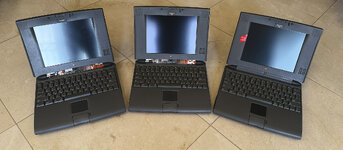
IMG_3023.JPG

Two of them won't latch properly though... they all have normal clips, strong springs, and the palm rest hole looks fine. But two of them only partially latch (if you lift via the lid -- you shouldn't but just using an example -- they will lose grip) whereas one is rock solid. Have to open them up again to take a look.

Clearly two of them are missing the center covers. I am trying to fix two of them with broken clips (which is what I did for the one that's good in the picture above)

Also have two partially working PowerBook 500 series:
  • PowerBook 540c overclocked to 40MHz with 8MB memory module, 160MB HD, Sharp LCD (Active) but no display ribbon cable... boo...
  • PowerBook 520c with stock memory, no HD, Sharp LCD (Passive) but no display ribbon cable... boo...
Also have parts of a 6th and 7th, but the logic boards are dead.. one is getting power but no chime. The other chimes but no video at all (both the LCD and the external video port). Both logic boards look physically fine. Yet another thing to debug in the future. No LCDs for them though.

Although what am I going to do with 7 of these?!? .. well even 5 of them... well even 3 of them ... ?? Hoarding mentality is too strong.

What I am really missing is a 550c........... and the monochromes which I should really not look for as the tunnel vision stuff would drive me nuts.

 
Two of them won't latch properly though... they all have normal clips, strong springs, and the palm rest hole looks fine. But two of them only partially latch (if you lift via the lid -- you shouldn't but just using an example -- they will lose grip) whereas one is rock solid. Have to open them up again to take a look.
My 540c has this problem and I don't know what the issue is. I did a full palmrest swap recently (to one in better condition) and the problem didn't go away, so I assume it's to do with the latch itself.
 
My 540c has this problem and I don't know what the issue is. I did a full palmrest swap recently (to one in better condition) and the problem didn't go away, so I assume it's to do with the latch itself.

Replaced the front facing cover panel (the one with the latch) with another, and it works fine.

The latch mechanism itself seems to be the same, nothing broken or missing. But it looks like the hook itself may have deformed on the ones that aren't locking. They are bent backwards slightly (~1mm) compared to the ones that are working. I guess the plastic deformed over time or with some yanking? I guess one could try gently heating it with a heat gun and bending it back (the tip of the hook needs to be a tad higher towards the edge of the lid).
 
I see. That makes sense, and yeah, careful work with a heat gun would probably be required to prevent that from breaking when you try to bend it back. Would be curious to see if you can pull it off.
 
Do those ones use the magnetic pull? I had some newer Powerbooks that did, and the issue was that the latches became misaligned with the magnet. Once those got lined back up again, they latched properly again.
 
Do those ones use the magnetic pull? I had some newer Powerbooks that did, and the issue was that the latches became misaligned with the magnet. Once those got lined back up again, they latched properly again.

No, for the 500 series PowerBooks, it's purely mechanical with no magnets. Just a spring and latch.
 
I see. That makes sense, and yeah, careful work with a heat gun would probably be required to prevent that from breaking when you try to bend it back. Would be curious to see if you can pull it off.

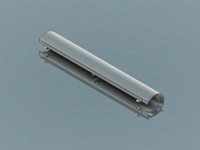
Looking for ribbon cables for a spare passive and a spare active LCD panel I have, both sharps. I did receive two of those CCFL tubes and wiring connectors. But I've put the complete systems back together already with replaced clips from other lids I had. Once I find new ribbon cables, I'll spend time with both the CCFL tubes to see if they will work as well as heating the latches to see if I can get them to work better.
 
Back
Top