• Hello MLAers! We've re-enabled auto-approval for accounts. If you are still waiting on account approval, please check this thread for more information.

my first Lisa

It says finder 5.3, I think it puts it at system 4 or 5?

Oh ok, so then if you DO want a real lisa, you are either going to have to source Lisa ROM(s) or write the existing. 

You have an XL which is an "upgraded" lisa. Oddly it doesnt have the screen mod, which makes it so its square pixels instead of rectangular with the Lisa.

 
Are you sure it's an XL? I remember that a 2/10 can boot MacWorks without modified ROMs. Also, RE the screen mod, that also points towards evidence that it is indeed a 2/10.

 
Last edited by a moderator:
;)

One note regarding MacWorks and Lisa Office System.

If you run a floppy only system, I believe you are stuck with MacWorks, and Macintosh system software. Lisa O/S IIRC requires a HDD.

 
Last edited by a moderator:
Since the day I paid for the lisa I have purposely not watched any vids on the lisa OS booting - wanted to see it for myself on my machine

I am lost about the Lisa OS.

What is mac works? - is that the OS ?

What is Lisa office system - is that another OS ?

I bought this as a Lisa XL

There are 3 variants that i know of

Lisa 1, twiggy drives.

Lisa 2

Lisa 2 XL (mine )

I think it would be a good idea to go and watch some videos and educate myself about the Lisa

 
Ok so here's how it works....

Lisa 2/5. No internal widget. Has to use external profile drive. Boots Lisa OS (And Mac works I've just heard?)

Lisa 2/10. Internal drive. Boots Lisa OS and Macworks.

Macintosh XL. Same as Lisa 2/10 however was "upgraded" to run Mac OS. Believe it uses custom roms with the video mod? The video mod makes it use square pixels so the screen is not stretched.

Lisa OS is the... well.... Lisa OS.

Macworks is an emulator allowing you to run Os 1-6 I think.

So appearently if you've got an HD you can install Lisa OS. You NEED a drive to run Lisa OS, but not Macworks...

 
There are a few different versions of MacWorks, that let you run different versions of the OS. The last was MacWorks Plus II; I believe, and it came from sun re marketing? It essentially turns the Lisa into a Plus-like system, and is capable of running up to System 7.5.5, as well as allowing that to be installed on the HDD. I'll have to check which MacWorks versions support what, but not all versions of MacWorks allow booting all versions of the SSW.

Yes an HDD is required for the Lisa Office/System.

2/5 came with external ProFile drive, and parallel port. 2/10 came with built-in 10MB widgit.

Macintosh XL is identical to the Lisa 2/10, except the ROMs have been modified slightly to make it 'mac-like'. Oh, and the screen mod was already done at the factory too for the XL models. Essentially, the XL was a way to use up the remaining inventory of the Lisa parts.

 
Last edited by a moderator:
Okay, regarding which versions of the Macintosh System Software that each version of MacWorks supports is this:

MacWorks XL (Essentially the first version of MacWorks, it was renamed XL to match the released of the Macintosh XL): System 1.0-3.2

MacWorks Plus (Designed to simulate a Plus computer, rather than a FatMac): System 6.0.2 (Some places say 6.0.3)

MacWorks Plus II (Updated version of MacWorks Plus): System 6-7.5.5

Of course, all of that is assuming that Wikipedia is somewhat correct, and my searching skills turned up the correct information:

https://en.wikipedia.org/wiki/MacWorks_XL

https://en.wikipedia.org/wiki/MacWorks_Plus

http://lisafaq.sunder.net/lisafaq-sw-mw-XL_about.html

http://lisafaq.sunder.net/lisafaq-sw-mw-plus_about.html

http://lisafaq.sunder.net/lisafaq-sw-mw-plus2_about.html

 
Best I remember, MacWorks loads the Macintosh Toolbox ROM code that the Lisa lacks into memory (and adds modifications for the Lisa hardware), and then hands over control to the Mac boot code.

The "screen kit" is just the hardware necessary to turn the rectangular Lisa pixels into square pixels as found on the Mac. Macworks can run either with or without the screen kit. Without the screen kit, the Mac environment appears to be stretched horizontally because of the pixel difference.

 
Best I remember, MacWorks loads the Macintosh Toolbox ROM code that the Lisa lacks into memory (and adds modifications for the Lisa hardware), and then hands over control to the Mac boot code.

The "screen kit" is just the hardware necessary to turn the rectangular Lisa pixels into square pixels as found on the Mac. Macworks can run either with or without the screen kit. Without the screen kit, the Mac environment appears to be stretched horizontally because of the pixel difference.
ScutBoy, is absolutely correct!  

MacWorks is not a emulator or simulator, but a Lisa Environment that loads into RAM the Mac toolbox code (patched to support the Lisa hardware:  larger display, HD, etc.)  allowing the Lisa to run the MacOS.   The screen kit is not required to run MacWorks and in no way does the screen kit make a Lisa into a Macintosh.  

Falen5 has a Lisa 2/10, and it does not matter it has a screen kit or not, it's still a 2/10 and if he uses the "H" ROMs and vid prom and get a working HD he can run the LisaOS.

AFAIK, apple never sold "MacXL's" with the screen kit pre installed.

Rick 

 
Thanks for all the great info people

I suppose the clue with MacWorks for Lisa is the 'Mac' part. Watching some videos and allot of the original software for the Mac was written on the Lisa.

All I want to to is see the Lisa OS. 

Not that any of it matters until I get my hands on some kind of hard drive.

Anybody out there got a profile drive they want to trade. I have all the 68K macs. Apple Profile hard drives are hard to come by in Ireland.

Thanks again folks

 
Last edited by a moderator:
Honestly, for usability, Mac OS is the way to go. I don't know really any games or anything for Lisa OS besides the built in stuff...

I would recommend installing a Lisa emulator and trying it out first before you do work and find out you don't like it!

 
Last edited by a moderator:
Anybody out there got a profile drive they want to trade. I have all the 68K macs. Apple Profile hard drives are hard to come by in Ireland.
Will not work with your Lisa, except if you can find a Parallel card also, the 2/10 lacks the port where the profile is hooked to.

 
Will not work with your Lisa, except if you can find a Parallel card also, the 2/10 lacks the port where the profile is hooked to.
The cable to run an external ProFile off the internal Widget connector is trivial. Basically straight through ribbon cable with the DE style connector on one end, and the square connector on the other. Just mind Pin 1 on either end. I've done it a few times without issue.

Just run the cable out the back through one of the slot covers.

 
Wow!

I looked at some videos and there is very little software for the Lisa OS. Not surprising I guess with it not being around that long and the Mac OS taking over.

Bit of a disappointment. Thats the pay off for me. When you finally get a machine working you get to play with its OS and software. Still playing with CP/M

Question. Looking at the large numbers of chips on the lisa's IO and CPU board, and then looking at a 128K board, where did all the chips go?

I guess many of the chips were all placed together on bigger single chips. Is that what a 'glue logic' chip is.

I just love looking at the evolution of the hardware

Have to say it  This Lisa is my favourite machine of my entire collection. Everything about it (to me) speaks of Apple pushing the limits. Looking at the build of the machine alone. Hats off to the team behind it. All their work was carried over to the Mac and continued on that line.

But the Lisa was breaking new ground. ( I know about xerox , their work, etc etc)

The Lisa is responsible for what we have today.

 
I have 2 x osborne 1's

first is the original , second is a later model. Cool machine Z80 cpu with a tiny screen and twin 5 inch floppy drives

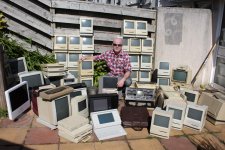
heres most of my machines

1.JPG

IMG_6506.JPG

 
Absolutely fantastic photos falen5! I didn't realize how small the osborne screen really is until compared with the compacts around it!

 
falen5, those are some impressive photos.

Next time I get a complaint from a friend "you already have too many Macs", I can show them those photos.

 
Back
Top