• Hello MLAers! We've re-enabled auto-approval for accounts. If you are still waiting on account approval, please check this thread for more information.

Upgrading to a 68040 in a Color Classic - no video mod

mraroid

6502
Hi folks...

I am not so interested in changing the screen resolution of my color classic to 640 X 480.  But I am bumping up against limitations of using a 68030 processor.  My browser runs so slow.  I feel the need for more speed....
 

I looked at the Mystic video upgrade.  I do have a board from a LC 575. 
 
If I understand the Mystic upgrade correctly I can do one of two things -
 
1) Do the ResEdit hack...
 
or
 
2) Do this hardware hack:

" Remove R116 (zero ohms, located on the bottom of the 575 logic board to the left of RP9) and solder a 4.7K ohm resistor at R109 (near R116). If you don't have the proper resistor, you can get away with using the zero-ohm resistor you just removed. Make sure nothing is installed across R110 (remove anything you find there) and you should be ready to go. "
 
Is a third option open to me if all I want is to keep my 512 × 384 screen rez and just upgrade to a 68040 processor using the LC575 board?
 
Thanks
 
mraroid

 
You don't have to do the video upgrade mod to use the 575 board. Just choose either the ResEdit or hardware method as described above, and it will work at default resolution. You'd have to additionally preform the VGA mod if you wanted to increase the resolution.

I know if using the hardware method, you'll also need to use system enabler 065. I'm not sure if you need that enabler if you opt for the ResEdit solution.

 
I'm pretty sure that you can just install system 8.1, it doesn't believe in the gestalt nonsense.

 
Last edited by a moderator:
I only have one mac computer (working) - the color classic.  I have read the directions for the ResEdit hack...  I am not sure if I understand them correctly.  This can all be done on the computer I am trying to upgrade?  I can skip the system enabler 065 if I am not changing the screen rez, is that correct?
 
I am good with installing OS 8.1.....
 
mraroid

 
Thanks for the link. 

So reading the FAQ it says:

Q: Are there any additional requirements for installing Mac OS 7.5 - Mac OS 8.0?

A: No, the LC575 is all you need to get started with OS8

**********************************
and:

Q: Can I just replace my current logic board with the LC575 logic board or do I need a certain minimum System software?


A: The LC575 needs System 7.1 with System Enabler 065. If you have 7.5 or later you should be fine. If you are using System 7.1, we recommend that you reinstall System 7.1 prior to installing the LC575 logic board. When you reinstall the software from the installer program do it as "customized" and select "for any supported Macintosh".

*****************************
 
I can't tell from reading the FAQ if they are talking about a LC575 that they have done a hardware hack to make it 640 X 480.  But I guess it does not matter?
 
I am running 7.6.1 right now.  But if I recall correctly, I installed it for "this Mac only".  I can do a re install and select "for any supported Macintosh".
 
So after I do that, I can just slide in the LC 575 board and reboot? It will boot to 7.6.1.  As well as a apple branded 7.6 CD, I have a apple branded OS 8 CD.  I can stick that in, and upgrade to 8.0, then find the upgrade to 8.1 and I should be in good shape?
 
I am fine with 512 × 384.  The LC 575 and OS 8.1 will be OK with 512 × 384?

 I would like to avoid the ResEdit hack if I can.... Am I missing anything?
 
mraroid
 
And just read this.  Might make a ResEdit hack easy...:

mraroid

********************************************************

Q: Are there any additional requirements for installing Mac OS 7.5 - Mac OS 8.0?

A: No and Yes. If you have the 66/33MHz version of the LC575 logic board you can install Mac OS 7.5 - 8.0 from the Mac OS Install disks or CD-ROM disc without any additional requirements.
However if you have the 80/40MHz version of the LC575 logic board, Mac OS 7.5 - 8.0 does not recognize the Gestalt number (Machine 'mach' ID code) of the logic board due to the upgraded 80/40MHz processor. To install the System software you need to perform an additional step prior to installing the new Mac OS software.


How to Install Mac OS 7.5 - Mac OS 8 on the 80/40MHz LC575 Model ONLY:


• Either you can install the Mac OS software by taking the hard drive you plan to place the System software onto and installing it into a Mac that is recognized by the Mac OS Installer (such as a Quadra, Centris or PowerPC-based Mac). After the installer program launches, select "Custom Install" as the installation you wish to perform (not "Easy Install") and select the installation for "any supported Macintosh". After the installation is complete, return the hard drive to your LC575 logic board upgrade.
• Or you can simply use a Freeware program like "MachID Wannabe" (available to download from the MicroMac Web site) and fool the Mac OS Installer by changing the Gestalt number of the 80/40MHz LC575 logic board to Gestalt 92 (the Gestalt number for a LC575 with 66/33MHz 68040 processor.) Changing the Gestalt number, however, does not influence the speed of the upgraded 80/40MHz 68040 processor. Changing the Gestalt number merely tricks the Mac OS Installer into recognizing your Mac model since the original LC575 produced by Apple were only 66/33MHz 68040-based Macs.
Here is how to install Mac OS 7.5 - 8.0, on the 80/40MHz LC575 logic board:
  1. http://www.micromac.com/software/MacID_Wannabe.sit.hqxDownload the MachID Wannabe Control Panel
    http://www.micromac.com/software/MacID_Wannabe.sit.hqxfrom the MicroMac Web site.

Install the control panel into your Control Panel Folder (inside your current System Folder on your
hard drive) prior to installing Mac OS 7.5 - 8.0.

Restart your Macintosh.

Open the MachID Wannabe Control Panel. It should appear as follows:
mid_wbe.gif.c527aba491afe600cc0015b344663218.gif


Type in 92 as the Machine 'mach' ID (Gestalt number).

Close the Control panel. Do not select the small [Reset...] Button. This button is used only if you wish to reset your Mac back to its original Gestalt number.

Restart your Macintosh.

Install the System software from the Mac OS Install disks or CD-ROM disc (do not boot from those CD or disks).
 
System Enabler 065 adds support for the 575 to System 7.1.x. It's not needed for later system versions.

If the analog board isn't modified for 640x480 (60 or 67Hz), then the LC 575 logic board needs modification or the System file needs editing in order for the 575 board to function with the CC's monitor. This applies to System 7.1.x to Mac OS 8.1.

If you modify the System file in ResEdit, this can be accomplished on the CC with the original logic board installed. The edit doesn't prevent the System from booting with the original CC logic board installed. If you install System 8.1 with the unmodified 575 logic board and with the original analog board configuration, you'll need to edit the System file on your installation boot media as well as edit the installed System file after installation completes.

Edit: http://colourclassicfaq.com/mobo/mystic.shtml

 
Last edited by a moderator:
I guess I can't get around it, and need to man up and do the rez edit .  I see you have already done the Mystic hack rsolberg.  How long has your CC been working with this mod?  Did you go all the way and are looking at 640 X 480?  How hard was it for you?  Did things go well when you did the mod?  Which OS are you running in your Color Classic?  I was thinking about running 8.1
 
I will re read the link several more times to make sure I understand it all.  Then get a good nights sleep, make some coffee, then give it a go.
 
Thank you for your feedback.
 
mraroid

 
System Enabler 065 adds support for the 575 to System 7.1.x. It's not needed for later system versions.

If the analog board isn't modified for 640x480 (60 or 67Hz), then the LC 575 logic board needs modification or the System file needs editing in order for the 575 board to function with the CC's monitor. This applies to System 7.1.x to Mac OS 8.1.

If you modify the System file in ResEdit, this can be accomplished on the CC with the original logic board installed. The edit doesn't prevent the System from booting with the original CC logic board installed. If you install System 8.1 with the unmodified 575 logic board and with the original analog board configuration, you'll need to edit the System file on your installation boot media as well as edit the installed System file after installation completes.

Edit: http://colourclassicfaq.com/mobo/mystic.shtml
I'm pretty sure you can run vanilla 8.1 with a unmodded 575 board and an unmodded AB.

 
Last edited by a moderator:
There is no need for trepidation. The ResEdit hack is trivially easy to do. However, as you do need to have a hacked boot floppy for emergencies anyway, it might be an idea to make the first trial hack on a disk tools floppy. See if it works. If OK, proceed to the real hack.

When you work with the System folder on the HD, duplicate it, and then work on the copy. Rename original and copy appropriately when ready to reboot with the 68040, and hopefully bingo! Keep your old System folder under a name like 'Old System 68030' or the like, so you can revert. If something does go wrong, boot from the hacked floppy and restore the old System by changing the name to what you began with, and possibly use the 68030 board for that. You are then back to where you began. Easy as pie.

 
I went the resistor route so I wouldn't have to worry about hacked floppies and systems, but then again I'm more of a hardware guy. I am running 7.1, so I do use the enabler. I didn't do the VGA mod, so I'm still at default resolution. Makes a great system with the Apple //e card!

 
I use my color classic as my bridge mac.  It has the 550 board making it a color classic II, with an external HD,zip and cd rom connected to the network and internet I can get just about anything to it that way and make anything for other older macs with it.

 
Thanks everyone for the many tips.  Yep - test run on a floppy.  Great idea.  Thank you beachcove.. 

beachcove - I will keep reading.  Your way sounds the best!

joethezombie....  So when you did the hardware route you did this?:

2.1.13 — I'm a complete klutz with ResEdit. Can't I do some soldering instead? Yep. Remove R116 (zero ohms, located on the bottom of the 575 logic board to the left of RP9) and solder a 4.7K ohm resistor at R109 (near R116). If you don't have the proper resistor, you can get away with using the zero-ohm resistor you just removed. Make sure nothing is installed across R110 (remove anything you find there) and you should be ready to go.

****************************

If I upgrade to OS 8.something, do I need an enabler?

Thanks

mraroid

 
Yes, that is exactly what i did. I simply moved resistor R116 to position R109. There was nothing at R110, so i was good to go.

I've not installed MacOS 8 on this system because it is not compatible with the //e card, but I believe you only need the enabler with system 7.1.

 
I am also much better with a soldering gun than trying to figure out if I am doing the rez edit hack correctly. I am a Weller soldering gun guy myself.  That and my solider sucker and I am all set.

I am re installing OS 7.6. as a "all computer install" rather then "just this computer" install (I can't remember the exact words in the OS 7.6 CD, but words to that effect).
 
After I finish this, I can do the hardware hack below on my LC 575, and just swap out boards?  The LC 575 will run 7.6 for me?  I take it I can upgrade to OS 8 sometime later on if I like?
 
Reading this:

2.1.13 — I'm a complete klutz with ResEdit. Can't I do some soldering instead? Yep. Remove R116 (zero ohms, located on the bottom of the 575 logic board to the left of RP9) and solder a 4.7K ohm resistor at R109 (near R116). If you don't have the proper resistor, you can get away with using the zero-ohm resistor you just removed. Make sure nothing is installed across R110 (remove anything you find there) and you should be ready to go.

**************************
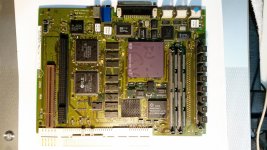
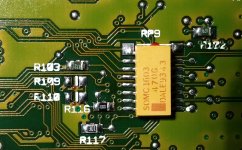
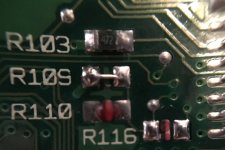
I believe I have located R116 Just above R110.  The stenciling is really poor. It looks like nothing is across R110.
 
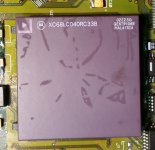
It looks like a 33Mhz 68040 processor on this LC 575.  I had this board re capped and washed so it should be in good shape.

http://www. cpu-world.com/CPUs/68040/Motorola-XC68LC040RC33%20-%20XC68LC040RC33B.html
See photos...
 
Suggestions welcome
Thanks everyone for the help.
 
mraroid


b2.jpg

my68040.jpg

r110.jpg

 
I guess I didn't even bother with the "proper" resistor.  I thought I had moved the R116 to position R109, but I must have lost the 000 on the floor, so I improvised:

IMG_0620.jpg

I did 3D print alaska's most excellent Mystic back cover, which I highly recommend:

IMG_0613.jpg

 
Last edited by a moderator:
Back
Top