• Hello MLAers! We've re-enabled auto-approval for accounts. If you are still waiting on account approval, please check this thread for more information.

Macintosh Portable M5126 BackLit video problem

Hello Guys 

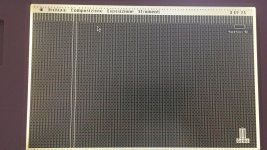
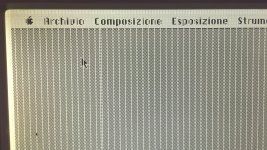
recently recapped and restored flat damaged cable in my Macintosh Portable Backlit , now it remain 2 problems to solve 

1) the two white lines : i suppose it is a display problem 

2) the continued lines : each 6 pixel , i remember i had the same problem with SE30 with bad UE , 

Any suggestion?
IMG_5814 2.JPG

IMG_5813 2.JPG

IMG_5812 2.JPG

 
Hello Guys 

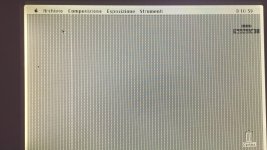
recently recapped and restored flat damaged cable in my Macintosh Portable Backlit , now it remain 2 problems to solve 

1) the two white lines : i suppose it is a display problem 

2) the continued lines : each 6 pixel , i remember i had the same problem with SE30 with bad UE , 

Any suggestion?
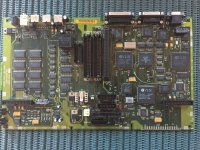
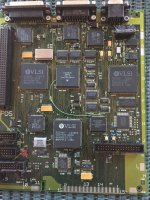
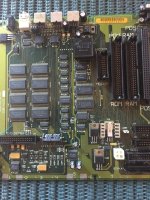
Here following attached motherboard pics

IMG_5842.jpg

IMG_5843.jpg

IMG_5844.jpg

 
the ribbon cable going between the display and the unit itself is likely damaged. You will need to meter this out to verify. 

Also, the lines showing only going half-way down is usually a bad LCD panel itself. 

 
Last edited by a moderator:
the ribbon cable going between the display and the unit itself is likely damaged. You will need to meter this out to verify. 

Also, the lines showing only going half-way down is usually a bad LCD panel itself. 
Hi Tech 

thank you for reply and suggestions , i missed two  infos :

1)i checked this display with repaired ribbon on another fully functionally portable and it showed only the two near lines ,this problem is sure on the LCD panel or ribbon cable ,

2) i try with the  fully functional lcd display  complete with ribbon cable  ( the one i have in the fully functional portable) on this portable recapped and it only shows regular lines each 6 pixels , so i suppose the problem is in the logic board recapped and should be good to check the video schematic  or the video connector pinouts but i'm stopped in this point and do not know how to proceed .

Thanks a lot any suggestion is appreciated!

 
then you have a broken trace between the video connector and the video IC. Its rare, but you could have a break between VRAM and the graphics IC, so I would ring out both. 

You need a good machine to build a pin-out chart between the LCD connector and the video IC, same thing with video RAM. 

Then go back to the bad board, and ring em out. you will find the break. 

 
Back
Top