• Hello MLAers! We've re-enabled auto-approval for accounts. If you are still waiting on account approval, please check this thread for more information.

Just picked up a Macintosh Classic! Got some questions

I managed to buy a Classic from a boot sale with the standard Keyboard II and the mouse and 40MB HDD, and it works! Boots up normally and seems fine.

This is the first time I've gotten a computer this old, and I have been mostly using Windows all my life, so I've got some questions to ask about this.

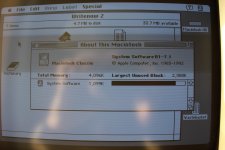
1. It runs System 7.1 (see uploaded image), but I couldn't find anywhere what the 'B1' referred to. Anyway, would you recommend me to upgrade this to System 7.5.5 which I understand is the newest OS compatible? Is 7.5.5 a good version, not like Win ME for instance? Also isn't 7.5.5 'too new' for it to run slow on a Classic?

2. It also seems to have 4096k (4MB) RAM, but Wiki claims the Classic was only sold with 1MB. Does that mean mine has been upgraded?

3. I would like to install some software on this Classic but how can I do that? I have an older Windows PC with a 3.5" floppy drive and some floppies, - so can I use that PC to download software, put it on the floppy, and use that on the Classic? Any good place where I can find software?

4. I'm not sure if sound is working properly. I know this Mac has that 'beep' sound on boot but I couldn't hear it. I then went to Control Panels and the sound was set to 3. I changed it to max (7) and I heard the beep, but it was very very quiet. Could there be a problem with speakers?

5. Being a rookie to Macintosh I'm not sure if I'm doing this wrong or not - at default when I boot, the mouse movement is very slow. In Control Panels it is set on the lowest, so I changed it higher. However after a reboot it went back to the slowest. Does that mean it isn't saving the setting properly?

Apologies if there's too many questions but I think I should know these, thanks!
big_smile.png.391e13b1c1da0987224f884300f7aeb8.png


IMG_0089.JPG

 
Last edited by a moderator:
you have ALOT of work ahead of you. First things first, the machine has to be taken apart and the battery removed, and the logic board cleaned and recapped. The analog board also needs recapped in these. your VERY lucky its actually working, but the quiet sound is a dead giveaway that its unrestored. Also, if it has a Quantum HDD, be prepared to replace it because even though it fires up now, it wont very soon. youll be stuck with a classic Flashing ?. 

Not to rain on your parade, I am just being honest here. 

System 7.5.5 is a dog on a Classic, and theres no reason to need it anymore. Back in the day you needed it to stay current and use the Web. Now since the world has shifted, and the use of these machines are for collectable/nostalgia nature instead of work nature, 7.5.5 isnt necessary. 

You can get away with either 7.1, or if your just gonna play games on it, roll back to system 6.0.8 its snappy. 

As far as getting stuff on the machine, even as far as installing an OS, well, thats a chicken and the egg syndrome if you dont have another mac similar. Like a bridge machine. You will have to do some reading around. Suggestion would be use emulation and a floppy drive on your modern machine, or even HFV explorer as it will format and mount macintosh floppy disks. Since that machine supports full high density disks, you can format them on your PC in Mac format, and put files on there from emulation hard-disk images using HFV explorer, or mount the floppy in the emulator itself. Thats how I did it back in the day, and I even made a video on it. 

Might be easier to get a CD-ROM drive, and a boot disk that contains the Apple CD driver and burn a Legacy Recovery disk because it has all the OSes, plus the Apple Disk copy which is a necessity as well as stuffit. 

Nowadays, people are going with a SCSI2SD solution for the Hard Disk drive, and since it uses a standard SD card, you can remove it and mount it on a modern machine to put files over to it. Then put it back in the old machine and boot it. Its becoming quite popular, And there is also the FLoppyEmu by bigmessowires that does a very similar thing. 

 
Last edited by a moderator:
2. It also seems to have 4096k (4MB) RAM, but Wiki claims the Classic was only sold with 1MB. Does that mean mine has been upgraded?

1MB was the standard setting, the Classic can be upgraded up to 10 MB IIRC, a daughter board was provided to do so, with 1 MB on-board a two slots for Ram simms, so your Calssic should have this board with two sticks.

5. Being a rookie to Macintosh I'm not sure if I'm doing this wrong or not - at default when I boot, the mouse movement is very slow. In Control Panels it is set on the lowest, so I changed it higher. However after a reboot it went back to the slowest. Does that mean it isn't saving the setting properly?

The Pram battery is there to keep those settings, if the battery is flat...

I agree with Techknight the first step is to have capacitors replaced (both those of the Logic Board and Analog) the Classic has just a few, so not big deal.

 
Last edited by a moderator:
For your information also, the Classic is the only one able to boot from ROM.

So even with a bad hard drive, no need to boot from a floppy.

 
Recap a MUST! As techknight said lucky it's even working... get those caps off that logic board before they do more damage.. Probably shouldn't power it on often until that is done!

 
Welcome to the 68kmla!  :)

the Classic is the only one able to boot from ROM.
Hit Cmd-X-O all at once right after flipping the switch. That's the command key, the "o" and the "x" keys. It will boot from its ROM.

There's a nice and straightforward guide for beginners like you on how to create 1.44mb floppies from pre-existing images for a Mac from a Windows PC.

Head this way

If you want to move separate files (.sit files for example), you can use TransMac (but it's not free)

Yeah apart from a Recap, you're good to go. 

Also: if you haven't, get yourself a case opener. Any LONG Torx T15 driver should do. And GET RID OF THAT PRAM BATTERY BEFORE IT BLOWS!!

 
Last edited by a moderator:
System B1-7.1 sounds like a language option. The Japanese version reports as J1-7.1 so I wouldn't find it unreasonable to see that's a different language pack on 7.1 (British English? Some other B language?).

 
B does indeed stand for British English. On all US systems the trash is called trash. On British & Ozzie systems, it's called the Wastebasket.

Funny enough, on the LOS, the trash is called wastebasket even in the US. On OSX, it's called Trash wherever you are (US, UK, Australia, NZ...)

 
2. It also seems to have 4096k (4MB) RAM, but Wiki claims the Classic was only sold with 1MB. Does that mean mine has been upgraded?

1MB was the standard setting, the Classic can be upgraded up to 10 MB IIRC, a daughter board was provided to do so, with 1 MB on-board a two slots for Ram simms, so your Calssic should have this board with two sticks.
The Classic II and Color Classic can use up to 10mb of RAM, the original Classic is stuck at a max of 4MB, along with the Plus, SE, and SE FDHD (as far as compact macs go).

Whatevers,

Everything else has already been said here by everyone.

Before anything else, acquire the proper screw driver (long T-15), and REMOVE OLD PRAM BATTERY.  Many from that time, especially red Maxell batteries, are prone to leakage and will destroy your logic board beyond repairability.

After that, then this break down of to-do items. Others in this thread have already given great advice and specifics on these topics:

1) Logic board has leaking capacitors (the weak audio being a symptom of that), and that will definitely continue to cause more symptoms and problems until cleaned and recapped.  I'd recommend this first and foremost.  The longer the old capacitors are left in there, the more damage that will be done.  There are great guides on how to do this yourself, as well as several users here can do it for you, or you can use Uniserver/MacCaps.

2) It would be wise to replace the capacitors on the analog board/power supply.  Since there are less chances of traces getting destroyed (and the work of bypassing destroyed traces) on these two items, they aren't quite as critical as the logic board.  However, if you can replace the capacitors on these at the same time as the logic board, you really should. Again, there are great guides on how to do this yourself, as well as several users here can do it for you, or you can use Uniserver/MacCaps.

3) Finally, that hard drive will most likely be running out of life soon.  If it works for you for now, I'd keep using it.  Just know that one day you may see the flashing question mark.  Luckily, as others have stated, you can boot from the ROM on this computer.  If you really wanted to, you could toss some games/applications on floppy disk (as long as they play well with System 6), and just boot from the ROM disk should the hard drive die.  Personally, I would replace it with another disk or SCSI2SD implementation when it does inevitably fail.

4) Lastly, the floppy drive may require servicing as well.  There is a great guide on this sites wiki (https://wiki.68kmla.org/index.php/Floppy_Drive_Lubrication) for doing some maintenance on it.  Again, I'd personally only do this if the drive isn't working correctly or is struggling to work correctly/inject/eject disks properly.  IF you do end up having to do it, it is pretty straight forward and Lowes/Home Depot sells the specific type of grease mentioned in the wiki article.  I've had to do a couple of mine.

After all that is said and done, yes there are several ways to use your older PC to write to Mac floppy disks.  However, there are numerous other threads on that topic.  We can cross that bridge when you get there.

Edit: Almost forgot to say, welcome to a great community :)  Good luck with your Classic.

 
Last edited by a moderator:

Welcome! Try not to get hooked and fill your basement/garage/attic/living room with vintage computers!

As others have said, this model is VERY prone to its capacitors going bad - you will likely have to replace them.  And the sooner the better.

Also, as others have said - take out the backup battery!  It could be one of the "good" ones that will fail gracefully, but it could be one that literally explodes corrosive goo all over the system.

Quantum hard drives are the devil. I recently did an inventory of my vintage hard drives.  Of ~14 drives I tested, 6 were bad.  All 6 were Quantum drives.  There was only one "good" Quantum drive.

 
Thanks to all for the replies!

Looks like I have quite a job to do. Knowing that it could be completely damaged with its failing components, I will no longer turn the machine on until I fix everything. When I have the time for this I will definitely restore this Macintosh.

Once again, thank you!

 
the faster you remove the battery the better off you are. At least do that before you store it on the shelf for the next rainy day project, Trust me I have a few of those, but the Batts are the first to go. 

 
if you dont remove that battery asap the next time  you post will be  a question about stripy lines or a checkerd display  - get a long screwdriver open it and remove the ticking time bomb NOW!!!!!

 
Last edited by a moderator:
I know it has already been said twice now, but it is really critically important that you remove the old clock battery. If it let's go, you can consider the logic board totaled.

Everything else is repairable with some patience, skill, and guides. Not the battery damage. You should really acquire that screw driver bit and get that old battery out ASAP.

If you are unable to source the correct screw bit locally, search eBay for item number 331657821608

With shipping, it is less than $8 and will allow you to remove the screws, including the ones under the handle. It fits most standard screw drivers that accept bits.

Consider the fact that it has been said by so many people of an underling to just how important removing that battery is.

 
Last edited by a moderator:
I see. But I didn't expect the battery to be able to do the total damage without the actual power being on...

In other words, I have a ticking time bomb in my room!

Alright I will have to remove that battery like today if I can.

 
Last edited by a moderator:
When the battery voltage gets really low it will start "venting", this also happens with cheap alkaline batteries that get too hot.

Not all of the clock batteries will do this.  The purple/green Tadiran and white/green Saft batteries are pretty good, Maxell batteries are NOT.  

I should also mention that I have had hundreds of old Macs in my possession over the years and have never seen a battery blown up but others have seen a bunch, so YMMV... 

 
Correct, the damage from a depleted battery (especially red Maxell units, but really any of the batteries) can happens when the computer is on or off.

 
yep it creates an acid stream which will destroy the circuit board beyond economical repair. 

I have only been able to revive 1 battery damaged board ever. 

 
Last edited by a moderator:
Back
Top