• Hello Guest! We're hosting a challenge to welcome vintage Intel macs to the MLA during the month of July! See this thread for more information.
  • We've made some quality of life improvements to the Trading Post. More info here.

Lisa 2/10 Problems

I recently got my hands on three (yes, THREE) Lisa 2/10s. I have some problems that I could probably figure out on my own, but it would be nice to have some additional input from people with more experience. All three keyboards have been fixed by replacing the foam pads, and all three Datapower 1.8A power supplies have been completely recapped, both electrolytics and safety film caps.

Lisa #1: Started up, but I got that classic fish smell from leaky electolytics in the power supply. I recapped the power supply, and the computer works fine now. Even the Widget boots and has a bunch of games on it. I played a few games of Solitaire to celebrate my accomplishment. I didn't win a single time.

Lisa #2: The power supply worked for a while, then it died while I was swapping out and cleaning some memory boards because it gave me a memory error. The recap didn't do anything, so I put the known working power supply in it temporarily. It turned on and the memory errors have been fixed, but the Widget tries to boot for about three minutes before giving up. I hear the head clicking in a consistent pattern, but it doesn't sound that unhealthy. The computer doesn't give me an actual error message, it just prompted me for a boot disk. When I inserted a boot disk, it just immediately gave me a disk read error. I went back to the power supply problem and found a blown fuse, so I'm currently waiting on some to come in the mail.

Lisa #3: This one needs extensive work. It already wasn't in good shape by the fact that it's missing its anti-glare screen and the Widget drive has been removed. It's been using an EMAC 20D instead, but it's also missing a SCSI card. The power supply never worked, and after a recap, it's still broken. I hear a slight hissing sound from the power supply when I press the power button. I put the working power supply in this one as well, it also starts up, but it gives a memory error and the screen is all sorts of messed up. The best way I can describe it is that there are three squished images that are stacked vertically. It's still usable enough to test the rest of the computer, but I'm guessing that the video card needs to be recapped. I'll order the caps when I find out what's wrong with the third power supply so that I don't have to put in two separate Mouser orders. I also read that sometimes memory errors can cause screen instability, so I'll have to look into that a little bit more to make sure that the video card actually needs to be recapped. Because of the lack of a usable hard drive, it immediately prompted me for a boot disk, but the disk wouldn't go in. The floppy drive mechanism was all gummed up, and I just got it moving again, but I still need to fix all of the other problems in order to test it. I tested the power supply again and it does produce the standby +5v, but I still get that hissing sound. I also need to get a SCSI card to use the EMAC, I've been thinking of building this instead of spending a bunch of money on a genuine one: https://github.com/alexthecat123/Lisa-GALSCSI-Card. (If you're wondering, I bought all three of these computers, plus three mice, three keyboards, a Lisa 2 manual, a MacWorks Plus 1.1 manual, the EMAC 20D drive, some cables, some MacWorks Plus floppy disks, and some original reciepts, all for less than what one of those orignal SCSI cards would cost.)

Now for my actual questions: How do I fix the Widget and floppy drive problems on Lisa #2, and how do I fix the power supply issue on Lisa #3?
 
RE #2 and the widget, try turning the drive on its side when it's trying to boot (after taking it out of the drive bay of course :)
I've fixed a few widgets by adjusting the brake with a feeler gauge. Lots of instruction available on the web for that procedure.
Hopefully stepleton will jump in here with some advice. He's Mr. Lisa AND Dr. Widget.
PS. If you want to sell a keyboard or mouse, let me know... I'm currently using Arcanebyte's mac2lisa keyboard adapter and would like to find a Lisa keyboard.
 
RE #2 and the widget, try turning the drive on its side when it's trying to boot (after taking it out of the drive bay of course :)
I've fixed a few widgets by adjusting the brake with a feeler gauge. Lots of instruction available on the web for that procedure.
Hopefully stepleton will jump in here with some advice. He's Mr. Lisa AND Dr. Widget.
PS. If you want to sell a keyboard or mouse, let me know... I'm currently using Arcanebyte's mac2lisa keyboard adapter and would like to find a Lisa keyboard.
Thanks for the reply! Unfortunately if I do sell anything, I'll sell a computer with a keyboard and mouse as a set, that way it's worth much more. I was able to get these for cheap because someone thought that they were just old Macs, I wouldn't be surprised if there are a few people out there holding on to one of these and they just think that it's some random old Apple keyboard. I got my 1581 disk drive for $5 that way, just because someone thought it was a normal Commodore disk drive. Keep your eyes peeled on things like eBay or FB Marketplace, and instead of looking up things like "Apple Lisa keyboard," look up things like "Apple keyboard" or "old keyboard."
 
You got a tremendous deal. One of those things you’ll always remember and probably never duplicate, but what a score!
 
Hello and congratulations on your lucky purchase.

For the widget in Lisa #2: sometimes Widgets that haven't been turned on for a while need some exercise to start working again.

Try turning your Lisa on and listening closely to how far the Widget gets in its startup sequence. Once it stops making noise (besides spinning of course), turn the Lisa off and leave it off for about a minute. Then turn it on again and listen for differences in the noises the Widget makes. Does it get any further? Keep repeating as long as you hear progress.

Be sure to stop the Lisa from attempting to boot from the Widget by hitting the space bar (e.g.) while the Lisa is doing its power-up testing. A boot will not be successful anyway if the Widget does not successfully complete its power-on sequence. But if the Widget does successfully start up, you may still want to exercise it a couple more times before you attempt to boot. Each power-on sequence will seek the head over the entire disk surface, which helps free up old lubrication. After a run of, say, three successful power-ups, I'd feel more comfortable about trying to boot from it. But I might use a tool like BLU to attempt to archive an image of the disk before attempting to boot from it.

For further troubleshooting, NeoWidEx or an ESProFile in Diag mode may be useful to you.
 
Hello and congratulations on your lucky purchase.

For the widget in Lisa #2: sometimes Widgets that haven't been turned on for a while need some exercise to start working again.

Try turning your Lisa on and listening closely to how far the Widget gets in its startup sequence. Once it stops making noise (besides spinning of course), turn the Lisa off and leave it off for about a minute. Then turn it on again and listen for differences in the noises the Widget makes. Does it get any further? Keep repeating as long as you hear progress.

Be sure to stop the Lisa from attempting to boot from the Widget by hitting the space bar (e.g.) while the Lisa is doing its power-up testing. A boot will not be successful anyway if the Widget does not successfully complete its power-on sequence. But if the Widget does successfully start up, you may still want to exercise it a couple more times before you attempt to boot. Each power-on sequence will seek the head over the entire disk surface, which helps free up old lubrication. After a run of, say, three successful power-ups, I'd feel more comfortable about trying to boot from it. But I might use a tool like BLU to attempt to archive an image of the disk before attempting to boot from it.

For further troubleshooting, NeoWidEx or an ESProFile in Diag mode may be useful to you.
Thanks, I'll have to try this!
 
Each power-on sequence will seek the head over the entire disk surface, which helps free up old lubrication.

Not to hijack this thread, but speaking of lubrication, is there a safe way to lubricate anything on the widget drive?
I'm thinking it is a hard no, but my drive is screaming like it would like something to reduce the friction.
 
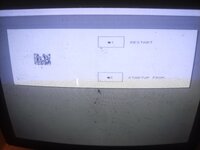
I got this after trying to boot from a floppy disk. It just immediately ejected it and gave me whatever this error code is. (Yes I know I need to clean the screen.)
 

Attachments

  • IMG_20260712_161211970_HDR.jpg
    IMG_20260712_161211970_HDR.jpg
    6.1 MB · Views: 8
Alright, I did a little bit more experimenting, and that weird error went away when I put in a different floppy drive and it could read the boot disk fine. As for the Widget, the brake gets released, and the head moves just fine. It's the way that it moves is the problem. It seeks right twice then returns back all the way to the left, and it constantly repeats that pattern, even when the computer is running off of the floppy drive.
 
That image is a new one on me.

Is this behaviour truly consistent --- the same thing every single time?
Yes I've seen that error at least twice, and I thought it was a weird corruption or some one-off thing the first time. I found that it was from the floppy drive, and swapping in a different one fixed it.
 
Interesting.

It might be time now to see what we can see with troubleshooting tools like NeoWidEx. I wonder if it will boot in your Lisa. Given the somewhat squashed appearance of the text in the screenshot you shared, it may be that you have the square pixel modification fitted in your machine.

Can you report the alphanumeric code that appears at the top-right of the display as the Lisa gets close to finishing its power-on tests?

You are likely to see either "H/88" or "3A/88", though other variants are possible. Only H/88 will work with NeoWidEx, while 3A/88 means you have the square-pixel mod. If NeoWidEx won't work, a few other options are available.

Although it is a bit cheeky of me to assign homework, it will be a good idea at this stage to follow the advice here: https://codeberg.org/stepleton/NeoWidEx#required-reading . Knowledge of the details described in the Widget ERS document will be extremely valuable in your troubleshooting journey.
 
Interesting.

It might be time now to see what we can see with troubleshooting tools like NeoWidEx. I wonder if it will boot in your Lisa. Given the somewhat squashed appearance of the text in the screenshot you shared, it may be that you have the square pixel modification fitted in your machine.

Can you report the alphanumeric code that appears at the top-right of the display as the Lisa gets close to finishing its power-on tests?

You are likely to see either "H/88" or "3A/88", though other variants are possible. Only H/88 will work with NeoWidEx, while 3A/88 means you have the square-pixel mod. If NeoWidEx won't work, a few other options are available.

Although it is a bit cheeky of me to assign homework, it will be a good idea at this stage to follow the advice here: https://codeberg.org/stepleton/NeoWidEx#required-reading . Knowledge of the details described in the Widget ERS document will be extremely valuable in your troubleshooting journey.
It is running the 3A/88 version, but I do have an EEPROM programmer and an eraser, so I could switch around the ROM and remove that small screen transformer if necessary. Before I use NeoWidEx, I might even try just swapping the drive logic boards around so I can get the data off of it, if it has any on there. I would like to preserve as much data as possible, and I still need to wait for my SCSI boards and parts to arrive in order to move data on to something that I can back up to modern devices. Thanks for the help!
 
Reversing the screen modification also requires replacing the video state PROM, which is a fast non-eraseable part that (as far as I know) can't be replaced with an EPROM. You can find rectangular pixel compatible video state PROMs from retailers like VintageMicros.

It may be worth considering getting an ESProFile and using this as your Widget diagnostic tool. The Lisa will only be required to provide power to the drive.

I would be wary of swapping drive logic boards without a better theory of what is wrong. One of them (the motor board at the bottom) has already been shown to work. Another (the motherboard) has trimmer resistors that will have been tuned precisely for your drive. There are also fragile ribbon cables that (as others on this forum can attest) are easily torn.

For what it's worth, you do not need SCSI boards to back up a working Widget, only a serial cable and BLU. You can also back up a working Widget with an ESProFile. I consider both of these methods safer and more accurate for your data than backing up the contents of a Widget with the help of a conventional Lisa/Mac XL operating system running on the Lisa.
 
Reversing the screen modification also requires replacing the video state PROM, which is a fast non-eraseable part that (as far as I know) can't be replaced with an EPROM. You can find rectangular pixel compatible video state PROMs from retailers like VintageMicros.

It may be worth considering getting an ESProFile and using this as your Widget diagnostic tool. The Lisa will only be required to provide power to the drive.

I would be wary of swapping drive logic boards without a better theory of what is wrong. One of them (the motor board at the bottom) has already been shown to work. Another (the motherboard) has trimmer resistors that will have been tuned precisely for your drive. There are also fragile ribbon cables that (as others on this forum can attest) are easily torn.

For what it's worth, you do not need SCSI boards to back up a working Widget, only a serial cable and BLU. You can also back up a working Widget with an ESProFile. I consider both of these methods safer and more accurate for your data than backing up the contents of a Widget with the help of a conventional Lisa/Mac XL operating system running on the Lisa.
I was just going to use SCSI because I already have the parts coming. I'll still look into other options, but SCSI is just more convenient for me. Thanks for the help!
 
Back
Top