


Thanks to @GameMan370, I now have working color ribbons for my IW II.
However, I’m having a problem with the MacPalette II driver. After I print a full color document, if I decide to print a second document (or another copy of the previous document), I get an error from Microspot Backgrounder telling me that the “Selected Port is in use by another application” and the IW II does nothing.
I have my IW II connected to my B&W G3 using a Keyspan USA-28 adapter. I am using the printer port in Chooser (serial port option does nothing). AppleTalk is disabled. Currently running OS 9.2.1
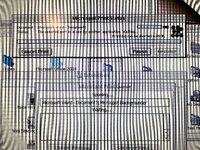
Pic of the error message:
However, I’m having a problem with the MacPalette II driver. After I print a full color document, if I decide to print a second document (or another copy of the previous document), I get an error from Microspot Backgrounder telling me that the “Selected Port is in use by another application” and the IW II does nothing.
I have my IW II connected to my B&W G3 using a Keyspan USA-28 adapter. I am using the printer port in Chooser (serial port option does nothing). AppleTalk is disabled. Currently running OS 9.2.1
Pic of the error message:





