1)
CODE resources are completely different than other types of code resources such as DRVR, CDEF, WDEF, etc.
CODE resources are segments of an application. You split an application into segments to improve memory utilization. i.e. A code segment is not loaded unless code in that segment is to be executed. A code segment can be unloaded by code in another segment when that code segment is no longer needed. Segments are either defined by compiler directives inserted into a source file, or by defining the segments in the project and dividing source files between the segments.
https://developer.apple.com/library/archive/documentation/mac/pdf/Processes/Segment_Manager.pdf
Thanks for taking the time to respond, I really appreciate it!
I'll be frank, to even start to get going, I tried to summon help from copilot and I was immediately skeptical, as I very often am, and end up eventually finding the real information from real references. The general strategy it told me was:
* make a separate Symantec project of Code Resource type (chosen with the radio button in that dialog) and enter 'CODE' as the type.
* use 'pascal long name_of_CODE_resource(short message, short item, short num, long param) as the entry point. BUT, I think that's bad advice and it only successfully compiles if I give it the name 'main'.
* build it, copy it to the main project's resource file as a CODE resource ID=128
* add a CDEV resource with this hex content only: 0000 0080 (decimal 128 in the 2nd word)
feels sketchy and weird, why wasn't it just a simple and straightforward building into a CDEV resource directly?
Does Symantec C++ have DRVR, CDEF, WDEF examples?
Generally, a code resource DRVR, CDEF, WDEF, etc is a separate target of a project. The target is a resource. The resource is then made a dependency of the application target so that it will get inserted into the resource fork of the application.
Symantec C++ is very light on examples. Making your own CDEV is typically not covered in programming books. I've opened quite a few more on top of the list I previously wrote. We're on the same page about understanding that it's best to make it a separate project just for the purpose of building the resource only.
2)
Depends. How much work does the Control Manager do for you?
Drawing controls is not as simple as a single draw. You need a device loop to handle drawing to multiple screens of different pixel depths (if you wanted to support Color QuickDraw).
I'm limiting myself to single monitor, 512x342 monochrome screen, ie the Mac Plus for now. Having a restrictive scope helps me get to a finish line.
As I understand it, there are 3 routes for custom controls:
1) completely wing it with events detection (mouse, keyboard shortcut if you want one and here, even a midi in command), update redraw myself as part of your Window Handle management loop
2)
(the one I want, since it'd allow me to reuse this well compiled resource) custom CDEV and bring it in as a Control, so that click management is done automatically, I can stash a MIDI byte value inside it so I know which note to sound off as part of my program, I can easily spawn many of them and their click detection routine is already done since it's just a variant of a common button
3) Complete overhaul of the Window as a Dialog instead, which lets me use static text fields with no text in them and I force their update to be tied with a FrameRect. However, I'd have to read how modeless dialog work. Iirc , dialogs work best if you expect one "result" instead of a continuous stream of results. I feel like there's a less robust event based looping with them compared with windows. It would also require the biggest code overhaul of the 3 across many of my files.
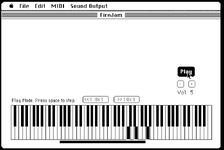
White keys of the keyboard are composed of one or two rectangles. Or you can make a region. The region is composed of one or two rectangles so they won't be too large in memory.
It looks like the left edge of your invert rectangle is two pixels too far to the left. Or three pixels if you want the inverting rectangle to be surrounded by white pixels.
The bottom edge is one pixel too far to the bottom. Or two pixels if you want the inverting rectangle to be surrounded by white pixels.
Good catch, this is only a dummy image I made with a PICT in superpaint, it's gonna be dynamically drawn soon and I can ditch the PICT.
My plan has shifted to draw brain dead simple full white rectangle first as a bottom layer, and overlay the black notes on top of them and have their mouse click detection supersede and prevent a white note detection directly underneath them. I also read I could do Rgn with a Diff but that seems like more work for no gain.
I think the number of tests needed is one to four, since the keys are mostly equal width.
Divide the mouse horizontal position by the width of the white keys to get the white key index. I suppose the black line dividing white keys should correspond to the white key to the right of the line.
The mouse vertical position determines if you need to test the modulus of the division to determine if a black key is pressed. If the width of a key is 8 then a mod < 3 should test for a black key on the left and a mod > 5 should test for a black key on the right. A mod value in between represents the white key.
For each white key, you should have a bit that states if the right side of the white key has a black key. For the left side of the white key, you would check the value for the white key to the left.
It appears that the position of the black key on the right side of a white key is variable (by one pixel?). An extra bit is required for that info. This extra bit is added to the mod check described above.
Those are good recommendations if I keep going with route 1, which is my fallback option if I can't figure out CDEV.
You said this which implies there may be a lot of tests (like a couple rectangles per key), but I reread your post, and see that earlier you said that what rectangle to invert is figured out mathematically, which probably means you do the divide method already to minimize the number of tests so maybe my description doesn't add anything to what you currently have.
The most complicated tests are mostly when figuring out a mouse click location and which key to trigger its updating of its graphics and which note to dispatch to audio. When I react to MIDI in or react to the typing keyboard, the note is a known quantity and no logical test needs to be performed.