
-
 Hello Guest! The forum software will be upgraded weekend of 06/26. See this announcement thread for more information.
You are using an out of date browser. It may not display this or other websites correctly.
You should upgrade or use an alternative browser.
You should upgrade or use an alternative browser.
Shut Down Scheduler for System 7
- Thread starter lem150
- Start date



Which version of 7? The power management Control Panel (whatever it's called, never use it) supports powering down. Otherwise, you could use AppleScript.Hi, looking for a little control panel or DA that would allow you to schedule the "pushing" or "selecting" of Special - Shut Down. Thanks!
How do you want to set it?
How are you going to power it down if you don't have soft power? Who's going to switch the switch, so to say?So it’s 7.5 but it’s on a Mac that doesn’t have soft power. Apple script might work? Is there a way to set the script to go off at a specific time of day?

I was wondering. That makes more sense. Does it do a time delay so you can trigger it from the Mac? Or are you working on the assumption that the Mac is always going to shut down (note that an unsaved document will block a shutdown request for example).Ah ive got a wifi plug thingy
Do you want the time of day to be variable, or basically always the same? Like, would writing a script that just waited until the time and shut down be enough? Or do you need an interface to update the time etc?
Ah so its just my "file server" Centris 610, it turns on automatically at 4pm and I want it to turn off at 10pm, the wifi plug thingy just is on an app and turns the plug on/off whenever. I don't want the computer just getting the power pulled, I wanted something that would auto click the Special-Shut down just before the wifi plug turns it off.
I'll knock something together for you when my cat gets off me. Should be sometime this yearAh so its just my "file server" Centris 610, it turns on automatically at 4pm and I want it to turn off at 10pm, the wifi plug thingy just is on an app and turns the plug on/off whenever. I don't want the computer just getting the power pulled, I wanted something that would auto click the Special-Shut down just before the wifi plug turns it off.

Here you go.Thanks! I have tried to use apple script but I just have no idea what to do lol
There are two files, one is a an Extension, and one is a Scripting Addition. If "Shutdown" isn't already in your Scripting Additions folder (you can find it in System Folder > Extensions > Scripting Additions) then you'll need to add it. The other file with a clock icon needs to go in the Extensions folder (it will go there automatically if you drop it on the System Folder).
You must have AppleScript (probably at least 1.1) installed.
Several warnings...
1. This gives no heads up or dialogue box or beep or anything, it just shuts the computer down.
2. Set your wifi socket to turn off at least a minute later, because I set the thing to only check the time every 30 seconds, so it can be 30 seconds past the time you set. Plus the clock might be different, so give a bit of slack.
3. Any applications with a document with unsaved changes will prevent the computer shutting down, because it will ask you if you want to save changes.
4. The same is true if anyone is connected to the server - it will throw a dialogue asking do you want to disconnect connected users.
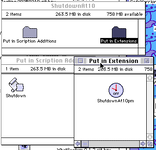
This is the most single use thing I have ever made
Attachments
 . Tomorrow plan
I swear that I have a program called auto shutdown somewhere here for Classic Macs.
Anyway here is a basic Apple Script to do what you want. It has to be saved as an application in script editor and added to the startup items folder inside the system folder. On startup it will run in the background until 10 PM every night. Then it shuts down the Mac, so you better have everything saved in any opened programs before 10. If anyone is logged onto the server at 10 then the usual message in a dialog box comes up and asks how many minutes you want to give them to log off. So that would be the only user interaction with it. Paste this into script editor.
on run
set time_in_seconds to 79200 -- this equals 10PM in seconds from midnight
set done to false
repeat until done = true
set get_current_date to get current date
set get_time to time of get_current_date
if get_time = time_in_seconds then
shutdown
set done to true
end if
end repeat
end run
Anyway here is a basic Apple Script to do what you want. It has to be saved as an application in script editor and added to the startup items folder inside the system folder. On startup it will run in the background until 10 PM every night. Then it shuts down the Mac, so you better have everything saved in any opened programs before 10. If anyone is logged onto the server at 10 then the usual message in a dialog box comes up and asks how many minutes you want to give them to log off. So that would be the only user interaction with it. Paste this into script editor.
on run
set time_in_seconds to 79200 -- this equals 10PM in seconds from midnight
set done to false
repeat until done = true
set get_current_date to get current date
set get_time to time of get_current_date
if get_time = time_in_seconds then
shutdown
set done to true
end if
end repeat
end run
Last edited:
Nice, I haven't tested it (just woke up), but a couple of suggestions.on run
set time_in_seconds to 79200 -- this equals 10PM in seconds from midnight
set done to false
repeat until done = true
set get_current_date to get current date
set get_time to time of get_current_date
if get_time = time_in_seconds then
shutdown
set done to true
end if
end repeat
end run
Testing if the time is exactly the target seconds might mean you miss that 1 second window if something else is hogging the CPU. It is probably better to use an inequality, or test for a range.
"get_date" is possibly redundant as it contains the same as "get_time", why not just "set get_current_time to get current date"? A couple of other things are sort of redundant as well. I don't think you need "on run" at all, but I'm still half asleep. I think you can just exit a loop without needing to test a variable as well.
Actually- I see you used "time of", but I think "time of" doesn't work in System 7.5... with AppleScript 1.1 anyway. I could be wrong.
The variable naming conventions used are PC style
Picky, but on macs, traditionally you'd say "getTime".Then the Biggie, this runs flat out for the entire day checking as many times as it can using all available CPU time it can get its hands on - I suspect it would impact performance of the computer.
Lastly - has this been tested, because I don't think get_time = time_in_seconds is a valid use of the AppleScript time functions? Because"get_time" doesn't contain the number of seconds into the day in AppleScript 1.1.
Last edited:
I apologise - "get time of" does work. I thought that needed a newer version.I swear that I have a program called auto shutdown somewhere here for Classic Macs.
Anyway here is a basic Apple Script to do what you want. It has to be saved as an application in script editor and added to the startup items folder inside the system folder. On startup it will run in the background until 10 PM every night. Then it shuts down the Mac, so you better have everything saved in any opened programs before 10. If anyone is logged onto the server at 10 then the usual message in a dialog box comes up and asks how many minutes you want to give them to log off. So that would be the only user interaction with it. Paste this into script editor.
on run
set time_in_seconds to 79200 -- this equals 10PM in seconds from midnight
set done to false
repeat until done = true
set get_current_date to get current date
set get_time to time of get_current_date
if get_time = time_in_seconds then
shutdown
set done to true
end if
end repeat
end run

I haven't heard of that, I'll have to check it out.Ido Script Scheduler and Applescript worked for me in the past.
Mine is also just an AppleScript Applet with some hacks done on it to turn it into a background task extension. There isn't much difference.
I've had some ideas to improve it, perhaps I'll add a UI and make it into something a bit more polished.

I think you have to emulate that program somebody wrote that can auto-click the dozens of "OK" buttons you get when you run the Installer – basically, try to script looking for that "There are still users connected, what do?" window and closing it out. AppleScript can examine an app's window list, so there must be some way to do it.

Similar threads
- Replies
- 2
- Views
- 531


- Replies
- 27
- Views
- 3K


- Replies
- 12
- Views
- 842