Macintosh SE sudden death: burned chip on logic board + suspected analog board capacitor leakage

Hey y’all,

a few weeks ago I posted about my Macintosh SE that suddenly died while it was running. I briefly left the room, and when I came back the machine was completely dead. The fan was not spinning and the entire room smelled very strongly of burnt electronics. I immediately unplugged the SE and have not powered it on again since.

Today I finally opened the machine to inspect the boards more closely, and I found some concerning things.


Logic board:

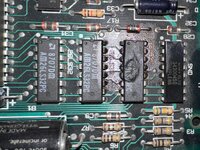
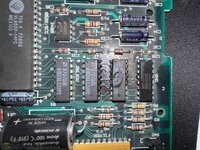
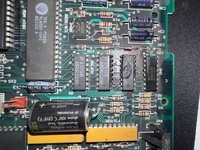
The logic board has a visibly burned IC, which I honestly have never seen before on a classic Mac:
  • It´s one of the three AM26LS32PC (quad differential line receiver)
  • The package itself is clearly thermally damaged and partially melted
  • The surrounding area also shows residue as if the whole chip burned for a few seconds
At the time of the failure, I had a BlueSCSI connected via the DB 25 port. Based on my limited understanding, the AM26LS32PC is involved in handling differential I/O signals, so I’m wondering whether this could be related to the SCSI interface or nearby I/O circuitry.

That said, I’m aware that these machines are not hot plug capable and I did not connect or disconnect the BlueSCSI while the machine was running. The device was firmly seated in the connector and had been working normally prior to the failure.


Analog board

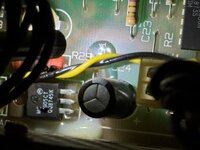
I also inspected the analog board (without fully removing it yet):

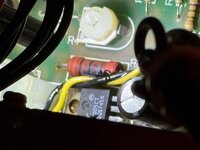
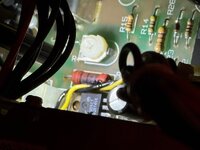
  • Near the PSU connector there is a power resistor with a dark / blackened area that looks like a burn mark.
  • Directly above that resistor is a large electrolytic capacitor
  • Next to it there is an area that looks like a glossy "puddle" on the PCB
Due to limited visibility I can’t be 100% certain, but this could very well be electrolyte leakage from the capacitor. But my understanding is that capacitor leakage often appears brownish or glossy rather than clear or dry?

I also used a small AliExpress endoscope to inspect the inside of the PSU. I didn’t notice any obvious damage, although the inspection was limited by visibility and access.

Questions

Initially I suspected a PSU failure, but given the burned IC on the logic board and the suspicious area on the analog board, this now feels more like a systemic issue rather than a single isolated PSU failure.

Has anyone seen an AM26LS32PC fail catastrophically like this on a Macintosh SE?
  • Is it realistic that a PSU fault could have caused damage to components on both the analog board and the logic board?
  • Alternatively, could leakage from the large capacitor on the analog board have caused downstream damage all the way to the logic board?

The good news is that the AM26LS32PC is a generic and easily obtainable part, but I obviously want to understand the root cause before replacing anything.

Thanks so much in advance!
 

Attachments

  • IMG_3453.jpeg
    IMG_3453.jpeg
    2.2 MB · Views: 29
  • IMG_3454.jpeg
    IMG_3454.jpeg
    2 MB · Views: 27
  • IMG_3455.jpeg
    IMG_3455.jpeg
    2.2 MB · Views: 28
  • IMG_3470.jpeg
    IMG_3470.jpeg
    759.8 KB · Views: 24
  • IMG_3471.jpeg
    IMG_3471.jpeg
    790.6 KB · Views: 25
  • IMG_3473.jpeg
    IMG_3473.jpeg
    860.2 KB · Views: 25
You should be able to test the resistor. The yellow/black wires are to the fan. The thing you are referring to as glossy is just hot glue. There is a bunch in that area to hold the caps rigid as well as the fan wires.
 
That's a 26LS30 not a 32. It's the line driver for the serial ports. Did you have anything plugged into the modem or printer ports when it happened?
 
Have you had the board out before? My first instinct would be lightning damage from a modem - I'm wondering did your serial port work before this? Is this old damage, is what I'm pondering.
 
That's a 26LS30 not a 32. It's the line driver for the serial ports. Did you have anything plugged into the modem or printer ports when it happened?
Thanks for pointing that out!

A few days before the failure, I did have an Apple RS-422 serial cable connected to the printer port while trying to establish a LocalTalk connection to a PowerBook. Nothing happened, and I later learned that I was missing the proper LocalTalk hardware, so I disconnected it. It was connected for about 5 minutes.

When the SE failed, nothing was connected to either the modem or printer ports, only the BlueSCSI, and the machine had been running normally for a couple of hours beforehand.

Would a previously stressed serial line driver realistically be able to fail catastrophically like this days later, or does this point more toward another fault that finally manifested under load?
 
Have you had the board out before? My first instinct would be lightning damage from a modem - I'm wondering did your serial port work before this? Is this old damage, is what I'm pondering.
I did have the logic board out a few weeks ago while fixing the floppy drive. Since it was my first time taking this machine apart, I inspected all components fairly thoroughly, especially the logic board. I also have a habit of taking lots of photos from multiple angles during repairs for later reference.

I checked those photos again, and the chip was completely intact at that time.

As mentioned in another comment, I briefly connected an Apple RS-422 cable to the printer port while attempting a LocalTalk connection (before realizing I needed the proper adapter). Nothing happened, and the machine continued to run normally for the following days.

So this damage must be recent and does not appear to be old or preexisting. While I can’t completely rule out that the serial cable may have stressed the circuitry and IC, it seems hard to reconcile that with the machine running normally for hours afterward before failing suddenly with a strong burnt electronics smell.
 
You should be able to test the resistor. The yellow/black wires are to the fan. The thing you are referring to as glossy is just hot glue. There is a bunch in that area to hold the caps rigid as well as the fan wires.
Thanks for the clarification!

I’ll definitely check the resistor once I fully remove the analog board and have proper access to it.
Good to know that the glossy stuff is just glue.
 
I did have the logic board out a few weeks ago while fixing the floppy drive. Since it was my first time taking this machine apart, I inspected all components fairly thoroughly, especially the logic board. I also have a habit of taking lots of photos from multiple angles during repairs for later reference.

I checked those photos again, and the chip was completely intact at that time.

As mentioned in another comment, I briefly connected an Apple RS-422 cable to the printer port while attempting a LocalTalk connection (before realizing I needed the proper adapter). Nothing happened, and the machine continued to run normally for the following days.

So this damage must be recent and does not appear to be old or preexisting. While I can’t completely rule out that the serial cable may have stressed the circuitry and IC, it seems hard to reconcile that with the machine running normally for hours afterward before failing suddenly with a strong burnt electronics smell.
It was worth asking.

I had a lightning struck Performa 630 - it ran fine apparently, except the sound didn't work.

When I investigated I found evidence that the serial port had got hot enough to spray molten metal over the PCB and the PCB had delaminated in the area.

If it hadn't taken out the regulator that supplied the sound as well as serial, you'd have never noticed.

Back to yours - check that cable for bent pins.

Also, BTW - you don't need local talk boxes to connect a printer - if you're only connecting two devices, a regular Mac serial cable effectively works like a null modem cable. It is all you need to connect two Macs or a Mac and an AppleTalk capable printer.
 
It was worth asking.

I had a lightning struck Performa 630 - it ran fine apparently, except the sound didn't work.

When I investigated I found evidence that the serial port had got hot enough to spray molten metal over the PCB and the PCB had delaminated in the area.

If it hadn't taken out the regulator that supplied the sound as well as serial, you'd have never noticed.

Back to yours - check that cable for bent pins.

Also, BTW - you don't need local talk boxes to connect a printer - if you're only connecting two devices, a regular Mac serial cable effectively works like a null modem cable. It is all you need to connect two Macs or a Mac and an AppleTalk capable printer.
That’s a very helpful example, thanks for sharing that.

I just checked the serial cable and all pins look fine.

Your LocalTalk explanation is good to know, as I was considering buying an adapter. In my case the connection didn’t work at all, so I assumed additional hardware was required.

I’ll keep looking into the serial port area on the SE side as well. Is it plausible that the SE could have cold solder joints or an intermittent connection at the Mini-DIN 8 port that might have caused this?
 
I’ll keep looking into the serial port area on the SE side as well. Is it plausible that the SE could have cold solder joints or an intermittent connection at the Mini-DIN 8 port that might have caused this?

Unlikely IMO.

I have a pretty good amount of experience with serial hardware, but not with macintosh serial hardware, so if I say anything wrong or irrelevant hopefully somebody else will correct me.

What I do know is that the 26LS30 is a RS-422 line driver and apple apparently used it is a dual mode rs-422/rs-232 driver, and it is possible to exceed the maximum protection voltage if faults occur during rs-232 applications.

So the IC could have potentially been damaged previously (with no visible external damage - every failed line driver I've ever replaced has had no external signs of failure) and that's why your localtalk connection didn't work.

If, in its compromised state, it ultimately shorted out VCC to gnd, that would likely blow the protection fuse in the PSU, and would explain why the machine was simply dead when you came back to it.

That is speculation, but it seems like a likely scenario...
 
Your LocalTalk explanation is good to know, as I was considering buying an adapter. In my case the connection didn’t work at all, so I assumed additional hardware was required.
That sounds like a sign it was already broken at that point, although sometimes the software side of AppleTalk can be tricky to set up - have you done it before?
 
If, in its compromised state, it ultimately shorted out VCC to gnd, that would likely blow the protection fuse in the PSU, and would explain why the machine was simply dead when you came back to it.
Yes - Check the 5v to gnd resistance to see if it is shorted, then I'd desolder the toasted chip, then check the 5v rail again (note macs often don't have much resistance between 5v and gnd, but if it is basically zero ohms, that is a problem). If there isn't a short any more and there was before, check the fuses. You might even feel brave enough to test it after that (it will probably work without the chip btw), but keep your finger over the off switch.
 
Kind of OT, but what system versions do you have? If both of your machines are running System 6 or less, there's no way for you to host files on either unless you have dedicated server software. System 7 and up had built-in file hosting.
 
Kind of OT, but what system versions do you have? If both of your machines are running System 6 or less, there's no way for you to host files on either unless you have dedicated server software. System 7 and up had built-in file hosting.
I believe they were connecting to a printer rather than another Mac.
 
Back
Top