SquirrelEDIT - a 16x16 sprite editor with C bitmap array export

DW1992

6502
Hi Everyone,

So, instead of working away at completing the tasks on my wife's 'Honey-Do' list, I decided to write a little utility to help with sprite creation. 😇

Introducing, SquirrelEDIT 1.0
and yes, it's named after my attention span... see the first sentence above... 😅
000a.png
SquirrelEDIT is a simple 16x16 pixel sprite creator / editor, but with a twist...
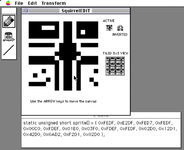
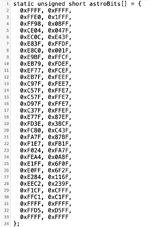
It doesn't just allow you to plot pixels on a 16x16 grid, it also generates the exact C code required to place your bitmap masterpiece into an array that you can simply copy / paste into your favourite IDE, like CodeWarrior, etc...
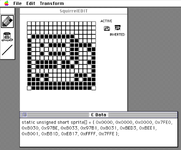
Jeep with CODE.png
I made this while (continually) working on OPERATION : PewPew!
My side scrolling space shooter game, to make it easier to improve its sprites. 👾👽


SquirrelEDIT should run on any 68K MAC with 1MB of memory and up, but I've only tested it with real hardware on an SE/30, LC475 and Colour Classic MYSTIC running System 7.x.x
Feedback for other versions / hardware welcome! 💾

All your favourite paint style functions are here..

Flip horizontally
Flip vertically
Rotate clockwise
Add a border
Invert
Line
Bucket fill

Grid on/off
Tile view on/off (for creating a 3x3 grid, updated in real time so make creating tileable icons easier)

Use the arrow keys to move your sprite around the canvas.

You can also Save / Open your sprites for later use.

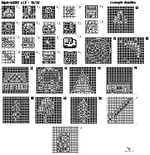
Here's an example of some sprites I created with it.
All the sprites shown here are included in the .SIT
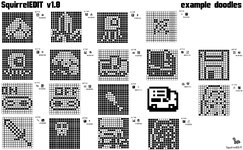
Example doodles.jpg

I hope this helps someone will find this little tool useful.
I'd love to see any sprites you make with it and hear how they are being used in your own code!


Any questions / suggestions / comments / whatever... please contact me!

Updates (if any) will be posted here in this thread.

A few screen shots below...

Aaron/DW
Dark Systems BBS
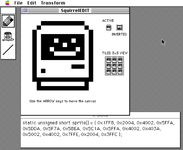
006.png008.png010.png
 

Attachments

Very useful. Would it be possible to add color support?
Thanks Maxoakland, I appreciate the kind words and it's awesome that someone may find it useful!

As for adding a colour pallet...
I'm totally open to adding support for colour. Off the top of my head it will change a few ways my code functions, since it's specifically written for 1bit.
Let me do a little thinking and see what I can come up with. :)

I also received a DM asking if it would be possible to have the selectable option to create 16x16 and 32x32 sprites, which I think would be super handy for higher resolution systems requiring larger sprites.
I think if I'm changing it to include a 32x32 option, it would also be the ideal time to add support for a colour pallet and maybe a few other standard drawing tools, like undo, circle, and region select / move (assuming I can figure out some of the maths behind that...)🤪

Thanks again!
I'll post updates ASAP.
Aaron/DW
Dark Systems BBS
 
I wrote something similar for Microsoft Basic in about 1992, and used it to develop a game called CrossFire (and I'm fairly sure that that name isn't unique either) that was distributed on one of TheMac cover CDs. Not that I've been able to find it since I lost my own TheMac collection. But if you fondly remember a space invaders style game, played by mouse, where you have two shooters and you only get the kill where your shooters missiles intersect, and if you played that game on your black and white Mac, and if that game was only marginally better than rubbish (definitely not my finest work, but I was young!) then you may have been playing my game. And if you have a copy of it, please could you upload it? I haven't seen it in nearly thirty years! In any event, neither my sprite editor nor CrossFire were a patch on SquirrelEdit and OperationPewPew.
 
UPDATE - SquirrelEDIT 1.9

000a.png
What?!? A new update?!? 🙀

Just a few new features I wanted to share.

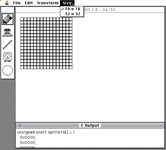
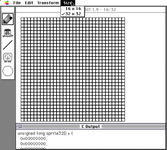
- You can now select between a 16 x 16 or 32 x 32 pixel canvas!
Just be sure to select the appropriate canvas size BEFORE loading one of your saved doodles.

- An UNDO button (OH NO!... OOPS!)
Just 1 level of undo for now, but it's a start!
Bonus points if to recognize the undo icon... 😃

- Circle shape tool
It's a shape... 🤔

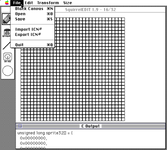
- Export ICN# to a resource file
As well as the standard Open/Save, you can now export as a resource file with your doodle saved as a ICN# resource.
This makes it simple to copy/paste your sprite into you program's resource file if you load your sprites that way instead of defining them in an array in your code.

- Reformatted C Array generation
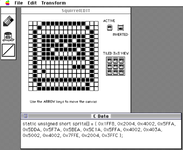
In an effort to generate more human readable code, AND to save real estate on a 9" B&W MACs screen, the preview C array code window now only shows a snippet of the code, and when you copy it to clipboard, it stores each location in the array on a separate line. Easier to read, same functionality. IF you hate it, I can change it back (or make it slectable)

---

No colour yet.
Still working out how exactly to implement a colour pallet and way to save the data so it is still compatible with B&W MACs.
Once I get colour figured out, SquirrelEDIT 2.0 will be released as a B&W / Colour upgrade. Fingers crossed! 🤞

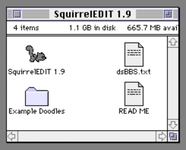
A few screen shots of the new features, and some 32 x 32 examples added to the included Example Doodles.

Enjoy, and if you draw anything, please share it!

As always, any comments, suggestions, requests, etc... please shout!

** EDIT **
I forgot to add, the array is now named sprite16[] or sprite32[] depending on the grid size you choose.
Don't forget to change the name once pasted into your code! :)

Aaron/DW
Dark Systems BBS


000b.png001.png002.pngExample doodles 19.png
 

Attachments

Last edited:
I wrote something similar for Microsoft Basic in about 1992, and used it to develop a game called CrossFire (and I'm fairly sure that that name isn't unique either) that was distributed on one of TheMac cover CDs. Not that I've been able to find it since I lost my own TheMac collection. But if you fondly remember a space invaders style game, played by mouse, where you have two shooters and you only get the kill where your shooters missiles intersect, and if you played that game on your black and white Mac, and if that game was only marginally better than rubbish (definitely not my finest work, but I was young!) then you may have been playing my game. And if you have a copy of it, please could you upload it? I haven't seen it in nearly thirty years! In any event, neither my sprite editor nor CrossFire were a patch on SquirrelEdit and OperationPewPew.
Cheers VMSZealot!

I'd love to see your original program, if you ever track down a copy please share!
 
UPDATE 2.1

I included the wrong SquirrelEDIT 1.9 version in the update above. 🫣
THIS is the real 1.9 update. 🥳

It contains two additional new features.

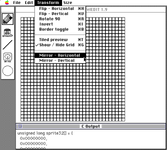
Mirror - Horizontal & Mirror - Vertical

When toggled on, Mirror - Horizontal will cause your pen tool to draw the same thing in the top or bottom of the canvas.
Mirror - Vertical will cause your pen to draw the same thing on the left or right side of he canvas.
Toggle them BOTH on to divide your canvas into 4 quadrants, each mirroring what your pen is drawing!

I Also removed the import ICN# (but kept the export ICN#) and made it only work when in 32x32 mode to match the resource file requirements.
Exporting ICN# when in 16 x 16 mode will cause a beep and do nothing if selected.

Sorry for the confusion!
Enjoy!
 

Attachments

Back
Top