
You are using an out of date browser. It may not display this or other websites correctly.
You should upgrade or use an alternative browser.
You should upgrade or use an alternative browser.
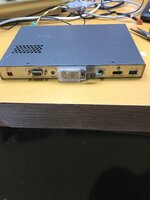
Good & reasonable HDMI scaler: Extron RGB-HDMI 300(A)
- Thread starter cheesestraws
- Start date


Can you tie the three inputs together electrically?Finally got this working. Anyone give me a heads up on settings for B&W output from a mac plus. I have a picture but only in RG or B depending on which colour input on the input socket I plug the video out from the Plus into
Yes, as @joevt suggests, you'll need to get the signal into all three channels. There's no monochrome mode on the scaler, because I'm afraid none of their customers have cared about that for a very long time. You could try just tying the three together, or ask @Trash80toHP_Mini what he did to get the radius monochrome display working.
I'm actually slightly surprised it works down as far as compact resolutions... I hadn't tried that.
I'm actually slightly surprised it works down as far as compact resolutions... I hadn't tried that.
In my experience, the RGB-HDMI 300A will sync to just about anything with enough twiddling. Absolutely the best bargain in vintage computer scan converters (I have 5 of them).I'm actually slightly surprised it works down as far as compact resolutions... I hadn't tried that.
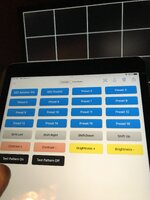
FYI: The built-in preset save/restore is only for output resolution. You need an attached PC running their control software to save/restore input settings. I've modded a couple of mine with Bluetooth serial modules to support control from an iPad for input selection.
Attachments
Last edited:

Settings for a Mac Plus -- wouldn't know where to start other than my earlier post.
It's got some weird thing where it doesn't like to set the Input configuration, Active, V to 480. If I go one up on the dial to try to go to 480 instead of 479 (default) it zooms up to like 1148 or something. H could also be 987. Keep in mind this assumes 640 x 480 input. As it's a scalar, if you have 512 x 342, you'll have to figure out some way to avoid stretching the whole image improperly.
Assuming factory default, with Auto-Image just completed, modify the following:
- Picture controls:
- Position: H +40; V +0
- Size: H 640; V 480
- Zoom: 640 480
- Output Configuration:
- Resolution: 480p@60
- Input configuration:
- Pixels: TOT 1301; PHS 31
- Start: H 45; V 138
- Active: H 964; V 480
- Audio delay: Appears that default is fine.
It's got some weird thing where it doesn't like to set the Input configuration, Active, V to 480. If I go one up on the dial to try to go to 480 instead of 479 (default) it zooms up to like 1148 or something. H could also be 987. Keep in mind this assumes 640 x 480 input. As it's a scalar, if you have 512 x 342, you'll have to figure out some way to avoid stretching the whole image improperly.

I've been looking into this one for Radius cards recently.

 texelec.com
Could be simplified tremendously given single bit images on the Compacts?
texelec.com
Could be simplified tremendously given single bit images on the Compacts?
Getting rotation set up for the Portrait Cards is at the top of my list.
I think @max1zzz is using the original, analog input version for his ITXPlus?
RGBtoHDMI - 6-bit TTL Edition - TexElec
The RGBtoHDMI is an excellent open project created by Hoglet67 (David Banks) and IanB (Ian Bradbury). The purpose of the RGBtoHDMI is to convert many different TTL and analog video signals from vintage systems to a modern HDMI or DVI compatible output. It uses a Raspberry Pi Zero along with a...
texelec.com
Getting rotation set up for the Portrait Cards is at the top of my list.
I think @max1zzz is using the original, analog input version for his ITXPlus?
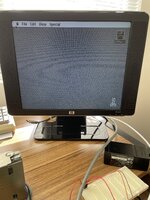
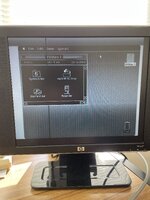
Thanks for all the info folks. I have managed to get a rough monochrome pic by combining the RGB input. I've also positioned the image on the screen with the various adjustment controls but it is a pretty average result when compared to the RGB to HDMI output from same Plus source. RGBtoHDMI image 1 and Extron Scaler 300A image 2.
Attachments

I’ve been able to get an excellent image from my Cube at 640x480@60 and 1024x768@60, but the 640x480@67 Hz output from the Macintosh IIx I have not found good image settings for. Seems the extron is very confused about the total number of pixels coming in, and won’t let me set it to the very much lower number needed to get a clear image.Why not. I still cant get a decent image from the 300A
I just use some ViewSonic Macintosh video -> VGA adapter thingy. I don't have a sync separator or anything else fancy. Aside from the IIsi leaving shop, nothing else has changed besides some settings.
I've used it with a IIfx, IIci, IIvx, IIsi, Quadra 700, Quadra 650, Quadra 610 and PM Server G3 with no changes.
I've used it with a IIfx, IIci, IIvx, IIsi, Quadra 700, Quadra 650, Quadra 610 and PM Server G3 with no changes.
Ok I goofed with it some more and these settings work well for the Toby
View attachment IMG_3418.jpeg
View attachment IMG_3418.jpeg
If anyone needs the updated firmware and flasher utility please PM me? That vector test image is cool, but I could not figure out a way to download it. The button redirects to an area at Extron that's accessible only to registered owners.I don't know. All I got for mine was the device and the power brick. Filename is "SPPCPSetupVer1x4.exe". I think it's been v1.4 for awhile now.
All I can say is, PM if you want it. I found a copy of the firmware online somewhere, so yeah.
Another item that's on the RGB-HDMI 300A page is a vector image test image. You can find a version here.. Save the page to disk, all files, and it's yours.
That's a great setup! Do you have a write-up on how to do it?I've modded a couple of mine with Bluetooth serial modules to support control from an iPad for input selection.
Here's a bunch of photos and schematic: https://bit.ly/extron-bt
Similar threads


- Replies
- 10
- Views
- 888


- Replies
- 14
- Views
- 3K


- Replies
- 44
- Views
- 2K