



Howdy Everyone,
I've been looking, on and off, for an ImageWriter II for years.
I'd found that, at least here in Canada, they have been a little harder to find in decent shape and for a fair price for some odd reason.
Since my elementary school days in the 80s, spewing out ream after ream of PrintShop banners in our //e lab.
I've always wanted my kids to experience the giddy thrill of picking out stock clip art and seeing their creation print to fruition, 9 pin line by 9 pin line!

A couple weeks ago, a friend sent me a text about a 'weird thing in an old style apple box' at a local thrift store (Value Village).
It was on a rack, just out of general sight in a back room, not yet brought out onto the sales floor.
Long story short, I ended up buying it for $119 Canadian (~$85us) and finally had my ImageWriter II!
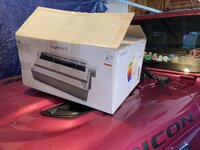
It came in the original box, with the shipping Styrofoam still cradling the printer.
The box contained the printer in great, non-yellowed shape. No scuffs or school inventory codes melted into it's plastic.
A black ribbon was already in the carriage, and a second black ribbon was still entombed in it's original packaging.
Serial and power cables, the original manual, a packing list (dated Oct 1, 1986) and warranty card (I really need to fill that out...) were also included in the box, along with some free musty basement smell.
After removing a clump of, what I'm choosing to believe was cat hair... and a quick check of the circuit board for obvious issues / leaking caps, etc.. I powered it up and was instantly transported back to my mid 80s childhood self as the sound of the carriage calibration screamed out.
Powering off again, I threw of piece of paper into the printer (unfortunately, just modern single sheet, not tractor paper... that will come later) and did a self-test, the button combination instantly coming back to me, just as fluidly as any 80s kid would remember ↑, ↑, ↓, ↓, ←, →, ←, →, B, A.
As expected.. nothing really appeared on the paper.
At the top, I can faintly make out "Self Test" and then some faded chicken scratch down the page. Apparently, nearly 4 decades was just too long a time for the poor ribbon.
As I'm sure you know, other than the ink simply drying out, the rollers inside the ribbon cartridge have foam on them that help grip the physical ink ribbon and advance it as the carriage moves back and forth.
Manually turning the advancement knob didn't cause the ribbon to... advance... in the cartridge.
This foam has LONG since turned to crumbly bits and the rollers no longer have any traction with the ribbon (story of my life...)
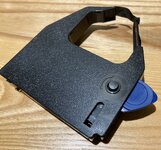
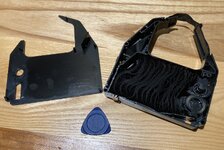
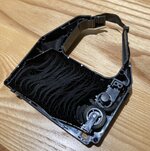
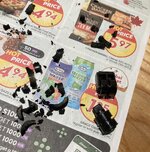
Taking apart the ribbon cartridge using a spudger (looks more like a guitar pick to me... ROCK ON! ) I popped the cartridge open. Yup, foam roller bits stared up at me, mocking my PrintShop dreams.
Removing the rollers (after taking a photo to make re installation easier) I cleaned off all the foam bits from the ribbon, bottom of the cartridge cavity and of course, the rollers themselves.
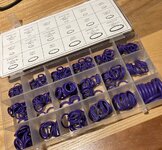
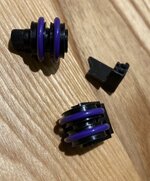
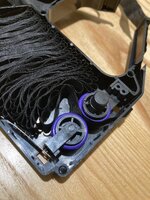
I used 7/16" x 3/32" O-rings to take the place of the old foam.
They fit perfectly over the rollers and reassembly of the ribbon was a lot easier then I has expected.
With the O-rings in place, this time manually turning the advancement knob did cause the ribbon to slide along as it should.
Installed the ribbon back into the printer and ran a test print. SUCCESS!
Black printing from my new ImageWriter II!
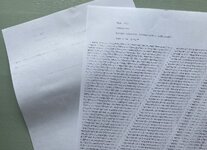
The more the test print.. printed... the further the ribbon advanced and the better the print quality became.
I'm going to do the same O-ring fix to the other 'new in box' black ribbon, as no doubt its foam rollers will have suffered the same fate over the decades.
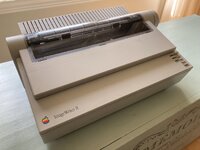
Can't wait to get the kids experimenting and creating with PrintShop!
I did manage to locate 3500 pages of tractor feed paper, for banner funness! 
Thanks for reading, I hope this might help someone else breath new life into their old ImageWriter ribbons.
Aaron/DW
Dark Systems BBS
P.S. Anyone in the Kawartha Lakes / Peterborough Ontairo area who collects original boxes, you're welcome to this. Else, it's probably going to recycling, as I don't have room to store it or any use for it...
I've been looking, on and off, for an ImageWriter II for years.
I'd found that, at least here in Canada, they have been a little harder to find in decent shape and for a fair price for some odd reason.
Since my elementary school days in the 80s, spewing out ream after ream of PrintShop banners in our //e lab.
I've always wanted my kids to experience the giddy thrill of picking out stock clip art and seeing their creation print to fruition, 9 pin line by 9 pin line!
A couple weeks ago, a friend sent me a text about a 'weird thing in an old style apple box' at a local thrift store (Value Village).
It was on a rack, just out of general sight in a back room, not yet brought out onto the sales floor.
Long story short, I ended up buying it for $119 Canadian (~$85us) and finally had my ImageWriter II!
It came in the original box, with the shipping Styrofoam still cradling the printer.
The box contained the printer in great, non-yellowed shape. No scuffs or school inventory codes melted into it's plastic.
A black ribbon was already in the carriage, and a second black ribbon was still entombed in it's original packaging.
Serial and power cables, the original manual, a packing list (dated Oct 1, 1986) and warranty card (I really need to fill that out...) were also included in the box, along with some free musty basement smell.
After removing a clump of, what I'm choosing to believe was cat hair...
and a quick check of the circuit board for obvious issues / leaking caps, etc.. I powered it up and was instantly transported back to my mid 80s childhood self as the sound of the carriage calibration screamed out.Powering off again, I threw of piece of paper into the printer (unfortunately, just modern single sheet, not tractor paper... that will come later)
and did a self-test, the button combination instantly coming back to me, just as fluidly as any 80s kid would remember ↑, ↑, ↓, ↓, ←, →, ←, →, B, A.As expected.. nothing really appeared on the paper.
At the top, I can faintly make out "Self Test" and then some faded chicken scratch down the page. Apparently, nearly 4 decades was just too long a time for the poor ribbon.
As I'm sure you know, other than the ink simply drying out, the rollers inside the ribbon cartridge have foam on them that help grip the physical ink ribbon and advance it as the carriage moves back and forth.
Manually turning the advancement knob didn't cause the ribbon to... advance... in the cartridge.
This foam has LONG since turned to crumbly bits and the rollers no longer have any traction with the ribbon (story of my life...)
Taking apart the ribbon cartridge using a spudger (looks more like a guitar pick to me... ROCK ON!
) I popped the cartridge open. Yup, foam roller bits stared up at me, mocking my PrintShop dreams.Removing the rollers (after taking a photo to make re installation easier) I cleaned off all the foam bits from the ribbon, bottom of the cartridge cavity and of course, the rollers themselves.
I used 7/16" x 3/32" O-rings to take the place of the old foam.
They fit perfectly over the rollers and reassembly of the ribbon was a lot easier then I has expected.
With the O-rings in place, this time manually turning the advancement knob did cause the ribbon to slide along as it should.
Installed the ribbon back into the printer and ran a test print. SUCCESS!
Black printing from my new ImageWriter II!
The more the test print.. printed... the further the ribbon advanced and the better the print quality became.
I'm going to do the same O-ring fix to the other 'new in box' black ribbon, as no doubt its foam rollers will have suffered the same fate over the decades.
Can't wait to get the kids experimenting and creating with PrintShop!
I did manage to locate 3500 pages of tractor feed paper, for banner funness!
Thanks for reading, I hope this might help someone else breath new life into their old ImageWriter ribbons.
Aaron/DW
Dark Systems BBS
P.S. Anyone in the Kawartha Lakes / Peterborough Ontairo area who collects original boxes, you're welcome to this. Else, it's probably going to recycling, as I don't have room to store it or any use for it...


 Value Village should be fecking ashamed of themselves for gouging customers like that.


