• Hello MLAers! We've re-enabled auto-approval for accounts. If you are still waiting on account approval, please check this thread for more information.

Mac SE/30 - "Long Chime of Death" Start-Up Sound & Horizontal Stripes

Hi all,

A few months ago, I bought my first Mac SE/30 sold-as-seen on eBay, figuring I'd take my chances on the condition of the battery.
I was unlucky this time, and the battery had bombed quite badly! The machine didn't make a start-up sound, and have horizontal stripes.

The original digital board wasn't really viable, so I bought a Bolle SE/30 PCB (fantastic work, Bolle and community!), and swapped the relevant parts over (including the ferrite beads on the rear of the board).
During this process, I socketed all of the DIP parts and the CPU, and have replaced quite a lot of parts too, including:
  • All of the electrolytic capacitors (you know why).
  • All three of the fuses.
  • All eight of the RAM SIMM sockets (originals were poor quality).
  • The ROM SIMM socket (original was battery damaged).
  • The video ROM socket (original was battery damaged).
  • The PDS connector (original was battery damaged).
  • The RTC IC (swapped for an ATTinyRTC module), RTC crystal, battery holder, battery diodes (originals were battery damaged).
  • The PAL ICs at UI6, UG6, UE6, UG7, UE7, UH7).
  • The 74F258 RAM multiplexers at UI2, UI3, UI4, UJ2, UJ3, UJ4 (originals were battery damaged).
  • The resistor packs at RP7, RP8, RP9 (originals were battery damaged).
  • The 74F253 ICs at UA8, UB8, UC8, UD8 (originals hit by leaked electrolyte).
  • The 74LS166 IC at UE8 (original hit by leaked electrolyte).
  • The AM53C80 IC at UI12 (original hit by leaked electrolyte).
  • The 8530 IC at UG12 (original hit by leaked electrolyte).
The current symptoms are now as follows: the machine gives a long "chime of death", and still only displays horizonal stripes.

The power supply and analogue board tested OK with another digital board (which I had on loan from a friend).
The ROM SIMM also tested OK, but that was a while ago now, and the traces look a bit suspect.
I have no idea if the RAM SIMMs are good - the machine gives the same symptoms with all the RAM SIMMs removed, and the same again with either of the two sets of four fitted in the lower four SIMM sockets only.
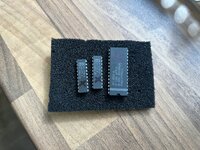
I've burned a 2764 EPROM for the video ROM (using the .bin file attached), but there is no change in symptoms with that or the original ROM.

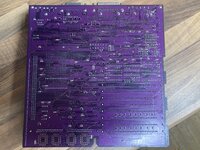
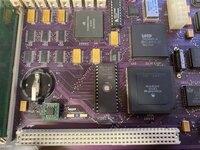
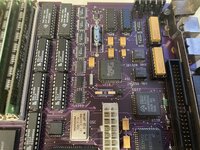
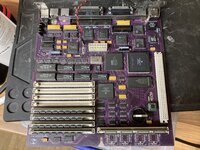
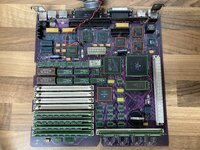
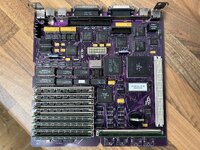
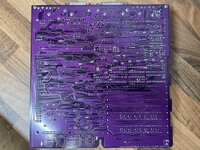
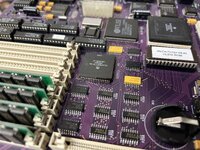
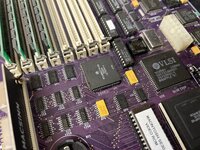
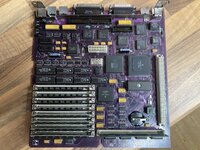
Please see below pictures of the board:
IMG_5122.JPG
IMG_5127.JPG
IMG_5128.JPG
IMG_5129.JPG

I'm not really sure where to concentrate on next, so I would appreciate some advice if anyone has any!
What typically causes these specific symptoms?
  • I'm pretty sure all of my soldering is OK, but I will check everything over again, the PLCCs in particular.
  • UF8 was also quite badly hit by leaked electrolyte, so I may replace UF8 and UG8 (both 74LS393s).
  • I'll try and check continuity on the pins/traces/vias on the ROM SIMM.
Many thanks,

Adam
 

Attachments

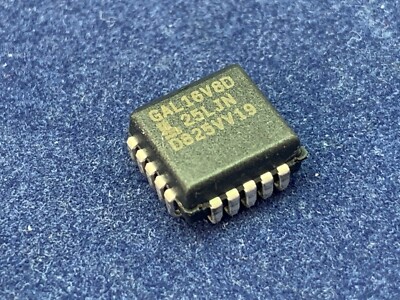
Is your GAL at UH7 a 25ns rated one? Try a faster one there. I'm not entirely sure what I used there for testing in the first place but I think it was an ATF16V8B-15. That's comparable to a GAL with a -10 speed rating, so I'd aim for that. Or try the original part from the donor board if it still has all legs :)
UH7 is involved with the RAM read/write as well as the RAS signals... slow chimes usually point towards a RAM problem, so this is where I'd start.

The rest of the board looks super clean, very nice soldering job.
 
Is your GAL at UH7 a 25ns rated one? Try a faster one there. I'm not entirely sure what I used there for testing in the first place but I think it was an ATF16V8B-15. That's comparable to a GAL with a -10 speed rating, so I'd aim for that. Or try the original part from the donor board if it still has all legs :)
UH7 is involved with the RAM read/write as well as the RAS signals... slow chimes usually point towards a RAM problem, so this is where I'd start.

The rest of the board looks super clean, very nice soldering job.
Thanks Bolle, that's very high praise indeed, I'm glad you think so! :)

That's right, I'm using a programmed GAL16V8D-25LJN at UH7, I should have been more careful when choosing the part speed.

I swapped all of the original PAL chips across to the new board at first, including UH7, so they're all still intact/usable - I found that they were all running quite hot, UH7 in particular, so I decided to swap them out for new parts in case they were shorted/damaged. I didn't realise at the time, but I'd missed off L15 by accident, so at this point I wasn't getting any audio whatsoever, and the same horizontal lines.

I will try the original UH7 and/or a faster programmed GAL16V8D, thank you for the advice!

I'll keep you all updated as to any progress.
 
Thanks Bolle, that's very high praise indeed, I'm glad you think so! :)

That's right, I'm using a programmed GAL16V8D-25LJN at UH7, I should have been more careful when choosing the part speed.

I swapped all of the original PAL chips across to the new board at first, including UH7, so they're all still intact/usable - I found that they were all running quite hot, UH7 in particular, so I decided to swap them out for new parts in case they were shorted/damaged. I didn't realise at the time, but I'd missed off L15 by accident, so at this point I wasn't getting any audio whatsoever, and the same horizontal lines.

I will try the original UH7 and/or a faster programmed GAL16V8D, thank you for the advice!

I'll keep you all updated as to any progress.
Hi again :)

I've swapped the original IC back into UH7, with no change in symptoms. I also have some faster GALs on order.
I've also tried some additional combinations of the various RAM SIMMs in the bottom four RAM SIMM sockets, with no change in symptoms.

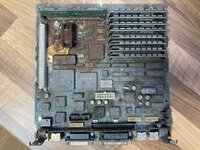
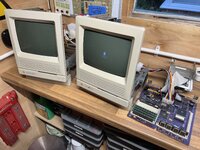
In case it's of interest to anyone, here's what the original mainboard looked like!

IMG_1124.JPG

Many thanks,

Adam
 
Hi all,

I hope you're well :)

I've been continuing with this SE/30 board as and when I can, but unfortunately I'm not making much progress.

Testing with a known-good ROM SIMM and four known-good RAM SIMMs in the lower bank makes no difference - the machine gives a long "chime of death", and still only displays horizonal stripes. I've also replaced the resistor packs at RP1, RP4, RP5, and RP6 in case any of these were damaged, but again, no change. I've replaced the 74F240 at UD1 and the 74LS30 at UJ6 but again, no change. With UH7 removed, the board doesn't give any chime or display anything on the screen - with a new faster programmed GAL fitted at UH7, I still get the same symptoms as before.

Out of interest, what are the symptoms for an SE/30 where the RTC IC is not fitted or not working correctly?

Many thanks,

Adam

IMG_5542.JPG
 
i was in your shoes (exact same symptoms) for a frustratingly long amount of time with my build. the root cause in my case did turn out to be poor connectivity on UH7, so that's probably where i'd start. specifically make sure that you're getting the expected clock signals out of the chip (C32M in particular), and that there is good connectivity between the legs of that chip and other spots on the board it's supposed to be connected to (the schematics are helpful here) -- the connections between UH7 and UE10, and between UH7 and the glue chip are of particular interest.

i found it *very* difficult to successfully solder UH7 because of its physical location on the board, and difficult to visually inspect for the same reason, so i ended up fitting a PLCC socket there (easier to hand solder once you cut the bottom out of it, since the pins are on the "inside") and continuity checking every pin of the socket and the rest of the board before inserting the chip.

don't lose heart! the fact that you're getting a chime at all means a lot of things are actually working. and honestly the fact that you were able to recover *anything* off of that battery bombed board is remarkable :)
 
i was in your shoes (exact same symptoms) for a frustratingly long amount of time with my build. the root cause in my case did turn out to be poor connectivity on UH7, so that's probably where i'd start. specifically make sure that you're getting the expected clock signals out of the chip (C32M in particular), and that there is good connectivity between the legs of that chip and other spots on the board it's supposed to be connected to (the schematics are helpful here) -- the connections between UH7 and UE10, and between UH7 and the glue chip are of particular interest.

i found it *very* difficult to successfully solder UH7 because of its physical location on the board, and difficult to visually inspect for the same reason, so i ended up fitting a PLCC socket there (easier to hand solder once you cut the bottom out of it, since the pins are on the "inside") and continuity checking every pin of the socket and the rest of the board before inserting the chip.

don't lose heart! the fact that you're getting a chime at all means a lot of things are actually working. and honestly the fact that you were able to recover *anything* off of that battery bombed board is remarkable :)
Thank you very much, I appreciate the support and encouragement, nice work getting yours working again :)

I'm back working on my SE/30 again, trying to make any slow but sure progress.
Here's where I'm at now: it's making a slow, immediate "death chime", and the video RAM isn't getting reset (horizontal stripes).

I think this is a ROM access issue, as it's immediate at power-on and the symptoms don't change with all of the RAM SIMMs removed.
I'm testing with a known-good ROM SIMM, and the SIMM socket is a new good-quality part which seems to be installed correctly.

I've attached a picture below of where I'm at in terms of part testing:
- Green means new, confirmed to work myself, or taken off another less damaged board without change in symptoms.
- Blue means I don't think it could be related to my current issues.
- Orange means I think it could potentially be related to my current issues.

I've fitted a 1k resistor pack at RP9, which apparently should be OK; I've also fitted a HC rather than LS part at UE8.
I've went over the board many times over and I can't see any immediate issues with the soldering, even on the SOICs and PLCCs.

All power, data, and address lines on the ROM SIMM look good except for A15/A17/A18/A19, which always seem to sit around logic low - I need to check continuity on these with the other ICs. I don't think these four lines are associated with or driven by a different IC to the others which could be causing those ones to fail. I also need to test A0-A31 on the GLU IC. The ROM SIMM is being correctly selected. D15 looks a bit weird, but I don't really have a good reference point so that could be normal.

The select lines on the RAM multiplexers don't seem to be being driven, and are always high - pin 2 of UH7 is always low, pin 18 of UH7 is always high, pin 76 of the GLU IC is always low. This might be normal if the system is not yet trying to access the main RAM. The signals on UD1 all seem OK. The other signals on UH7 all look OK, except for "A WR" on pin 13 which looks a bit weird but that might be normal.

If anyone has had this issue before and/or could offer any advice, I would be very appreciative, as I just want my SE/30 to work at this point - I've thrown so many hours at it! Could video ROM access also be causing this problem, or would it just be the main ROM?

Many thanks,

Adam

IMG_9350.JPG
 
Thank you very much, I appreciate the support and encouragement, nice work getting yours working again :)

I'm back working on my SE/30 again, trying to make any slow but sure progress.
Here's where I'm at now: it's making a slow, immediate "death chime", and the video RAM isn't getting reset (horizontal stripes).

I think this is a ROM access issue, as it's immediate at power-on and the symptoms don't change with all of the RAM SIMMs removed.
I'm testing with a known-good ROM SIMM, and the SIMM socket is a new good-quality part which seems to be installed correctly.

I've attached a picture below of where I'm at in terms of part testing:
- Green means new, confirmed to work myself, or taken off another less damaged board without change in symptoms.
- Blue means I don't think it could be related to my current issues.
- Orange means I think it could potentially be related to my current issues.

I've fitted a 1k resistor pack at RP9, which apparently should be OK; I've also fitted a HC rather than LS part at UE8.
I've went over the board many times over and I can't see any immediate issues with the soldering, even on the SOICs and PLCCs.

All power, data, and address lines on the ROM SIMM look good except for A15/A17/A18/A19, which always seem to sit around logic low - I need to check continuity on these with the other ICs. I don't think these four lines are associated with or driven by a different IC to the others which could be causing those ones to fail. I also need to test A0-A31 on the GLU IC. The ROM SIMM is being correctly selected. D15 looks a bit weird, but I don't really have a good reference point so that could be normal.

The select lines on the RAM multiplexers don't seem to be being driven, and are always high - pin 2 of UH7 is always low, pin 18 of UH7 is always high, pin 76 of the GLU IC is always low. This might be normal if the system is not yet trying to access the main RAM. The signals on UD1 all seem OK. The other signals on UH7 all look OK, except for "A WR" on pin 13 which looks a bit weird but that might be normal.

If anyone has had this issue before and/or could offer any advice, I would be very appreciative, as I just want my SE/30 to work at this point - I've thrown so many hours at it! Could video ROM access also be causing this problem, or would it just be the main ROM?

Many thanks,

Adam

View attachment 70991

Thank you very much, I appreciate the support and encouragement, nice work getting yours working again :)

I'm back working on my SE/30 again, trying to make any slow but sure progress.
Here's where I'm at now: it's making a slow, immediate "death chime", and the video RAM isn't getting reset (horizontal stripes).

I think this is a ROM access issue, as it's immediate at power-on and the symptoms don't change with all of the RAM SIMMs removed.
I'm testing with a known-good ROM SIMM, and the SIMM socket is a new good-quality part which seems to be installed correctly.

I've attached a picture below of where I'm at in terms of part testing:
- Green means new, confirmed to work myself, or taken off another less damaged board without change in symptoms.
- Blue means I don't think it could be related to my current issues.
- Orange means I think it could potentially be related to my current issues.

I've fitted a 1k resistor pack at RP9, which apparently should be OK; I've also fitted a HC rather than LS part at UE8.
I've went over the board many times over and I can't see any immediate issues with the soldering, even on the SOICs and PLCCs.

All power, data, and address lines on the ROM SIMM look good except for A15/A17/A18/A19, which always seem to sit around logic low - I need to check continuity on these with the other ICs. I don't think these four lines are associated with or driven by a different IC to the others which could be causing those ones to fail. I also need to test A0-A31 on the GLU IC. The ROM SIMM is being correctly selected. D15 looks a bit weird, but I don't really have a good reference point so that could be normal.

The select lines on the RAM multiplexers don't seem to be being driven, and are always high - pin 2 of UH7 is always low, pin 18 of UH7 is always high, pin 76 of the GLU IC is always low. This might be normal if the system is not yet trying to access the main RAM. The signals on UD1 all seem OK. The other signals on UH7 all look OK, except for "A WR" on pin 13 which looks a bit weird but that might be normal.

If anyone has had this issue before and/or could offer any advice, I would be very appreciative, as I just want my SE/30 to work at this point - I've thrown so many hours at it! Could video ROM access also be causing this problem, or would it just be the main ROM?

Many thanks,

Adam

View attachment 70991
Hi,

I have exact same problem as yours and it was a bad RP1 issue. (Check my post earlier) Yours should not be the same since you have a new PCB and RP1, but most likely RAM related. ROM should be fine in your case because it is actually code in the ROM running that playback the chime. Maybe trying a ROM-inator-II would give you a different behavior. It has a different algorithm on RAM testing.

Also check all the connectivity between SIMM contacts and their sources

Good luck.

-Yi
 
Hi all,
It's been quite some time, but I am yet again revisiting this SE/30 mainboard.
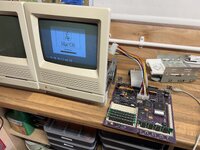
Will at CayMac very kindly looked at the board for me a couple of months and got it fully running.
When it arrived I didn't test it immediately (because I'm an idiot), instead I:
  1. Fitted a MACSIMM in the ROM slot.
  2. Fitted four 4MB SIMMs in the bottom four RAM slots.
  3. Soldered in the missing four top RAM slots and fitted four 1MB SIMMs.
  4. Touched up a few pins on the bottom side of the 68882 at UI5.
  5. Ran the board through my ultrasonic cleaner and blew it off with compressed air.
After that, I got a sad Mac (code 0000000F 00000001 which I think is a generic bus error) with the MACSIMM and an insert disk icon but intermittent SCSI boot with the stock ROM.
I desocketed the Bourns filters in case there was an intermittent connection, and reseated all of the other socketed ICs, but no change.
I noticed that a trace running between pins 7 and 8 of the 68882 to pin 10 of RP7 was broken and shorted to pin 7 of the 68882, it's likely that I accidentally did this when I touched up these pins - I disconnected this from the 68882 and ran a bodge wire around it, but I'm not sure if this has changed the symptoms. Could this short have damaged something else?
I seem to get intermittent sad Macs and intermittent boots but with no SCSI, I'm not sure if it's temperature related and I've tried cold spray and a hairdryer to check, but it's very difficult to replicate.
The 8530 is running hotter that I'd have expected, a couple of its lower pins weren't all that well soldered I think so I resoldered them but is it possible that the 8530 could have been damaged by them being floating? Could this interfere with SCSI?
I'm testing SCSI with a known-good BlueSCSI on both the internal and external SCSI ports - it's getting power correctly, when it's not booting the activity LED flashes regularly as though something is resetting.
The board seems to load disks OK from the floppy drive when it does boot up.

If anyone has any ideas I would be very grateful, thank you!

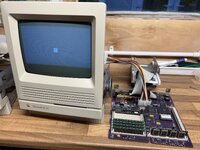
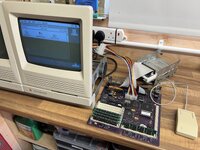
IMG_0986.JPGIMG_0989.JPG
IMG_1152.JPGIMG_1153.JPG
IMG_1220.JPGIMG_1261.JPG
 
I'd send it back to Will. Have you tried the original ROM sim? Did you wash in isopropyl after ultrasonic and leave it a couple of days to ensure it was fully dry? Check what pin 7 and 8 on the 68882 do, quiet likely shorting would affect it and other chips
 
I'd send it back to Will. Have you tried the original ROM sim? Did you wash in isopropyl after ultrasonic and leave it a couple of days to ensure it was fully dry? Check what pin 7 and 8 on the 68882 do, quiet likely shorting would affect it and other chips
Thanks Fred :) Will has kindly offered to look at it for me again, which I'm very grateful for, but I wanted to do the basics myself if possible as this would mean waiting several months.

Yes, I've tried an original ROM SIMM too - this doesn't give a sad Mac, but SCSI still doesn't work, so I'm guessing that there is still a hardware error but the original ROM doesn't report that there is a problem like the MACSIMM does (which reports a bus error on most startups).

I didn't wash the board in IPA after the ultrasonic cleaning, I run my bath with deionised water and 20%ish electronics cleaner, when I pull the board out I immediately blow it off with a high-pressure electric air duster to dry off the board and push all the water out from under the ICs, connectors, etc - it's quite effective. I also leave it for a while to bake out too.

Pins 7 and 8 of the 68882 seem to be ground, and pin 10 of RP7 is the pull-up resistor for the /RMC line of the CPU / PDS, a tri-state active-low output of the CPU which according to the datasheet "Provides an indicator that the current bus cycle is part of an indivisible read-modify-write operation". It's an important signal for bus arbitration, and it's possible that this line could have been damaged by the short to ground, so the CPU could be faulty. But, I'd also imagine that the 68030 should have some form of short-circuit protection on its outputs, and if it needs an external pull-up resistor then it might be open-drain anyway and not actually sourcing current, so I'm not so sure. Could the short have have taken out RP7? I'd have thought not as it's a fairly high resistance across the resistor pack 5V and output where the ground short was.

I'll try and get an oscilloscope trace of the /RMC line and see if there's any activity now.
There could even be cross-talk from the jumper wire that I've ran for it around the edge of the 68882, which should shown on the 'scope.

Should the SE/30 report a hardware (i.e. bus) error if there is a problem with memory-mapped peripherals such as serial and/or SCSI? Because I might be barking up the wrong tree if /RMC is OK and it's actually an issue with the 8530 taking out SCSI.
 
Last edited:
RP7 quite possible its dead. Can you boot it from floppy?. If so may be scsi chip is dead as well
Thanks Fred :)

The board boots happily from floppy with an original ROM SIMM installed.
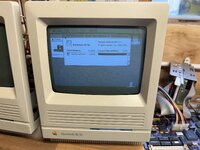
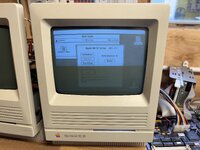
I loaded a System 7.1 "Disk Tools" 1.4MB 3.5" disk, and the system prompts me to initialise two Macintosh volumes.
The system recognises the 16MB RAM that I have installed, though only 7MB free, I'm not sure if that's right - it seems low.
Running "Apple HD SC Setup", the system seems to recognise two SCSI devices, one at 0 and the other at 1.
The setup correctly reads the device 0 volume name as "OpenRetroSCSI 7.0.1", and running "Test" on this device passes.
The volume on device 1 volume is not initialised, which is what I'd expected - "Test" immediately fails with "problems reading data from drive", and initialise runs for a long time but then fails with "the disk could not be initialised, format verification failed".
It's possible that the SD card on my BlueSCSI is behaving weirdly, I'm going to prepare and try another one just in case.

I'm honestly not sure why the MACSIMM is giving the bus errors - Will did his testing with an original ROM SIMM, so maybe it's a red herring...

I haven't checked RP7 or the /RMC line yet, though.

IMG_1387.JPGIMG_1405.JPGIMG_1406.JPGIMG_1407.JPG
 
Thanks Fred :)

The board boots happily from floppy with an original ROM SIMM installed.
I loaded a System 7.1 "Disk Tools" 1.4MB 3.5" disk, and the system prompts me to initialise two Macintosh volumes.
The system recognises the 16MB RAM that I have installed, though only 7MB free, I'm not sure if that's right - it seems low.
Running "Apple HD SC Setup", the system seems to recognise two SCSI devices, one at 0 and the other at 1.
The setup correctly reads the device 0 volume name as "OpenRetroSCSI 7.0.1", and running "Test" on this device passes.
The volume on device 1 volume is not initialised, which is what I'd expected - "Test" immediately fails with "problems reading data from drive", and initialise runs for a long time but then fails with "the disk could not be initialised, format verification failed".
It's possible that the SD card on my BlueSCSI is behaving weirdly, I'm going to prepare and try another one just in case.

I'm honestly not sure why the MACSIMM is giving the bus errors - Will did his testing with an original ROM SIMM, so maybe it's a red herring...

I haven't checked RP7 or the /RMC line yet, though.

View attachment 89533View attachment 89534View attachment 89535View attachment 89536
I think I've got to the bottom of my SCSI boot issues!

Given that both drives on the BlueSCSI were properly detected, I figured that the lack of SCSI boot could have a different cause - I read somewhere that a non-working or invalid PRAM can cause this symptom, I tried clearing the PRAM with command-option-p-r on boot but this didn't do anything (only one chime as usual), so I turned my attention to the RTC IC.

The RTC IC is socketed, I'd tried out a modern RTC replacement previously which used pretty thick turned-pin headers which had made the socket pretty loose, and I'm pretty sure that the RTC IC was just making intermittent contact. I replaced the socket and the board seems to boot very reliably from SCSI now, which is fantastic.

I've yet to test out everything else, but things are hopeful.
With the MACSIMM fitted, I no longer get a sad Mac / bus error, it chimes as usual and tries to boot to the System 7.5.3 install that I have on the BlueSCSI device 0, but crashes at "Welcome to Macintosh" - I think this is just because I haven't patched the image for custom ROMs, though.

So thank you all for your help, I'll be in touch here if I come across any more issues.

IMG_1724.JPG
 
Congratulations on finally having a working machine! What did Will do to fix it? Did he do a video of the repair?
Thanks -
 
Congratulations on finally having a working machine! What did Will do to fix it? Did he do a video of the repair?
Thanks -
Thank you!

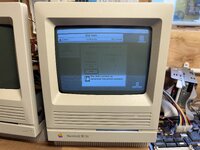
Will diagnosed a bad video ROM (which caused the horizontal lines) and a pair of bad PALs (I'm not sure the exact symptoms that these caused), plus a couple of not-great solder joints I think (socket on UH7 at least). It's interesting because I lent another working SE/30 to test the socketed ICs in and these were originally OK, so I'm not sure if they were damaged by the board or just failed over time (the board was sat around for a couple of years between me working on it, on-and-off). This highlights the benefit of having a known-good system for testing parts, including the ROM and RAM SIMMs. I'm not sure if he has a detailed write-up or a video or anything.

IMG_1887.JPG
 
Thank you!

Will diagnosed a bad video ROM (which caused the horizontal lines) and a pair of bad PALs (I'm not sure the exact symptoms that these caused), plus a couple of not-great solder joints I think (socket on UH7 at least). It's interesting because I lent another working SE/30 to test the socketed ICs in and these were originally OK, so I'm not sure if they were damaged by the board or just failed over time (the board was sat around for a couple of years between me working on it, on-and-off). This highlights the benefit of having a known-good system for testing parts, including the ROM and RAM SIMMs. I'm not sure if he has a detailed write-up or a video or anything.

View attachment 89655
 
I'm working on a few damaged and/or non-functional SE/30 logic boards, trying repair them before moving the components to a couple Re-loaded boards with the hope of starting with known-good components to transfer to the new boards. I'm trying to improve my diagnostic and soldering skills on the old boards so I'm always interested in detailed trouble-shooting sagas and especially experiences with sockets.

I appreciate your sharing of the trails you've traveled.
 
Hi, did Will explain the root cause of the slow death chime and horizontal lines? Sorry if I missed that in the thread. I'm in the exact same situation with my reloaded board. Thanks for any info.

sorry I see the explanation now. Disregard.
 
Last edited:
Back
Top