• Hello MLAers! We've re-enabled auto-approval for accounts. If you are still waiting on account approval, please check this thread for more information.

Restoration CD for market software

Yes, there are 16 discs, not just 10 as the printed guides state. These guides were designed for on-site reference and they were rarely updated once printed. Dealers had the opportunity to buy theses restore discs individually. I'm sure not all dealers saw all of these models,so IDK how many really ordered them or even needed them.

Thank you for your incredible effort to preserve these rare CDs! You likely have one of the very few remaining copies of this series in your possession. And it's complete! Thank you so much for your generosity of sharing these images with the entire community!

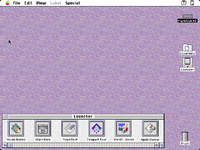
As an example of the things you have unlocked by sharing these discs, we now know what the Performa 560 Money Magazine Edition looked like out of the box:
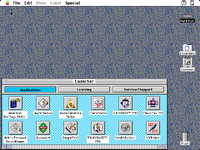
1755144554022.png
 
@RepairManiac, I'll add my thanks here as well. Thanks for not only preserving them yourself, including the included documentation, but also following best archiving practices when getting them online! This means we'll have a very interesting piece of history preserved for the future!
 
You know, I somehow glossed over this in Apple's tech note in the past:
Many control panels normally have compressed resources. This makes it easier to fit all the necessary files on system software floppy disks. Once a control panel is opened, the resources are decompressed, and then written back to disk decompressed. This process can take quite a bit of time (minutes, on a Performa 400), and is most visible with the Monitors control panel.
This means that all the Performas where we had Apple Backup restore images before likely didn't have the original as-shipped content: from the factory, a bunch of files would have had compressed resources, and when the user booted up the device, those resources would have started uncompressing, even before Apple Backup was run.

While I can see why Apple would do such a thing for floppy disks, the Performa series didn't come with a Floppy set. Which means, users would start up their new Performa with a built-in 40MB, 80MB or 120MB HDD, and then find the free space continually shrinking as they attempted to use the various pieces of software bundled on it. Not from prefs and temp files, but from expanding resources. Seems like a bit of a "bait and switch" where megabytes of reported "free space" were actually required just to open the software already installed.

Anyway, these sets should have the compressed versions, which means we can now properly demonstrate exactly what Apple did for the first time!
 
Anyway, these sets should have the compressed versions, which means we can now properly demonstrate exactly what Apple did for the first time!

Very interesting! I had noticed that note about compression in the past, but didn't think about the consequences of it in terms of preservation.

I'll have to play around with different OS versions. I restored the 7.1P2 version for the Performa 450 from Volume 1, but I didn't find that the Monitors control panel changed in size before or after I opened it (40,699 bytes). I also tried a 7.1P3 restore -- same exact size. I wonder if these restore images pre-decompress everything?

Another fun note is that same 7.1P2 restore leaves the hard drive named as Macintosh HD instead of Hard Disk.

1755215472043.png
 
So, the Volume 6 software for the 640 DOS includes a PC Drive images with DOS, Windows and the SB drivers. I assume DOS 6.22 and Windows 3.1 since that is what it shipped with initially. Finally a copy of this directly from an Apple CD. The PC Drive image isn't mentioned in the readme. Volume 11 also has the PC Drive image, but it appeared to be blank when I tried to mount it. Will test further on my LC 630 DOS. I need to look at the other disks to see if there is anything for the other DOS compatible systems.
 
I need to look at the other disks to see if there is anything for the other DOS compatible systems.

Volume 3 has a restore for the Quadra 610 DOS Compatible (694-0268-B). It only includes a DOS 6.2 image though, no Windows. I do like the little caption in the Get Info window: "DOS for the rest of us".

1755217080729.png
 
Hearing others enjoying this once missing resource is thanks enough! 😊
I still can't believe that no one else had those discs. My mind is blown! 🤯

Now all we need is a properly imaged collection of the regular System Software Restoration discs.
Is this true? I assumed they were good to go.
I .iso imaged those 6 Discs as well when I was doing the Market Series set.
LMK
 
Is this true? I assumed they were good to go.
I .iso imaged those 6 Discs as well when I was doing the Market Series set.
LMK

The System Software Restoration Disc 1 available online was improperly imaged with an (old) copy of toast... the drivers didn't survive.
At the very least, uploading that one would be very helpful!
I haven't checked the other disc images yet. Some are good images from @MrFahrenheit, and some are from another person.
Wouldn't hurt to have them all in one place!
 
Very interesting! I had noticed that note about compression in the past, but didn't think about the consequences of it in terms of preservation.

I'll have to play around with different OS versions. I restored the 7.1P2 version for the Performa 450 from Volume 1, but I didn't find that the Monitors control panel changed in size before or after I opened it (40,699 bytes). I also tried a 7.1P3 restore -- same exact size. I wonder if these restore images pre-decompress everything?

Another fun note is that same 7.1P2 restore leaves the hard drive named as Macintosh HD instead of Hard Disk.

View attachment 89833
Here's the note for 7.1P2:
Many control panels normally have compressed resources. This makes it easier to fit all the necessary files on system software floppy disks. Once a control panel is opened, the resources are decompressed, and then written back to disk decompressed. This process can take quite a bit of time (minutes, on a Performa 400), and is most visible with the Monitors control panel.

If a user shuts down their system while the decompressed resources are being written back to disk, it can lead to problems. By providing users with control panels which already have decompressed resources, it should speed things up, reducing the risk that a customer might think something is wrong and want to shut down their system improperly.
* The Read Me document now very clearly provides information about the importance of the proper shut down procedure.
So it looks like starting with 7.1P2, they pre-decompressed all the resources, which not only would have sped up first use, but also provided a more accurate free space count.
 
So it looks like starting with 7.1P2, they pre-decompressed all the resources, which not only would have sped up first use, but also provided a more accurate free space count.

Ahh I see, I misread their explanation and missed the part under 7.1P2 where they said: Control panels "exercised" (opened and closed) during Custom Mac process.
 
I await a detailed change log of the various Performa System 7.1P releases now that all of them have been unearthed. :cool:

A friend had a Performa 600CD growing up, so that purplish desktop background is burned into my brain. It was annoying when I used other machines and couldn't find it because the enhanced desktop background control panel was not present on stock System 7.1 installations!
 
Scanned User Guide (from the CD Sleeve insert) into a PDF - attached here + uploaded to MG

Need to add some more pics / screenshots + some some more text to the description.
Otherwise it's about complete as it can get from what I have.
 

Attachments

@RepairManiac I literally don't have the words to tell you how much I appreciate this! I had really given up hope that anyone still had disc 1, let alone all the others I didn't even know existed. THANK YOU!
 
Scanned User Guide (from the CD Sleeve insert) into a PDF - attached here + uploaded to MG

Need to add some more pics / screenshots + some some more text to the description.
Otherwise it's about complete as it can get from what I have.

Thank you to everyone for the effort in preserving these! 👏

I just came across a similar September 1994 disc, it appeared to already be on the Garden but with some chatter about the disc not mounting right I added mine there too just in case.

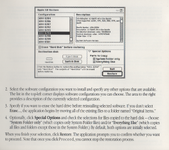
What's interesting is in my booklet the graphic is a bit distorted. I've also uploaded scans of the CD and the package on the MG page.

1761513180626.png
 
Thank you to everyone for the effort in preserving these! 👏

I just came across a similar September 1994 disc, it appeared to already be on the Garden but with some chatter about the disc not mounting right I added mine there too just in case.

What's interesting is in my booklet the graphic is a bit distorted. I've also uploaded scans of the CD and the package on the MG page.

View attachment 91964
Thanks for this; I'll compare the two and see if there are any differences. That distortion in the graphic is interesting; that usually indicates that the appropriate font size wasn't available or someone did a really bad job resizing the screenshot.
 
What's interesting is in my booklet the graphic is a bit distorted. I've also uploaded scans of the CD and the package on the MG page.
All the booklets from Volume 4 ~ Volume 11 are all distorted like that. Booklets look OK in Volumes 1 ~ 3 & 12 ~ 16. That's just weird! However, if memory serves me correct, support services seemed "rushed" and chaotic when the Market products came out.

Thanks for this; I'll compare the two and see if there are any differences.
Appreciate the follow-up @adespoton
 
Back
Top