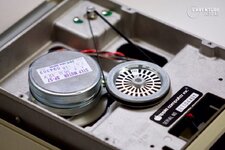
Have an original Apple III, looks like nobody has been inside since the 1980s. I've cleaned and lightly lubed the 3 Apple III drives (internal and two externals), retrobrighted the Apple III and Monitor III and reseated the chips. I just swapped out the Rifa caps on the PSU and the PSU is working.
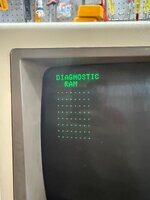
RAM Diagnostic comes up clean. (Picture)
The internal drive attempts to boot, but won't read any disks. A number of bootable disks came with the machine and none seem to be readable. I guess they could ALL be bad, but unlikely as they were in sealed containers.
Could use advice on next steps. I was considering....
Swapping in one of the other drives into the internal drive or just swapping cables.
Is there a keyboard combo that allows me to boot from the external drive?
Floppy Emu, I have one for the Apple II, but I'd need to modify it to work with the III
I'd try ADTPro, but don't have a disk.
Attached some photos, the machine looks great after the retrobright, and a video showing the failing boot sequence. Many thanks for any help.
RAM Diagnostic comes up clean. (Picture)
The internal drive attempts to boot, but won't read any disks. A number of bootable disks came with the machine and none seem to be readable. I guess they could ALL be bad, but unlikely as they were in sealed containers.
Could use advice on next steps. I was considering....
Swapping in one of the other drives into the internal drive or just swapping cables.
Is there a keyboard combo that allows me to boot from the external drive?
Floppy Emu, I have one for the Apple II, but I'd need to modify it to work with the III
I'd try ADTPro, but don't have a disk.
Attached some photos, the machine looks great after the retrobright, and a video showing the failing boot sequence. Many thanks for any help.