• Hello MLAers! We've re-enabled auto-approval for accounts. If you are still waiting on account approval, please check this thread for more information.

So got three surprises in one computer

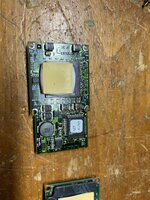
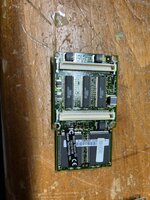
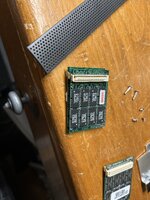
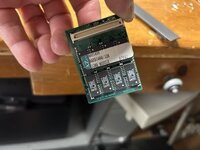
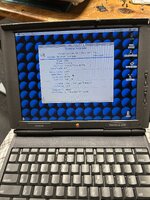
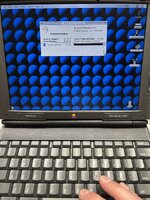
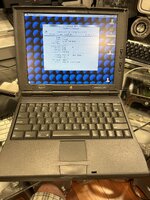
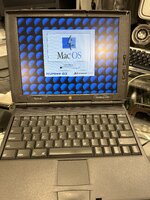
So picked up this 1400. Was basically destroyed by the removable battery. Surprise #1. Was kind of pissed as the listing said untested but it came with missing screws and was obviously opened. So didn’t do much with it until today. I decided to pull it all apart and see if i could clean logic board etc. as i pulled memory off i noticed both said 32 megs each. Suprise #2. I then pulled off processor and noticed it said newertech on bottom. So i was like wow, and g3 upgrade??? Holy moly:) surprise # 3. So what i thought was a $120 kick to the crotch was actually a good deal. Now my good 1400c 166 is maxed out.
 

Attachments

  • IMG_5424.jpeg
    IMG_5424.jpeg
    2 MB · Views: 50
  • IMG_5425.jpeg
    IMG_5425.jpeg
    1.7 MB · Views: 41
  • IMG_5426.jpeg
    IMG_5426.jpeg
    1.9 MB · Views: 35
  • IMG_5427.jpeg
    IMG_5427.jpeg
    2.1 MB · Views: 39
  • IMG_5428.jpeg
    IMG_5428.jpeg
    2.3 MB · Views: 49
  • IMG_5429.jpeg
    IMG_5429.jpeg
    2.1 MB · Views: 56
Wow, great find!

I also didn't know a 1400 could use more than 64MB of RAM!? I thought the max was 8MB logic board + 8MB "factory" expansion card + two stacked 24MB "user" expansion cards.
 
Bonus time! It's amazing how we still find treasures like this when the pool of Macs is thinning out.

My best surprise, years ago, was a PowerBook 540c sold by an eBay reseller shop front that was not far from my work. I went to pick the Mac up in person, got it for about $30 and the lady sneered at me bringing out the "old laptop", they only liked doing antiques and collectables. The shop didn't last long at all.

Was: Pristine 540c, NuPowr 167Mhz upgrade, 36MB RAM and the Acard 2.5" SCSI to IDE adapter, still my favourite portable Mac
 
Bonus time! It's amazing how we still find treasures like this when the pool of Macs is thinning out.

My best surprise, years ago, was a PowerBook 540c sold by an eBay reseller shop front that was not far from my work. I went to pick the Mac up in person, got it for about $30 and the lady sneered at me bringing out the "old laptop", they only liked doing antiques and collectables. The shop didn't last long at all.

Was: Pristine 540c, NuPowr 167Mhz upgrade, 36MB RAM and the Acard 2.5" SCSI to IDE adapter, still my favourite portable Mac
wow, thats really sweet:) always nice to get the unexpected bonuses for sure! Love the 540c as well
 
Wow, great find!

I also didn't know a 1400 could use more than 64MB of RAM!? I thought the max was 8MB logic board + 8MB "factory" expansion card + two stacked 24MB "user" expansion cards.

This has been seen on the forums previously here - @Snial explained in their response below that if you install more than 64MB the RAM will overlap leading to system instability.
 
Perhaps that issue is mitigated by the G3 upgrade?
The PBX chip, which manages the physical to physical mapping, is on the Motherboard. So, if the Ram is plugged in the normal way, which I think it must be, then the limit must still be 64MB. To repeat. PBX is a 32-entry array of nibbles; one entry per 2MB of physical memory the motherboard can manage. 32 entries x 2MB = 64MB.

Each entry is 3-bits, representing 8 select lines and each select line selects a bank of RAM from 2MB to 16MB. There's 8MB of Motherboard RAM (bank 0); then there's 4MB or 8MB of RAM in bank 1 for the Factory slot (though I think 16MB might be possible). Then bank selects 2..4 pass to the lower RAM card and 5..7 pass to the upper one.

So, you could do 32MB as 2x 16MB banks 2 and 3; while the second 32MB uses 5 and 6. Mac OS might think there's 80MB (8MB Soldered, 8MB factory, 32MB expansions), but 16MB will physically overlap with Factory RAM. e.g. you access the address 0x4000000, but the hardware performs an access to both bank 6 (as intended) and bank 0 (as it wraps around). Because 16MB of memory is aliased, it doesn't really work as intended (and there might be chip timing differences). It might be that the banks aren't allocated as I've described, but the problem will still be as I've described and I guess it's possible you could put a higher load on some RAM or two simultaneously accessed banks will output different data at some point.

It would be wise for you to remove one of the 32MB expansions, taking your PB1400 back down to 48MB. Sell the 32MB and buy a 16MB expansion to take you back up to 64MB. I have 56MB on my PB1400, so I'm OK, very OK - I can run Mac OS 8.1 with VM off and run SoftWindows 3.1 on top of that; and run Turbo C++ 4.5 for Windows usably on top of that too (it worked fine in 32MB on my PM4400/160 in the day, so 56MB is a luxury [he says in a Yorkshire accent]).

Addendum

How is it that Mac OS could think there's 80MB, but really there's only 64MB? The answer is how Mac OS or the ROM measures RAM. 8MB is soldered in, so Bank 0 can be set up immediately. Then all the other banks can be tested by allocating them to the same physical address range: 16MB to 24MB. The Mac finds that select line 1 has 8MB installed (factory RAM). Then it finds individual select lines 2, 3, 5 and 6 all contain 16MB of RAM too, so it adds it all up to 80MB. So it maps them, but it's not real, there's a discrepancy between the PBX mapping and the OS RAM allocation as described above.

 
Last edited:
Interesting.

So, if I'm understanding correctly, the addresses of the upper 16 or so MB wrap back around and overlap with the bottom 16 MB, causing all sorts of mayhem.

If this is true, then the RAM can be upgraded past 64 MB and the PowerBook will dutifully report the amount (81 MB, in this case), but any thing above 64 MB won't be usable because as I noted above, accessing it will not end well.

How am I doing?

c
 
Interesting.

So, if I'm understanding correctly, the addresses of the upper 16 or so MB wrap back around and overlap with the bottom 16 MB, causing all sorts of mayhem.

If this is true, then the RAM can be upgraded past 64 MB and the PowerBook will dutifully report the amount (81 MB, in this case), but any thing above 64 MB won't be usable because as I noted above, accessing it will not end well.

How am I doing?

c

Sounds about right to me (except that 81,920 KB is 80 MB).

The concept is a bit like the knock-off flash disks that report their size as 1TB (or whatever) but only have e.g. 8GB of real storage and any accesses past 8GB loop back on themselves leading to data loss.
 
So, if I'm understanding correctly, the addresses of the upper 16 or so MB wrap back around and overlap with the bottom 16 MB, causing all sorts of mayhem.
Once PBX has mapped it, yes, e.g. bank 6 could be mapped to 64MB to 79MB, but that 16MB would just wrap around to 0. When checking RAM earlier, each Bank 1..7 can be mapped to the 16MB to 31MB region so they can be checked individually.
If this is true, then the RAM can be upgraded past 64 MB and the PowerBook will dutifully report the amount (81 MB, in this case), but any thing above 64 MB won't be usable because as I noted above, accessing it will not end well. How am I doing?

Pretty good! I don't know why PBX works the way it does. I would have just connected physical address bits 24..26 to a 3:8 decoder and then made the VM mapping handle any discontiguous banks. Then maximum RAM would be 120MB. Instead they have something more complex, physical address bits 21..25 go to PBX (32x 2MB regions) which outputs a bank select + bits 23 to 21. So it only gives you 64MB.

BankSelect<7:0>=1<<(PBX[(PhysicalAddr>>21)&0x1f]);
BankAddr<23:0>=PhysicalAddr&0xffffff;

I would have done:

BankSelect<7:0>=1<<((PhysicalAddr>>24)&7]);
BankAddr<23:0>=PhysicalAddr&0xffffff;
 
Could you not just pull the small 8MB card out instead? It's not permanently attached. Or are the slots physically wired to certain banks that preclude this?

I always hate when eBay people say "untested" in the listings; it's almost always a copout because they likely did try it and it didn't work, and/or they took stuff out of it. One time I bought a 6100 "untested" and when it showed up, it wouldn't boot. I opened it, and the ROM SIMM was missing. I asked the seller and they said they pulled the L2 cache (this was 25 years ago when a x100 L2 cache may have had value on its own as an upgrade). No, idiot, you pulled the ROM and it has basically no value. I don't think they ended up sending it to me so they got negative feedback.

I do love surprise CPU upgrades though. A few years ago I was trawling Kleinanzeigan (basically a western European version of Bookoo or OfferUp) and came across an ad for a Power Mac 8200/120 (one of the non-US-market systems I wanted). It was a few hours away, but had a sticker that I couldn't quite make out but looked suspiciously like a Sonnet sticker, so I went out to buy it. Sure enough, that was a Sonnet sticker on the case, but the seller didn't mention it and I didn't either, so I paid the €100 or so and went on my way. When I got home I held my breath and opened the case: there it was, the Sonnet Crescendo 72/8200. It was only the 400MHz version but that was fine, because I finally got one. I tried to buy one before but the Amiga weirdos drive the prices for those over the moon, so €100 with a bonus PM8200 was a pretty good deal.
 
Could you not just pull the small 8MB card out instead? It's not permanently attached. Or are the slots physically wired to certain banks that preclude this?

I always hate when eBay people say "untested" in the listings; it's almost always a copout because they likely did try it and it didn't work, and/or they took stuff out of it. One time I bought a 6100 "untested" and when it showed up, it wouldn't boot. I opened it, and the ROM SIMM was missing. I asked the seller and they said they pulled the L2 cache (this was 25 years ago when a x100 L2 cache may have had value on its own as an upgrade). No, idiot, you pulled the ROM and it has basically no value. I don't think they ended up sending it to me so they got negative feedback.

I do love surprise CPU upgrades though. A few years ago I was trawling Kleinanzeigan (basically a western European version of Bookoo or OfferUp) and came across an ad for a Power Mac 8200/120 (one of the non-US-market systems I wanted). It was a few hours away, but had a sticker that I couldn't quite make out but looked suspiciously like a Sonnet sticker, so I went out to buy it. Sure enough, that was a Sonnet sticker on the case, but the seller didn't mention it and I didn't either, so I paid the €100 or so and went on my way. When I got home I held my breath and opened the case: there it was, the Sonnet Crescendo 72/8200. It was only the 400MHz version but that was fine, because I finally got one. I tried to buy one before but the Amiga weirdos drive the prices for those over the moon, so €100 with a bonus PM8200 was a pretty good deal.
Amiga weirdos lol.. yeah i know… cool find! definitely nice to get a good deal as well
 
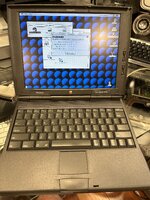
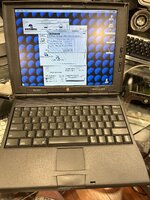
so grabbed the nupower installer and installed so now shows the proper information.
 

Attachments

  • IMG_5437.jpeg
    IMG_5437.jpeg
    2.4 MB · Views: 20
  • IMG_5438.jpeg
    IMG_5438.jpeg
    2.6 MB · Views: 20
  • IMG_5439.jpeg
    IMG_5439.jpeg
    2.5 MB · Views: 18
  • IMG_5436.jpeg
    IMG_5436.jpeg
    2.4 MB · Views: 19
so grabbed the nupower installer and installed so now shows the proper information.
You really don't have 80MB mate.

I do love surprise CPU upgrades though...
That happened to me too. I bought another 16MB of RAM for my PB1400 and the seller threw in a 166MHz PPC603ev (+the expected 128K cache). I was really thankful for that! I have also acquired a glitchy 133MHz CPU with 128kB of cache (but no heatsink, though I do have a small sheet of copper) and 2x 603e/117MHz modules. I think the last two both work.

I must say I really like my PB1400c/166. I need to rebuild a battery and sculpt/glue up the left-hand hinge cap. I'd love to work out a sort-of PCMCIA PowerMacduino expansion system. The concept would be to implement an interface that could work across PDS, NuBus, PCMCIA and SCSI so that it'd be possible to develop retro Mac hardware for all I/O targets with minor changes. I figure that you don't really need much in the way of an API: Read block, Write block, Check Ready, Respond to IRQs. For all the memory-mapped ones it'd be pretty similar and maybe for simplicity I'd just use a 16-bit interface x Device ID x 1MB address range (for Mac II compatibility). Then have an extension/INIT that mapped the API to the actual hardware and conventional device drivers would sit on top of that.
 
oh I also had this 220Mhz G3 version on one of my 1400c..
I felt quite slow though to my surprise, the 1400 is just a single bottleneck
 
I must say I really like my PB1400c/166

I agree, for the most part. It's worlds better than the 5300 even though it's basically the same underneath. Between the 1400, 2400, and G3 WS, I don't know which has the best keyboard. Arguably it's the 1400 because it's so very light compared to the others yet it's accurate and crisp, not spongy or kinda imprecise (i.e., you have to hit the key square on or it'll rock and may not give a response) like most other PowerBooks of the era (to say nothing of the dreadful Duo keyboards). The 2400's is crisp and clean and the inverted-T is a nice touch, but the key caps sometimes feel a little too cramped for my meat mitts. The WS's is also quite good but there can be some flex to it that the 1400 and 2400 don't have. It's not as flimsy-feeling as some of the later models, but it's still present.

Has anyone ever tried to populate the second battery bay circuitry in the 1400? A quick Googling didn't turn anything up as to a successful operation. If it's just a matter of popping in the components (i.e., the PMU is already programmed to manage a second battery if present), it shouldn't be too hard.
 
<snip> best keyboard. Arguably it's the 1400 because it's so very light <snip> accurate and crisp <snip> hit the key square on or it'll rock and may not give a response) like most other PowerBooks of the era (to say nothing of the dreadful Duo keyboards). The 2400's is crisp and clean and the inverted-T is a nice touch, but the key caps sometimes feel a little too cramped for my meat mitts. The WS's <snip> some flex
I once had a Duo230 and although I remember how much I hated the trackball, I'd forgotten how annoying the keyboard is. My LCII keyboard is quite nice, better than my PM4400 keyboard was (spongy, like a Sinclair membrane Rubber-key thing with proper key caps, which I guess is what it is ;-) ). Strangely, the keyboard doesn't seem to auto-correct like the one on my MBA M2 does ;-) .

Using the PB1400 earlier today, I also started to appreciate its trackpad. 1990s-era trackpads were tiny, but because the screen has a fairly low-resolution, these are about the right size. You can zip around the screen and still position it accurately (by rocking my finger a bit). The button is nice.

It's pretty amazing to think that Apple got trackpads right back in the mid 1990s, but most PC laptop trackpads are still so bad users end up buying a mouse! And they think there's nothing odd about that!

Has anyone ever tried to populate the second battery bay circuitry in the 1400? A quick Googling didn't turn anything up as to a successful operation. If it's just a matter of popping in the components (i.e., the PMU is already programmed to manage a second battery if present), it shouldn't be too hard.
Good thought. I only need to replace the batteries in the normal one. I think @Phipli did a version a couple of years back by using an off-the-shelf set of batteries that were easier to fit (no spot welding), but lower capacity. I guess, gosh, one alternative is to fit lithium ion batteries, like the 5300 originally had and the PB1400 would still have had if they hadn't been recalled! You'd need a BMS that both charged the Li-ion correctly and faked the response from the NiMH cells though!
 
Back
Top