• Hello MLAers! We've re-enabled auto-approval for accounts. If you are still waiting on account approval, please check this thread for more information.

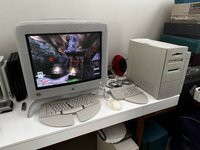
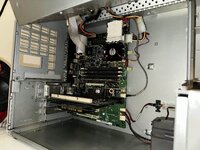
Two G4s in a beige!

I've opted to purchase this upgrade for my G3 B&W! (It will be an interesting thing to play around with!)
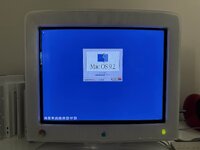
I only run OS9.2 on this machine, so I'll try to get two G4 CPU's up and running.

View attachment 88560
I believe it will only work in a beige G3 not a B&W but worth trying. I’d try it in a beige first just to see if it works correctly putting it in a B&W may damage it….
 
I believe it will only work in a beige G3 not a B&W but worth trying. I’d try it in a beige first just to see if it works correctly putting it in a B&W may damage it….
My mistake!

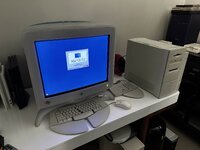
I meant for the Beige G3 Mini Tower that’s in the picture.

My B&W already has the 1GHz SONNET G4 upgrade.

IMG_8605.jpeg
 
Last edited:
You said you're only running 9.2 on your machines? ISTR there being no baseline support for multiple processors under OS9. Very low confidence recollection: some apps were multi-threaded for use with dual processors under OS9, maybe Photoshop or some such?

IOW, will a multiprocessor upgrade do much good in your use case?
 
You said you're only running 9.2 on your machines? ISTR there being no baseline support for multiple processors under OS9. Very low confidence recollection: some apps were multi-threaded for use with dual processors under OS9, maybe Photoshop or some such?

IOW, will a multiprocessor upgrade do much good in your use case?
The main reason for this purchase is to experiment.

I’m a hardware collector and really like quirky hardware such as this! Each one of my systems needs to have something interesting about it, and in the case of the Beige system, this will be it.

As far as the graphics are concerned, all I'm going to do in this system is give the Rage 128, (which I stole from my G3 B&W, when I upgraded it with a Radeon 9200 Mac Edition), the MPEG-2 add-on card, which it currently lacks. (I'm not going to get another 9200 Mac edition for this system, as I already have one in my B&W and I don't need more of the same.)

As far as I’ve heard, these cards don’t work well under OSX, so OS9 it is.

At a minimum, it will at least give me a 450MHz G4 in this system (which is currently a 300MHz G3), in the cases where both CPU’s aren’t used.

I haven’t seen any footage of anyone else playing around with one of these, so it will be interesting!
 
Last edited:
The main reason for this purchase is to experiment.

I’m a hardware collector and really like quirky hardware such as this! Each one of my systems needs to have something interesting about it, and in the case of the Beige system, this will be it.
Very cool! Same here, I often feel more "Radius fanatic" than a Mac collector.:ROFLMAO:
 
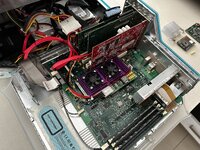
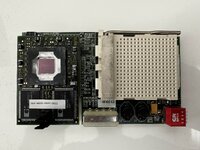
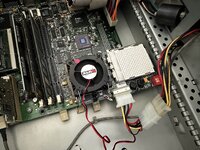
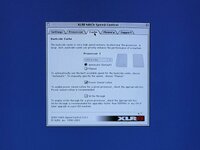
My XLR-8 MACh Velocity MPe CPU card arrived today! 🙂

After quite a bit of struggling I've got it up and running! (ended up repartitioning my OS9 disk when I didn't have to.)

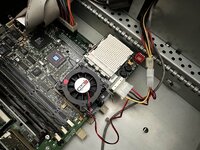
This little toy has cost me a hell of allot of money so far ,and it still needs its second CPU! (This is pretty much the only one of these cards pictured on the internet, so they're damn rare!)

01F87255-1044-4FC0-BF30-A5C105F5ACE8.jpg

315AF32C-7A0F-454F-9B89-764BA78DB3F8.jpg

D83CC56B-B03C-453E-9040-7ABA2DA54894.jpg

5BD1EFBD-C26E-405F-8453-E15D1CF3AB1B.jpg

C726CDF0-0BF8-4755-AFAB-984303F0C129.jpg

EC5E1896-7402-4932-A97D-E34FF157A88B.jpg

32B95F52-A542-4907-89EB-522143128682.jpg
 
Thank you for sharing your experiences with us! Good luck with the experiments. The G3 ZIF modules are more common; I wonder if two of those could work on that device.
 
It certainly looks like an impressive upgrade. Presume a Yikes! G4 ZIF is the only option but a lowly 400Mhz unit should clock up to 466 - should. Wonder if the drop-in CPU runs without backside cache?
 
It certainly looks like an impressive upgrade. Presume a Yikes! G4 ZIF is the only option but a lowly 400Mhz unit should clock up to 466 - should. Wonder if the drop-in CPU runs without backside cache?
I wonder if it wouldn't be possible to slot a 500MHz SONNET ZIF G4 CPU into the secondary slot and down clock it to 450MHz to match the CPU that's already installed?

Even more interestingly, I have a spare 450MHz G3 ZIF CPU lying around, maybe it's possible to slot it into the secondary slot, making the machine a G3/G4 hybrid?
 
Last edited:
Interesting, I didn't know these even existed! It would be fun to compare performance with the 1GHz sonnet ZIF upgrade. Two 7410 chips at 600MHz should beat it in many cases, at least with OS X. Doesn't the sonnet use a 50MHz bus instead of 67? Anyway, I found it here:

www.ebay.com/itm/374150035863


...and searched the forum for info. This old thread was all I found, so I thought I'd bump it and steal some pictures from that link above to preserve them:

View attachment 50904
View attachment 50905View attachment 50906View attachment 50907

It looks like there were at least two versions made (the board doesn't match the picture on the box). For searching, it was called xlr8 MACh Velocity MPe for ZIF sockets G4 or G3 beige, etc.

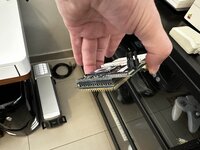
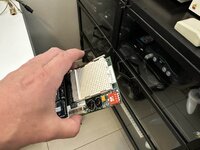
The one that I have looks different to that one, because it's specifically for the G3 Beige Mini Tower, as it's a tight fit:
111EACB7-CDFD-471D-9EB1-579186ED775E.jpg

The one in the picture is longer and wouldn't fit into a G3 Beige Mini Tower.
 
anything that supports multiprocessing services.
photoshop is a big one. get those gaussian blurs on!
allegedly the finder can benefit from the multiprocessors for threaded tasks... dunno if that's true though.
here's a list of apps that probably support multiple processors.
 
Last edited:
I'm listening in as this is a interesting topic. Did the secondary CPU have to be "MPe" or multiprocessor enabled, akin to Daystars marketing at the time?
 
Apparently you get better performance if you slot an MPe CPU in the secondary slot, but apparently the CPU’s from other vendors work as well. In the case I’m going to be trying a standard Yikes CPU.

Ideally you’d want to slot another XLR8 Mach Speed MPe @ 450MHz, but they seem to be extremely difficult to come by!
 
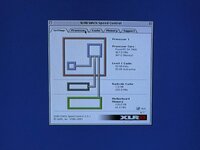
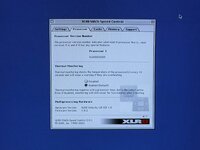
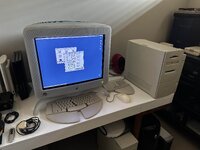
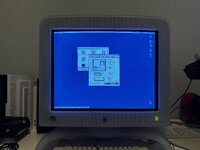
I’m still running my G3 beige with a single CPU, but today I decided to see if I couldn’t get the installed CPU to run @ 500MHz?
I’m happy to report that the overlock was successful and it’s now running @ 501MHz!!! (This is screaming fast for a Beige)

D0505CB1-1F09-49E5-8A06-3C4D943E8B59.jpg

8AA497BC-C090-4747-89BF-9C20DF5F6F47.jpg

C5DDC7CC-CDEE-4724-A0DD-13DAD0A0A321.jpg
 
Last edited:
...CPU’s from other vendors work as well. In the case I’m going to be trying a standard Yikes CPU.

Did this work? What combinations have you tried? I don't think a pair of G3 CPUs would be different from G4s. A G3/G4 combination might be interesting too. It looks like the adapter has a separate power supply for the second socket, so the voltages for each CPU can probably be different.
 
Back
Top