
-
 Hello Guest! We're hosting a challenge to welcome vintage Intel macs to the MLA during the month of July! See this thread for more information.
 -
We've made some quality of life improvements to the Trading Post. More info here.
You are using an out of date browser. It may not display this or other websites correctly.
You should upgrade or use an alternative browser.
You should upgrade or use an alternative browser.
Mac SE ADB Controller
- Thread starter Scott Squires
- Start date


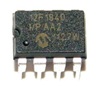
Yup, that looks right. Try the hex file I attached earlier, though, I'm hoping that will answer some questions...It's taken me a while @Tashtari but I am taking a look now.
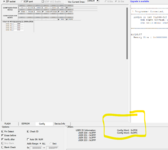
This is what I see when I read the PIC - I can see the values you mention on the bottom right, does that make any sense to you? This is the "config" tab.

I just tried and... it WORKS!!! I put the old back in and got the error message straight away.
Amazing, thanks a lot!
Wait: no, on my other SE board, it boots but the mouse stutters, as if the ball was dirty. If I install the genuine ADB chip, it works perfectly. Well I guess we've managed to go a step in the right direction, on the first board I tested it, it was working 100%, it must be something minor. Is there anything I can check with the scope which might help you?
Amazing, thanks a lot!
Wait: no, on my other SE board, it boots but the mouse stutters, as if the ball was dirty. If I install the genuine ADB chip, it works perfectly. Well I guess we've managed to go a step in the right direction, on the first board I tested it, it was working 100%, it must be something minor. Is there anything I can check with the scope which might help you?
Last edited:
Hmm. Well, it's a data point, at least. I assume it's the same PIC16F87/88 you're testing in both boards and it works in one but not the other?
Also, I've forgotten - do you have a TechStep? If so, can you check on the working SE whether the PIC16F87/88 passes the ADB test?
Other than that, right now, I have no ideas... the clock rate was the major difference and I think this latest change resolves it. Not that there's any convenient way to tell for sure. Let me know if you observe any other behaviors that might shed some light on the issue and I'll post here if I come up with any ideas.
Also, I've forgotten - do you have a TechStep? If so, can you check on the working SE whether the PIC16F87/88 passes the ADB test?
Other than that, right now, I have no ideas... the clock rate was the major difference and I think this latest change resolves it. Not that there's any convenient way to tell for sure. Let me know if you observe any other behaviors that might shed some light on the issue and I'll post here if I come up with any ideas.
Yes, the very same PIC16F88 works on one board but on the other the mouse stutters. The mouse is a genuine Apple. If I put the original code (on an 87 I had handy), at least the first board crashes during boot with address error as previously observed.
Sure, I'll test the PIC16F88 on the working board with the techstep - next week
I've just noticed that ghofbauer on your github had the very same issue with the mouse. I think I'll try the external oscillator method - it gets a clock from the Mac and divides it by two, right?
Only, I do not know how to change the code the way ghofbauer mentioned, would you be able to put together a version that uses the external oscillator for me?
I might come up with a small PCB to avoid a spaghetti junction
Thanks a lot so far!
Sure, I'll test the PIC16F88 on the working board with the techstep - next week
I've just noticed that ghofbauer on your github had the very same issue with the mouse. I think I'll try the external oscillator method - it gets a clock from the Mac and divides it by two, right?
Only, I do not know how to change the code the way ghofbauer mentioned, would you be able to put together a version that uses the external oscillator for me?
I might come up with a small PCB to avoid a spaghetti junction
Thanks a lot so far!
Sure, I can do that, though if it is the clock that's still at fault, I'd really like to be able to cook up a solution that just slots in without any external hacks like this...Only, I do not know how to change the code the way ghofbauer mentioned, would you be able to put together a version that uses the external oscillator for me?
hi @Tashtari
I've only now found a minute to test. It doesn't work, it gets stuck at RAM test.
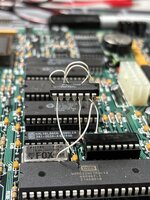
I checked the clocks, I have 3.6MHz from the board, into the flip flop and then I see 1.8MHz into pin 16 of the PIC.
Is that expected? I thought the FlipFlop would divide by 4 and I would get 500KHz?
Edit: no, I've re-read your readme and it's supposed to be around 2MHz. Then it doesn't work. Any ideas?
I've only now found a minute to test. It doesn't work, it gets stuck at RAM test.
I checked the clocks, I have 3.6MHz from the board, into the flip flop and then I see 1.8MHz into pin 16 of the PIC.
Is that expected? I thought the FlipFlop would divide by 4 and I would get 500KHz?
Edit: no, I've re-read your readme and it's supposed to be around 2MHz. Then it doesn't work. Any ideas?
Last edited:
I've got nothing, I'm afraid. =/ To the best of my knowledge, the instruction clock is the only thing that should be different between the real thing and the PIC16F88/87 adaptation. If I had a better understanding of the code and the affected machine to test with and a whole load of free time, I might be able to make some progress with it, but alas, I do not...Any ideas?
If you want to dig into this further, I'd focus on trying to figure out what's different between the good and bad SEs. Attach a logic analyzer to the pins of the ADB controller and try to figure out what precipitates the mouse freezing. If you gain some idea what's going on, I can make changes to the firmware and send you images to test with, but that's about all I can do.
Thanks, I appreciate the help.
I don't think I've got the skills to go so deep into the problem - it puzzles me that with the external clock nothing works altogether though. I tested the very same PIC with the "447 code" and it works as before (the mouse freezes every second or so) so the PIC is good.
I followed the drawings mentioned by ghofbauer on your github and used the code you provided. Am I missing anything? The fact that I have 1.6MHz into the PIC should confirm that the flipflop installation is ok.
One thing I could try is the original VIA, at the moment I have the WDC on.
I don't think I've got the skills to go so deep into the problem - it puzzles me that with the external clock nothing works altogether though. I tested the very same PIC with the "447 code" and it works as before (the mouse freezes every second or so) so the PIC is good.
I followed the drawings mentioned by ghofbauer on your github and used the code you provided. Am I missing anything? The fact that I have 1.6MHz into the PIC should confirm that the flipflop installation is ok.
One thing I could try is the original VIA, at the moment I have the WDC on.
I don't think so. As far as I'm aware, ghofbauer's change was just to switch the PIC's config to use an external clock source and divide it in half so it had the same instruction clock rate as the original. If you're seeing 1.6 MHz into the PIC, that should be it.Am I missing anything?
I'm lacking context, what are you referring to?One thing I could try is the original VIA, at the moment I have the WDC on.
The VIA - I currently have installed the WDC replacement, not the original one. But I am not aware of any issues with that replacement.I'm lacking context, what are you referring to?
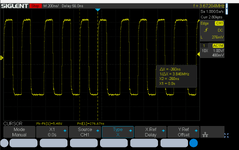
One thing I'll check is the clock stability: it was a bit jittery but that's usually because of my long ground lead, for convenience. Right now the flipflop is literally "up in the air", I'm wondering whether this is introducing some noise or something that the PIC/SE doesn't like?
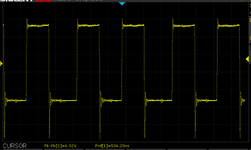
Checking now, the clock is really not so cool - the frequency reads 1.8MHz but he period of each pulse seems to change over time? Hence the jitter I was seeing. This comes from the board -the frequency seems to change between 3.1 and 3.8MHz. Could that be why this board has always been so fussy about everything?

Let me check on the other board - I have two clues to follow now: the weird clock period and the ringing.
Attachments
Last edited:
I wouldn't suspect any trouble with that, but I'm not really enough of an electrical engineer to say for sure. As for the VIA versus the WDC replacement... it's a data point, I'm not sure why one would work and not the other, but if you're able to swap them, that might be a good experiment.
Similar threads

- Replies
- 11
- Views
- 1K
- Replies
- 7
- Views
- 2K


- Replies
- 33
- Views
- 10K


- Replies
- 70
- Views
- 21K
