• Hello MLAers! We've re-enabled auto-approval for accounts. If you are still waiting on account approval, please check this thread for more information.

Strange behavior Radeon 9100 128MB Flashed

indibil

6502
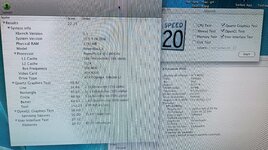
Hi, I recently found this used 128MB Radeon 9100 for a good price and decided to flash it for Mac:
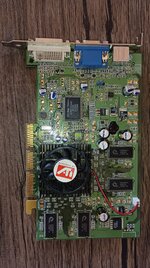
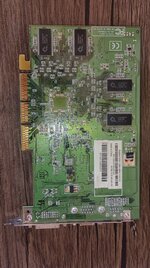
IMG_20250408_170456.jpg
IMG_20250408_170506.jpg

For flashing, as I don't have a PC, I use a TLL866 programmer and I have a few 25P10 EEPROMs to replace the original 25P05, which I have used with other graphics cards (7000PCI, Radeon 9200,...)

I should say I've run the tests on a GE and a QS. The GE already has a flashed Radeon 8500 64MB installed, which works perfectly.

I used the ROM I found here for 9100 :
macelite

I used a ROM modified by @joevt, I don't know if he's the same one from this forum. It's configured for 250/250 MHz (I don't know if the chips in this graphics card would support the speed of the 8500 ROM).

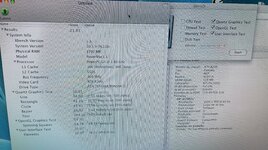
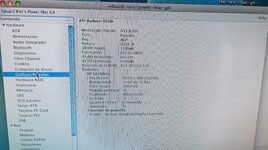
Many years ago I flashed another 9100, I don't remember if it was 128MB or 64MB, but 64MB was useful. I thought only 64MB was working, but booting into Sorbet Leopard shows me 128MB. I've run xbench and the graphics card seems to work without any problems:
IMG_20250408_170406.jpg

Is it normal for it to recognize 128MB? I don't know the brand of the graphics card.

But under OS 9, it stays on the desktop without loading the icons or the top bar, both on the GE and the QS. I've tried it several times. And as I said, the GE already uses a 64MB 8500 without any problems:
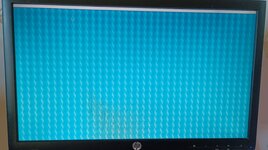
1744124939808.jpg

What could be the cause of this issue under OS9? Could it work with the original 8500 ROM?

Thanks.

 
I used a ROM modified by @joevt, I don't know if he's the same one from this forum. It's configured for 250/250 MHz (I don't know if the chips in this graphics card would support the speed of the 8500 ROM).
I did some Radeon flashing stuff over 20 years ago.

I converted Mac ATI ROM dumps to Forth (.4th) files, applied names to many unnamed constants, variables, fields, and methods, combined several of these .4th files (for Radeon 7000 to Radeon 9200) into a single .4th file that includes preprocessor commands to differentiate between the variants. An MPW Make file is used to set the preprocessor options, create a ROM file, and a flasher app.

The preprocessor commands are just MPW Shell commands so you can do stuff like loops which are difficult to do in a C preprocessor. The preprocessor options are exported environment variables.

What could be the cause of this issue under OS9? Could it work with the original 8500 ROM?
I don't know what the cause could be or if it could work with the original 8500 ROM. Did you try booting with extensions disabled?
 
But under OS 9, it stays on the desktop without loading the icons or the top bar, both on the GE and the QS. I've tried it several times. And as I said, the GE already uses a 64MB 8500 without any problems:

View attachment 85282

What could be the cause of this issue under OS9? Could it work with the original 8500 ROM?

Thanks.

Honestly, it appears to me it’s being treated as a second monitor for some reason. I’m guessing all your icons and menu bar are showing up on the computer’s built-in video feed. I could well be wrong about that, but it was my first thought looking at that screen.
 
The 9000 Pro uses 275 Mhz for the GPU and 275Mhz for the DDR speed, The 9100 uses 250Mhz for the GPU but 200 Mhz for the DDR (its dual channel to make up for speed difference). So, if your modified BIOS is using 250/250 you are overclocking the RAM.
 
Quake III would be a decent benchmark under OS X. I'd also reset PRAM and maybe plug monitor in after boot, might detect things again, possibly.

 
Quake III would be a decent benchmark under OS X. I'd also reset PRAM and maybe plug monitor in after boot, might detect things again, possibly.

:)

Ok, I'll try Quake 3, I've never played it, but I was referring to some software that allows me to verify that it works correctly, OpenGL, and other things.
 
But under OS 9, it stays on the desktop without loading the icons or the top bar, both on the GE and the QS. I've tried it several times. And as I said, the GE already uses a 64MB 8500 without any problems:

View attachment 85282

What could be the cause of this issue under OS9? Could it work with the original 8500 ROM?

Thanks.
This behavior is sometimes due to a crash of the ATI Displays application which insert a little menu icon. Try to do a Force Quit on it to check if this is the problem
 
The Ati Displays control pannel?
Exactly, you can check macos9lives forums about this subject:

I can't find now the exact post but on the Mac Mini G4 hack, sometimes the mini seems to crash at boot because of this CP.
A "Force quit" later and it works like a charm.
 
Also, I see you're from Spain ... be careful with the ATI drivers updates that are localized in US English only while Apple had translated Extensions names in our EU variants (I had many pb with my french OS back in the days because of that; same with Quicktime btw).

The installer is not able to remove old versions of localized drivers so you still have the old spanish ones with the new US ones. 👻
 
Thank you all very much for the ideas. I've run several tests and think I've found the problem, but I can't find a solution.

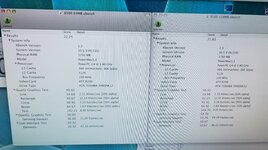
First, I compared the Radeon 8500 64MB with the Radeon 9100 128MB using xbench, and both have similar results; one has more memory, but the other uses it faster. I think @joevt 's ROM works very well!

IMG_20250409_154521.jpg
IMG_20250409_155148.jpg
IMG_20250409_155248.jpg

But in OS 9 it doesn't work properly. I rebooted and it only works as a single monitor, no dual monitor. If I boot with Shift pressed, disabling extensions, I can get to the desktop and it works, but I guess it won't have 3D acceleration.

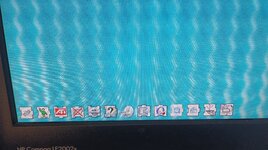
I've removed ALL ATI extensions and installed the latest drivers, and the problem persists. But during boot, I noticed that with the 8500, all the extensions load, but with the 9100, the "ATI Graphics Accelerator" extension is shown crossed out, not loaded.

IMG_20250409_161605.jpg
Captura de pantalla de 2025-04-09 16-36-12.png

Is this the same problem as the one mentioned in OS9Lives by @zefrenchtoon? It mentions ATI Video Accelerator 4.8.5.

Also, I don't have any ATI control panel.

Do you know what I can do?
 
There is a trick about the model id of your 9100 card I think.
During mini G4 hacking, they have found that the ATI extensions detects only specific cards using their model id (can be found in Apple System Profiler). The first hack was done by modifying the extension to include the model id of the mini ATI card. Finally, they did a clever trick by switching the detected model id in OpenFormware so they don't have to modify the drivers.

In your case, maybe you simply have to hack the driver as they did in their first hack.
To find the post about this hack will be a pain :-/ but doable I think

Also, they did not used the very last drivers but the january 2005 ones because the last ones were less compatible / more buggy (choose the one you prefer)
 
There is a trick about the model id of your 9100 card I think.
During mini G4 hacking, they have found that the ATI extensions detects only specific cards using their model id (can be found in Apple System Profiler). The first hack was done by modifying the extension to include the model id of the mini ATI card. Finally, they did a clever trick by switching the detected model id in OpenFormware so they don't have to modify the drivers.

In your case, maybe you simply have to hack the driver as they did in their first hack.
To find the post about this hack will be a pain :-/ but doable I think

Also, they did not used the very last drivers but the january 2005 ones because the last ones were less compatible / more buggy (choose the one you prefer)
Thanks for the tip. I'll look into it, but I don't know if I'll be able to; I've never been very good at modifying drivers.

From my ignorance, I understand that the 9100's ID is in the hardware; it's not something you can add to the ROM, right?

Reviewing the photos I added earlier, both graphics cards show the same ID, 0x514c. Is this their ID?
 
This afternoon I tried every driver I could find, even those for the Mac Mini G4, and the same thing happens with all of them: ATI Graphic Accelerator appears crossed out, and the desktop is left without icons.

If the IDs for the 8500 and 9100 are the same, I assume there's nothing to change in the drivers. Maybe it's the 128MB, but I don't know what could be causing this incompatibility.
 
Yes, but if you look at my photos, they both have ID 514c. I can't change it to the same number.

What should I put? On which driver? What software allows me to do this?
 
Did any version of the ATI Graphics Accelerator load?

Normally when you get these desktop hangs in OS 9 with an ATI card the ATI Graphics Accelerator which handles 2D graphics acceleration is the offending extension.

If your card has the same device ID as the Radeon 8500 you should not need hacked drivers. Just install the latest ATI drivers for Mac OS 9, nothing more.

If the ATI Graphics Accelerator is still x'ed out then we need a full dump of the cards .properties. This can be done from Open Firmware in two machine mode or with the Display Name Registry tool in OS 9 from the PCI DDK. Or it can be done with the ioreg command line tool in OS X.
 
Back
Top