• Hello MLAers! We've re-enabled auto-approval for accounts. If you are still waiting on account approval, please check this thread for more information.

Hootswitch, a (work-in-progress) Apple Desktop Bus switch

I updated my ancient version of KiCad so I could load the schematics and it does seem like everything is connected as it should be. With the schematics I was able to verify the operation of J10 so had jumpered that and verified I had 5V at the ADB ports.

The Hootswitch starts up and I can cycle outputs with the button on the front panel however when connected to a keyboard/mouse and computer(s) the mouse/keyboard don't work and I can't cycle inputs with the keyboard.

The activity light on the computer side for the Hootswitch lights up when the computers are running, so that side seems to be working fine.

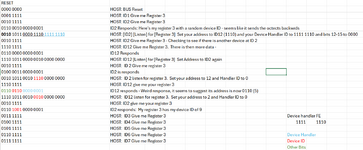
On the input side, some things are happening... I connected my logic analyzer and watched what was happening when the Hootswitch boots up. It seems like the Hootswitch finds the keyboard and the keyboard sees the Hootswitch but the back and forth doesn't seem exactly as I would expect from my limited research on the ADB protocol. I only had one keyboard connected (an Apple Desktop Keyboard (i.e. the one that shipped with the Mac SE) and here's what I'm seeing:
1737345884794.png

It seems like the Hootswitch and the keyboard go around in circles a bit with respect to registering the keyboard. I need to connect my analyzer to an actual computer and see what it does. After the startup sequence occurs, it doesn't seem that there is any activity on the bus. The Hootswitch doesn't seem to poll and pressing keys on the keyboard doesn't do anything.

Will keep digging here.
 
Last edited:
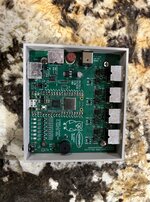
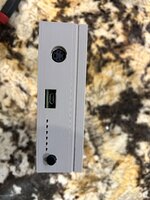
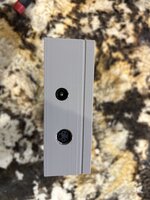
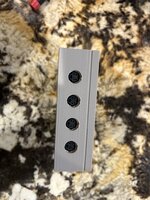
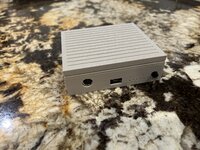
As an aside, I create a 3d printed case for the Hootswitch for once I get it working. Very pleased with how it turned out - the LEDs line up perfectly and look quite good. While you can see some printing imperfections in the photos, you don't really see them in person. Will share the STL files here shortly. This is designed for the B version of the hardware
 

Attachments

  • IMG_5955.JPG
    IMG_5955.JPG
    1.2 MB · Views: 24
  • IMG_5956.JPG
    IMG_5956.JPG
    850.8 KB · Views: 24
  • IMG_5957.JPG
    IMG_5957.JPG
    783.2 KB · Views: 22
  • IMG_5958.JPG
    IMG_5958.JPG
    861.8 KB · Views: 27
  • IMG_5959.JPG
    IMG_5959.JPG
    1.1 MB · Views: 25
Last edited:
It seems like the Hootswitch and the keyboard go around in circles a bit with respect to registering the keyboard. I need to connect my analyzer to an actual computer and see what it does. After the startup sequence occurs, it doesn't seem that there is any activity on the bus. The Hootswitch doesn't seem to poll and pressing keys on the keyboard doesn't do anything.

Will keep digging here.
Reading a blog post on BMOW it does seem the flipping back and forth of the address ID is normal. So it seems after that happens the Hootswitch just stops doing anything on the bus. Not sure why yet. May need the debugger.
 
The address shuffle is a good sign, at least some communication is happening.

If you plug in a USB cable and set up a terminal, 115200 baud, 8-N-1, on startup it should spit out at least some detail on what's happening. If you can capture that and post it, it might indicate what's going on.
 
@saybur
So it works fine with my AEK II, but not with my Apple Standard Keyboard (i.e. the keyboard that shipped with the Mac SE) or my Apple ADB Keyboard (the keyboard that shipped with the IIgs). It also seems to NOT allow the mouse to work when either of the two non-working keyboards are connected, but the mouse does work if it's the only device connected.

Out of curiousity, is the first led supposed to do anything? I thought it might light up when there is activity on the keyboard/mouse side of the device but it doesn't seem to.

Here are the debugging outputs I captured:

Apple Standard Keyboard - No Mouse
[2185713] dbg: hootswitch-v20240803
[ 2186203] dbg: host reset bus
[ 3190776] dbg: host re-addr
[ 3191055] dbg: addr $1 {
[ 3193944] dbg: } got 0
[ 3194168] dbg: addr $2 {
[ 3198779] dbg: fnd $1 (id 0)
[ 3199036] dbg: mov $E
[ 3199036] dbg: mov $E
[ 3221078] dbg: mov $E, $2
[ 3230694] dbg: mov $2, $E
[ 3240286] dbg: } got 1
[ 3240495] dbg: addr $3 {
[ 3243397] dbg: } got 0
[ 3243591] dbg: addr $4 {
[ 3246509] dbg: } got 0
[ 3246722] dbg: addr $5 {
[ 3249622] dbg: } got 0
[ 3249826] dbg: addr $6 {
[ 3252735] dbg: } got 0
[ 3252909] dbg: addr $7 {
[ 3255847] dbg: } got 0
[ 3256043] dbg: re-addr ok!
[ 3256144] dbg: assign handlers
[ 3256255] dbg: handler 'mse':
[ 3256397] dbg: handler 'kbd':
[ 3256514] err: host drop dev 0
[ 3256670] err: disabling host, no devices!
[ 3256843] err: host device reset err 7

Apple Standard Keyboard - WITH Mouse
[ 2186180] dbg: host reset bus
[ 3190735] dbg: host re-addr
[ 3191013] dbg: addr $1 {
[ 3193886] dbg: } got 0
[ 3194109] dbg: addr $2 {
[ 3198729] dbg: fnd $1 (id 0)
[ 3198976] dbg: mov $E
[ 3211422] dbg: mov $2, $E
[ 3221032] dbg: mov $E, $2
[ 3230657] dbg: mov $2, $E
[ 3240249] dbg: } got 1
[ 3240455] dbg: addr $3 {
[ 3245071] dbg: fnd $1 (id 1)
[ 3245272] dbg: mov $E
[ 3257766] dbg: mov $3, $E
[ 3267375] dbg: mov $E, $3
[ 3276981] dbg: mov $3, $E
[ 3286587] dbg: } got 1
[ 3286792] dbg: addr $4 {
[ 3289698] dbg: } got 0
[ 3289894] dbg: addr $5 {
[ 3292812] dbg: } got 0
[ 3293016] dbg: addr $6 {
[ 3295927] dbg: } got 0
[ 3296123] dbg: addr $7 {
[ 3299038] dbg: } got 0
[ 3299239] dbg: re-addr ok!
[ 3299364] dbg: assign handlers
[ 3299486] dbg: handler 'mse':
[ 3299762] dbg: id 1 ok
[ 3299903] dbg: handler 'kbd':
[ 3300068] err: host drop dev 0
[ 3300235] dbg: host reset ok!
[ 3301761] dbg: sw abs 1
[ 3302160] dbg: sw to port 1
[ 3302529] dbg: sw ok!
[ 3258440] dbg: sw abs 1
[ 3258785] dbg: sw to port 1
[ 3259182] dbg: sw ok!

Apple Extended Keyboard II - No Mouse
[ 114421700] dbg: sw next
[ 114422125] dbg: sw to port 2
[ 114422437] dbg: sw ok!
[ 2187537] dbg: hootswitch-v20240803
[ 2188117] dbg: host reset bus
[ 3192572] dbg: host re-addr
[ 3192852] dbg: addr $1 {
[ 3195723] dbg: } got 0
[ 3195953] dbg: addr $2 {
[ 3200554] dbg: fnd $2 (id 0)
[ 3200769] dbg: mov $E
[ 3213187] dbg: mov $2, $E
[ 3222760] dbg: mov $E, $2
[ 3232353] dbg: mov $2, $E
[ 3241911] dbg: } got 1
[ 3242115] dbg: addr $3 {
[ 3245027] dbg: } g
[ 3245231] dbg: addr $4 {
[ 3248139] dbg: } got 0
[ 3248344] dbg: addr $5 {
[ 3251251] dbg: } got 0
[ 3251437] dbg: addr $6 {
[ 3254361] dbg: } got 0
[ 3254566] dbg: addr $7 {
[ 3257475] dbg: } got 0
[ 3257680] dbg: re-addr ok!
[ 3257839] dbg: assign handlers
[ 3257978] dbg: handler 'mse':
[ 3258147] dbg: handler 'kbd':
[ 3258292] dbg: id 0 dhid to 3?
[ 3271833] dbg: id 0 dhid:3
[ 3272151] dbg: id 0 ok
[ 3272357] dbg: host reset ok!
[ 3273901] dbg: s
[ 3274378] dbg: sw to port 1
[ 3274807] dbg: sw ok!

Apple Extended Keyboard II - WITH Mouse
[ 2186870] dbg: hootswitch-v20240803
[ 2187340] dbg: host reset bus
[ 3191907] dbg: host re-addr
[ 3192185] dbg: addr $1 {
[ 3195088] dbg: } got 0
[ 3195308] dbg: addr $2 {
[ 3199925] dbg: fnd $2 (id 0)
[ 3200148] dbg: mov $E
[ 3212567] dbg: mov $2, $E
[ 3222136] dbg: mov $E, $2
[ 3231729] dbg: mov $2, $E
[ 3241291] dbg: } got 1
[ 3241493] dbg: addr $3 {
[ 3246110] dbg: fnd $1 (id 1)
[ 3246322] dbg: mov $E
[ 3258791] dbg: mov $3, $E
[ 3268397] dbg: mov $E, $3
[ 3278002] dbg: mov $3, $E
[ 3287601] dbg: } got 1
[ 3287806] dbg: addr $4 {
[ 3290716] dbg: } got 0
[ 3290921] dbg: addr $5 {
[ 3293829] dbg: } got 0
[ 3294021] dbg: addr $6 {
[ 3296940] dbg: } got 0
[ 3297144] dbg: addr $7 {
[ 3300055] dbg: } got 0
[ 3300249] dbg: re-addr ok!
[ 3300379] dbg: assign handlers
[ 3300494] dbg: handler ' ':
[ 3300752] dbg: id 1 ok
[ 3300925] dbg: handler 'kbd':
[ 3301063] dbg: id 0 dhi
[ 3315413] dbg: id 0 dhid:3
[ 3315696] dbg: id 0 ok
[ 3315885] dbg: host reset ok!
[ 3317417] dbg: sw abs 1
[ 3317669] dbg: sw to port 1
[ 3318104] dbg: sw ok!
 
Those are great, thank you! I've got all that hardware minus the IIgs keyboard so I'll do similar setups here this weekend and try to diagnose what's up.
 
Found the problem: I misread Apple's docs and assumed all keyboards used 0x02 as the default handler. The Standard Keyboard (and probably the IIgs) use 0x01. Support for that is now up on Github and an updated build is attached. Doesn't explain the mouse not working but let me know if that's still happening.

Unrelated, but per your question about D1 that's an error light. It is not used at the moment. If everything is working D2 (amber in the BOM) should be flickering along with bus activity.
 

Attachments

Thanks @saybur! That updated firmware did the trick for the IIgs keyboard. I have now successfully tested my Hootswitch with my SE-style keyboard, my IIgs-style keyboard and an AEKBII. I have also tested it on my IIgs without any issue. It did not work with my Kensington TurboMouse 4.0 trackball where that was plugged in in lieu of a mouse, but it did work when it was plugged in alongside a mouse. I will look into that further at some point. I do want to test it with a Mac Classic style membrane keyboard still.

For anyone that's interested, I will have ~3 additional units available in completed form (i.e. fully soldered but without the BOM case or my 3d printed case) available at my cost + shipping. I just need to figure out what my cost ended up being.

Lastly, attached are the STL files for the 3d printed case and lid.
 

Attachments

As a further follow-up, 12V power is working by jumpering the DC in (-) to the negative pin of the C1. I first tried jumpering it to the negative pin of J8 but for some reason that didn't work, although I think it should have so I may have done something dumb (i.e. was my wall wart plugged in?) Ultimately 12V power is my preference as I find it more convenient than a USB adapter also prefer this to having a USB adapter plug coming out of the front of my Hootswitch.
 
I tried my Macintosh Classic keyboard and it did not work. I also realized that the latest firmware (uploaded here and on GitHub) doesn't seem to allow for USB debugging - when I plug the Hootswitch with the new firmware in, my computer can't setup a USB com port.

* I used the 2024b hardware branch as that firmware wasn't updated which restored the USB serial comms. allowing me to identify the Classic keyboard's Device Handler ID of 0x08
* I edited the keyboard.c file to add in 0x08 as a valid keyboard option and:
* It worked quite reliably when plugged in via USB, but it would only work ~20% of the time when powered up by 12V DC
* I figured it might be an issue with the keyboard maybe taking longer to start up so I added a bit more of a delay in main.c but that didn't make a difference

I am not sure if there is a slightly different timing with this keyboard. I do find it odd that it generally worked on USB power but not 12V DC.
 
I tried my Macintosh Classic keyboard and it did not work. I also realized that the latest firmware (uploaded here and on GitHub) doesn't seem to allow for USB debugging - when I plug the Hootswitch with the new firmware in, my computer can't setup a USB com port.

* I used the 2024b hardware branch as that firmware wasn't updated which restored the USB serial comms. allowing me to identify the Classic keyboard's Device Handler ID of 0x08
* I edited the keyboard.c file to add in 0x08 as a valid keyboard option and:
* It worked quite reliably when plugged in via USB, but it would only work ~20% of the time when powered up by 12V DC
* I figured it might be an issue with the keyboard maybe taking longer to start up so I added a bit more of a delay in main.c but that didn't make a difference

I am not sure if there is a slightly different timing with this keyboard. I do find it odd that it generally worked on USB power but not 12V DC.
Sorry for the multiple posts here - The intermittent problem with the Classic keyboard was my fault. I put a DBG statement in at what must have been a timing sensitive point. I removed that and now it seems to work fine.

Out of curiosity, my understanding is that keyboards always present themselves at ADB address 2 - Would it be possible to just reflect any device found at address 2 as a keyboard instead of only fully setting up keyboards (and maybe mice - see note about my trackball above) with specific Device Handler IDs?
 
Nah no problem with the posts at all, this is all great stuff. A second set of eyes is super helpful to find problems.

That updated firmware did the trick for the IIgs keyboard.
Awesome, glad that's working!

It did not work with my Kensington TurboMouse 4.0 trackball where that was plugged in in lieu of a mouse, but it did work when it was plugged in alongside a mouse
That's interesting and might be a sign something weird is going on with the mouse interview logic (see below). I do not have one of these devices to test with but Tashtari's documentation on ADB devices probably gives enough info to implement support if they have special quirks. I'll add this to my list.

Ultimately 12V power is my preference as I find it more convenient than a USB adapter also prefer this to having a USB adapter plug coming out of the front of my Hootswitch.
Good feedback. I was wondering if the next hardware revision should just omit this circuitry to make things simpler. I'll try to preserve it and just fix the underlying layout error.

I also realized that the latest firmware (uploaded here and on GitHub) doesn't seem to allow for USB debugging - when I plug the Hootswitch with the new firmware in, my computer can't setup a USB com port.
The update included the new VID/PID assigned to Hootswitch from pid.codes but it shouldn't have affected anything else on the USB side. USB debugging is working on my system (Linux), for whatever that's worth. Are you on Windows or macOS?

Out of curiosity, my understanding is that keyboards always present themselves at ADB address 2 - Would it be possible to just reflect any device found at address 2 as a keyboard instead of only fully setting up keyboards (and maybe mice - see note about my trackball above) with specific Device Handler IDs?
That could easily be done. The device handlers perform an interview (see docs in handler.h if interested) where they can check if a peripheral is something they can control: the keyboard handler will not associate unless the address is 2 and the device handler ID is between 1 and 3. That second check could be disabled easily in keyboard.c, or mouse.c.
 
The update included the new VID/PID assigned to Hootswitch from pid.codes but it shouldn't have affected anything else on the USB side. USB debugging is working on my system (Linux), for whatever that's worth. Are you on Windows or macOS?


That could easily be done. The device handlers perform an interview (see docs in handler.h if interested) where they can check if a peripheral is something they can control: the keyboard handler will not associate unless the address is 2 and the device handler ID is between 1 and 3. That second check could be disabled easily in keyboard.c, or mouse.c.

I am using Windows to connect the Hootswitch to monitor what's happening with a terminal. With the new firmware Windows complains that there is a problem with the USB device, the RP2040 doesn't properly show up in device manager and no comm port becomes available. So I'm using a bit of a hybrid firmware that takes the unaltered firmware from the 2024-B hardware branch, replaces the keyboard.c module, and then I further updated that to support the Mac Classic keyboard (device handler id 8). This restored communications between my windows device and the Hootswitch.

As an aside, I purchased enough PCBs/parts to build 5 Hootswitches. Besides mine, one is already spoken for so I have 3 available which I posted on the Trading Post. https://68kmla.org/bb/index.php?threads/hootswitches.49317/
 
With the new firmware Windows complains that there is a problem with the USB device
Looks like the USB descriptors were not being handled correctly. I think I've got that fixed now.

I also disabled all the device handler ID checks for both keyboards and mice, so anything at the relevant addresses should now be grabbed and associated.

If you want to test, the main branch has both those changes on it. If it isn't working let me know.
 
@saybur thanks for the invite to your fabulous project! Eyes crossed a bit while skimming the thread over wakeup cuppa joe.

The absolute positioning talk much confused me. Does it really matter where the cursor is located?

Looking at this from the perspective of a rotary switched KVM setup from back in the day thru today. The single problem ever to arise was the target computer sometimes losing comms with the mouse. KBD always worked, so simple solution was to install ADB Reset and plonk an alias for it onto the desktop. No mouse = no problem, type A to select alias and then return to run it. Voila, all ADB peripherals reset and good to go.

Also confused about switching target machine from the KBD? Searched the term "panel" and only references to case design.

I saw no mention of writing a control panel for telling Hootswitch where to stick it! Providing Control Panel support with autorun of ADB Reset after appropriately short pause ought to take care of any quirks arising from switching Mouse/KBD/ADB_Tablet/Whatnot, no?

Sorry if I missed the obvious, definitely in need of second cuppa joe. A full read of the thread will be required if this post is silly.:unsure:


edit: thinking KVM expansion of the project just might be a lot less complicated that what I skimmed?
 
Last edited:
@saybur thanks for the invite to your fabulous project!
Of course, and thanks!

The absolute positioning talk much confused me. Does it really matter where the cursor is located?
Not as things stand right now. I think a generic absolute-positioning driver with a standardized interface would be useful in the future (or for other projects) but it isn't important if all you want is keyboard/mouse switching with real ADB peripherals.

Looking at this from the perspective of a rotary switched KVM setup from back in the day thru today. The single problem ever to arise was the target computer sometimes losing comms with the mouse. KBD always worked, so simple solution was to install ADB Reset and plonk an alias for it onto the desktop. No mouse = no problem, type A to select alias and then return to run it. Voila, all ADB peripherals reset and good to go.
The idea was to avoid the issue entirely by never disconnecting anything presented to the computers on each of the 4 ports. All switching is in software: for example, when you switch from computer 1 to computer 2, the 'virtual' peripherals on computer 1 will stop sending input keystrokes/movement but will still respond to required commands, remember configuration/addresses, etc. I personally think it's a cleaner approach, but if you already own a rotary switch and are happy with the ADB Reset software, a Hootswitch doesn't offer a ton of extra "core" functionality (at least as the firmware stands right now).

Also confused about switching target machine from the KBD? Searched the term "panel" and only references to case design.
Pressing Control / Option / ⌘ / Shift in sequence, followed by 1 - 4, will choose the matching port number. You can also switch ports in sequence with the button on the front of the PCB.

I saw no mention of writing a control panel for telling Hootswitch where to stick it! Providing Control Panel support with autorun of ADB Reset after appropriately short pause ought to take care of any quirks arising from switching Mouse/KBD/ADB_Tablet/Whatnot, no?
I'm not sure I'm understanding correctly, but with this device ADB Reset is not required.

edit: thinking KVM expansion of the project just might be a lot less complicated that what I skimmed?
I don't own a monitor switcher that has remote-control functionality, mine is just a push-button affair. This feature could potentially be added via the expansion header, assuming a third-party device could be connected, but there is no software support for anything like that at the moment.
 
I could really use one of these as I have 3 ADB macs plugged into the same mouse/keyboard (I just only use one machine at a time and manually swap the ADB cable). My ADB chain is Mac->AEKII->Kensington TurboMouse 5.0->ADBMII. I use Kensington MouseWorks to assign special functions to the additional buttons on the TurboMouse, and to make one of them right-click for the machines that have DOS cards. What's the current state of TurboMouse support with the Hootswitch? Should my arrangement "just work"?
 
What's the current state of TurboMouse support with the Hootswitch? Should my arrangement "just work"?
At present support for pointing devices only follows the classic mouse protocol, not the more advanced "Extended Apple Mouse Protocol" or any vendor-specific addons (not sure how/if that part changes things on the ADB communication side). I don't own one of those to test with, but based on HW01's description and tashtari's exceedingly helpful documentation I don't see any reason why support couldn't be added.

Basically if you plugged that chain into a current-firmware Hootswitch I'd expect the trackball would work like a basic mouse, but buttons 2-4 would do nothing and the tracking behavior would be 'off' due to incorrect scaling being applied.

I will add this to my list to implement and post if I get anything working.
 
Back
Top