• Hello MLAers! We've re-enabled auto-approval for accounts. If you are still waiting on account approval, please check this thread for more information.

Modern display into Powerbook 190

A bit off topic: it would be very interesting indeed if someone might design a NIC for that slot with WiFi bridge on board. Looking at it in the past, feeding the connector cable up thru the hinge to antenna wrapped around the shielding envelope of the LCD would be very cool indeed.

I've got PC Card WiFi NICs with antenna bulge. Have they become rare? At any rate, internal WiFi card/antenna in lid would avoid clumsy, unsightly antenna bulge and free up that slot. :D

The NIC @Bolle did for the SE/30 PDS riser could work well for that if compatible with a 25MHz bus?
 
The easiest way is to use a PC Card adapter for CompactFlash, or a similar (5-in-1 etc.) adapter including SD, in one of the PC Card (PCMCIA) slots of the PB 190. A properly formatted flash card with a valid system folder should even be bootable.
(manuals.info.apple.com/Apple_Support_Area/Manuals/powerbooks/0306899APWRBK190UG.PDF).

Maybe this adapter can work:
IDE2SD
Supports DMA and ultra DMA mode applicable to DOS, NT4, windows98se, me, 2000, XP, vista, MAC, Linux systems

Decoding the LCD's ribbon cable output for use as RGB would be the only other solution that comes to mind for avoiding a bodge wiring morass on the logic board, if indeed that approach might be feasible?

This has always been my initial suggestion, to use the internal flat cable connector, not the external port. Connect the VGA cable there, with a DB15 adapter, but you need to know the pinout.
 
Honestly, if you have enough RAM that you don't need to use virtual memory, an IDE-CF adapter and a 4GB CF card is perfect for those things. Even a non-industrial CF card would be fine to use without worry about burning it out, and they're generally a lot cheaper and less fiddly than IDE to SD or M2 adapters.

As for the LCD, I don't have suggestions there. Sometimes you can go on electronics resale sites and type in your panel's model number and get some hits (a lot of commercial and industrial machines used LCD panels like this for years and years), but otherwise your best option is repair if it's feasible. I'm pretty sure the signaling is some sort of TTL, so someone should have an Arduino or Pi Zero project that converts TTL to LVDS or whatever a modern panel wants. You won't really get much of an upgrade, though, especially if the new panel doesn't support scaling in any way. Kind of hard to find a 4:3 640x480 VGA LCD anymore, and even if you did find something suitable (or even slightly better, such as an 800x600 SVGA or 1024x768 XGA panel), you'd still be limited to the small color and resolution options provided by the built-in video controller.
 
This has always been my initial suggestion, to use the internal flat cable connector, not the external port. Connect the VGA cable there, with a DB15 adapter, but you need to know the pinout.
You need to know a whole lot more than which connection goes where. To date, I've not heard of anyone deciphering any driver/cable interface for a PowerBook. LCD.

A card translating the digital interface of that cable might be possible. Feeding those signals to a RAMDAC driving the analog signals of VGA seems a tall order. You'd still need to divine the digital interface, no mean feat to my way of thinking.

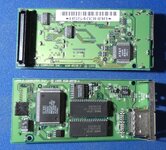
Bodging connections to the analog signals on the fifteen exposed SMT pad trails on the VidCard is the only solution I've come up with so far.

P1000759c.JPG

The three (c)Apple ICs are likely relabeled standard parts, but if gate arrays(?) the formulas may or may not be deduced. Haven't looked at specs.

@Melkhior whatcha think, any chance of someone reverse engineering this thing?
 
Last edited:
Thanks for your answers. I'll have to do a lot of research. It's clear that the modern screen to adapt, like the 9.7" 4:3, would be choosing a lower resolution, of course, I don't intend to use it at 1080p. As I said, I use my LCs on a 1080p LCD screen but selecting low resolutions.

Is there any way I can format and dump a 7.5.3 image onto a 2.5" IDE from a PPC G4? The smallest HD I have is 20GB, what partition size should I choose? I guess HFS (not +)

Can the RAM from a PB3400 at 3.3v work on a PB190? It's the only one I can find.

Thanks!!
 
Is there any way I can format and dump a 7.5.3 image onto a 2.5" IDE from a PPC G4? The smallest HD I have is 20GB, what partition size should I choose? I guess HFS (not +)
You would have to use Mac OS Standard (HFS) on a Mac running anything earlier than Mac OS 8.1.

The Mac OS Standard format specifications can be found in the following article:
web.archive.org/web/20030201224108/http://docs.info.apple.com/article.html?artnum=8647

The "PPC G4", which exact Mac model (and operating system version)?
everymac.com/systems/by_processor/powerpc-g4-powerpc-7400-macs.html
 
Last edited:
You're overthinking this I think, apply the KISS principal! You can just use your crap screened 190 to install any compatible operating system on a CF in adapter from floppy drive if it works. Sweet, neat and simple. I use an "install for any Macintosh" OS in a couple of flavors on CF to boot from any of my IDE PowerBook with Type 1 slots available. ;)
 
You're overthinking this I think, apply the KISS principal! You can just use your crap screened 190 to install any compatible operating system on a CF in adapter from floppy drive if it works. Sweet, neat and simple. I use an "install for any Macintosh" OS in a couple of flavors on CF to boot from any of my IDE PowerBook with Type 1 slots available. ;)
Yes, this is the same method I use with a PowerBook 5300 (and other models). PC Card adapters for CompactFlash can be found for approx. 10 EUR/USD. Also perfect for file transfers on a PC-formatted CF card from PCs and modern Macs. For downloads, keep the MacBinary (.bin) or BinHex (.hqx) encoding unaltered until on the PB 190 (once there, on an HFS hard disk or CF card, decode by dragging the files onto the StuffIt Expander icon). A Linux computer may even handle HFS.

download.info.apple.com/Apple_Support_Area/Manuals/powerbooks/0306899APWRBK190UG.PDF (p 41ff)
 
Last edited:
Having the crappiest specimen of fully functional 1400/CD available makes OS installation a breeze from media burned on current machines.
 
I've been trying to prepare a HD without much success. I only have 7.1 on the floppy disk and it doesn't want to boot on the 190, I would have to create 7.5.3 floppies but I don't have a floppy drive on a "modern" computer, only on the LCs.

I've tried a 20GB HDD and an 80GB HDD without success, both with a single partition and making 4GB partitions. I've even tried to restore the image of the original HDD that came with the 190.

I've used OS9 on an MDD, connecting the HDD directly to the IDE port. Standard HFS format.

It has never booted, after the chime I only have a blank image. The original HDD boots without problems.
 
I've been trying to prepare a HD without much success. I only have 7.1 on the floppy disk and it doesn't want to boot on the 190, I would have to create 7.5.3 floppies but I don't have a floppy drive on a "modern" computer, only on the LCs.

I've tried a 20GB HDD and an 80GB HDD without success, both with a single partition and making 4GB partitions. I've even tried to restore the image of the original HDD that came with the 190.

I've used OS9 on an MDD, connecting the HDD directly to the IDE port. Standard HFS format.

It has never booted, after the chime I only have a blank image. The original HDD boots without problems.
First of all, just to clarify, the original (perhaps 500 MB or so) IDE hard drive contains a working operating system (which version?) and can boot?

If so, you could buy a PC Card adapter for CompactFlash and something like a 0.5 to 2 GB CF card.

Then, boot the PB 190 from the original hard disk drive. Place the adapter with the CF card in one of the PC Card slots. Reformat (erase) the CF card to Mac (HFS). After that, drag copy the System Folder (or the entire original hard disk) to the CF card. This should provide you with a bootable CF card.

Do you have any tools like Disk Copy 4.2 or 6.3.3 and StuffIt Expander on the original hard disk drive? Is there possibly a disk image of a PB 190 Disk Tools floppy on the hard disk? Other disk images/backup files/installers?
 
Last edited:
I've been trying to prepare a HD without much success. I only have 7.1 on the floppy disk and it doesn't want to boot on the 190, I would have to create 7.5.3 floppies but I don't have a floppy drive on a "modern" computer, only on the LCs.
Which system version on the LC(s)? StuffIt Expander? Any chance of transferring/downloading files to the LC(s)?

Without access to a PB 190 Disk Tools floppy, a Disk Tools PPC (download.info.apple.com/Apple_Support_Area/Apple_Software_Updates/English-North_American/Macintosh/System/Mac_OS_8.1_Update/Disk_Tools_PPC.img.bin) floppy could perhaps be made to work, but that would be experimental. However, Disk Copy 6.3.3 (web.archive.org/web/20230708074453/https://support.apple.com/kb/DL1262?locale=en_US) would also be needed in order to create a properly sector-copied floppy (via a Make a Floppy command) from the disk image. All this is unnecessarily complicated, though.

With a PC Card adapter and a CF card (containing an appropriate operating system), you should be able to work directly on the PB 190 instead.
 
Last edited:
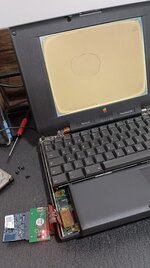
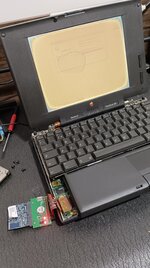
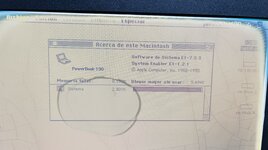
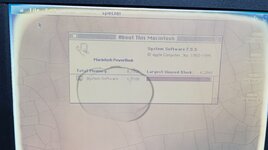
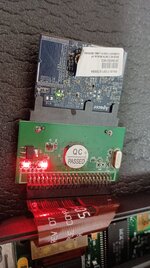
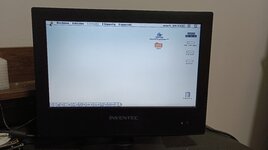
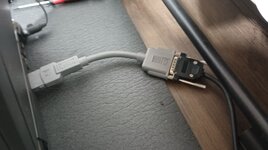
Hello!!! I'm here to explain that I've managed to get an SSD working on the PowerBook 190!!

It took me a whole afternoon, but it was worth it, you can see it in the photos.

Tomorrow I can try to upload the image of the floppy I created (in Spanish) but I'll tell you the procedure.

The main problem is that the PB190 doesn't like a HD formatted in Mac OS9, so you have to format it on the 190.

On an LC475, and from the floppy1 image of OS 7.6 installation, I replaced the "installer" application with the "Drive_Setup_1.5 patched" valid for 7.6, but renamed as "installer", and I replaced the "software installer" app with a renamed Drive Setup Alias, to which I gave its original name "software installer". Please note that I am translating the names, in my case they were in Spanish, use whatever your names are. I then created the physical floppy.

When booting from the Floppy on the 190, it automatically runs the Drive Setup. In this case I used an 8GB SSD from Aliexpress. I selected 4 partitions and hit initialize. The disk creates the 4 partitions, but before formatting them, it gives me the option to shut down or restart. We turn off.

Next we connect the SSD to a PMG4 and boot with OS9. This will tell us if we want to format the partitions, we say yes in HFS Standard.

Once the partitions have been formatted, we can copy the OS from an already installed image onto each of them, in my case I have cloned the solid HDD that came with the 190 (7.3.5) and I have also tested a 7.5.5 image. Both start without problems at high speed.

IMG_20250129_190426.jpgIMG_20250129_190446.jpgIMG_20250129_190452.jpgIMG_20250129_190638.jpgIMG_20250129_190644.jpg
 
I'm still looking for modern display options. This display controller might be valid, but only if the internal flat cable sends signals similar to a VGA or the usual Macintosh DA15.

I can't find the pinout of the monitor's internal connector anywhere. I don't know if looking at the IC inside the display where the flat cable goes could help me figure out something.

https://es.aliexpress.com/item/1005...XZ&utparam-url=scene:pcJustForYou|query_from:

Modo VGA】


[] 640X480 Soporte


[] 800X600 Soporte


[] 1024X768 Soporte


[] 1024X600 Soporte


[] 1280X1024 Soporte


[] 1366X768 Soporte


[] 1440X900 Soporte


[] ....... ......


[] 1920X1080 Soporte
 
Flat panel displays are nothing like Apple or VGA signals which are analog. All flat panels have a digital interface and Apple's of that era were of inexplicable arcane design.

You've linked the kind of controllers you'd be using in the FDD bay, fed analog signals bodged from the Video card for 190/5300 external display to drive a flat panel matched to that controller in the lid.
 
Last edited:
Flat panel displays are nothing like Apple or VGA signals which are analog. All flat panels have a digital interface and Apple's of that era were of inexplicable arcane design.

You've linked the kind of controllers you'd be using in the FDD bay, fed analog signals bodged from the Video card for 190/5300 external display to drive a flat panel matched to that controller in the lid.
Do you have any link where this operation is explained? Is there any information available? I assume that this operation is common to Apple laptops of that time.
 
Flat panel displays are nothing like Apple or VGA signals which are analog. All flat panels have a digital interface and Apple's of that era were of inexplicable arcane design.
I'm honestly expecting a parallel data interface of up to 8 bits (not all of which might be used on a grayscale system), a dot clock (possibly sampling the parallel data on both rising and falling edges), a blanking or row/column start signal or two, and some signals for running the backlight and setting brightness. A bit of work with a multi-channel scope might end up figuring out the bulk of it fairly quickly... or it could be way more abstruse.

One of the main reasons that I'm not trying to get a powerbook to try and reverse engineer it myself is that I really don't want to be buying any more projects, at least until I've finished some of the ones I already have.
 
Back
Top