


• Hello MLAers! We've re-enabled auto-approval for accounts. If you are still waiting on account approval, please check this thread for more information.

Modern display into Powerbook 190

indibil

6502
Hello, how can i found the pinout of the connector of the build-in display of the 190?

I want to try if it is possible to adapt some modern display like this:

display 9.7"

I have an 190 with degraded display:
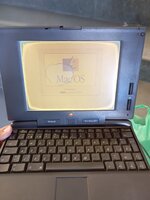
IMG-20250122-WA0003.jpg
 
There's no way to directly connect a color LCD (modern or otherwise) to that with a simple adapter; you will need to first have something like a FPGA or a fast microcontroller capture the video output, process it as needed, then output to your display of choice using the relevant modern interface for the display. Not a trivial task...

Unfortunately, there are also not many powerbook schematics in the wild to get the display pinout from... Portable, 100, and 140 are all I seem to have. Attached is the 140 CPU board anyways so you can get an idea of what the interface is like on that.
 

Attachments

i'm fairly certain the older powerbook displays didn't use LVDS or eDP (obviously), but rather an RGB TTL interface. i forgot exactly how it works on these but chances are you'd need to find a compatible panel based on how your original panel is laid out. yeah, sadly, no modern adapters exist for these, otherwise i'd have my powerbook 520 with a nice active matrix 640x480 color screen, with an LED backlight and a slim profile.
 
May not necessarily help in this case, but there was an optional video-out upgrade card for the PowerBook 190, intended for the connection of an external monitor.
See, for example, pp 60-63 in download.info.apple.com/Apple_Support_Area/Manuals/powerbooks/0306899APWRBK190UG.PDF .

One idea could be to try using the PB 190 without a built-in display. That is, only the lower section connected to an external monitor. This would probably require some experiments involving things like activation of mirroring, et cetera. Another idea may be to check whether a different kind of internal display somehow could be wired to the upgrade card.
 
Thanks for your answers.

I imagined that the internal screen communicated in a similar way to a Macintosh via DB-15, and since there are DB-15 to VGA adapters, and that modern screen has a VGA input, I figured it might work.

So there is no solution for these old computers, use them until the screen no longer displays anything. A pity.
 
So there is no solution for these old computers, use them until the screen no longer displays anything. A pity.
There's still the possibility of reverse-engineering the (apparently digital!) communication between the computer and the panel.

Just looking at the pb140 CPU board schematics, I can see an eight-bit parallel data channel to the display, a brightness signal, a blanking signal, at least two clock signals (one marked "DISP_CLK", one marked "LINE_CLK"), a couple more that look like non-clock frequency signals (possibly one is for the inverter that drives the florescent backlight, to keep brightness levels consistent with the display refresh rate?)... The challenge becomes determining which timing signals indicate what, which signals can be used to latch the data being sent to the panel, the actual encoded data sent to the panel, and then coming up with an interface to a more modern panel (which would also mean ditching the power-hungry CCFL backlight).
 
So there is no solution for these old computers, use them until the screen no longer displays anything. A pity.
Sadly there is no easy replacement for most internal laptop LCDs. Your top LCD polariser film can be replaced to rectify the "cataract", by carefully peeling it off and finding a replacement. The LCD is not dying, it just can't display through a degraded film with bad adhesive. It will take some trial and error to find the correct polarizer film, you might need to buy a selection and trial and error to see what works best.
 
Thanks for your answers. Although I'm good with electronics in general, I don't know if replacing the polarized film is one of my skills, I'm afraid of ruining the screen and then not having anything.

Here in Spain it's very difficult to find spare parts, and even more so for a 5300.

I've seen that these laptops can use two types of screen, the Casio MFSTN MD805TT00-C1 or the Sharp LM64185P. Is it possible to know if there are other devices from that time that used these screens? How are these screens connected to the PCB? Would their connection protocol be adaptable to other screens?

I'm probably asking without knowing what I'm saying.
 
I've looked into switching to a modern Panel from a VGA interface controller board for the 190/5300. Setup occupies the FDD bay, but who uses that these days. FDD not necessary even back in the day due to addition of the SD card slots.

Would require:
video out board
VGA input panel controller board
Suitable panel

Video out card would be hotwired internally to the VGA inputs on the LCD controller board in the FDD bay with VGA adaptation to stock LCD resolution implemented.

Running the panel in mirror mode takes care of ghost screen problem. Could enable maximum resolution supported by video out board if there's a way to resolve ghost screen complications?

Anyhoo, been sitting on this idea for many years. Comments?
 
Thanks for your answers.

I imagined that the internal screen communicated in a similar way to a Macintosh via DB-15, and since there are DB-15 to VGA adapters, and that modern screen has a VGA input, I figured it might work.

So there is no solution for these old computers, use them until the screen no longer displays anything. A pity.
Details about signals, monitor sense codes, et cetera at the optional video card could be found in the PB 190 developer note (developer.apple.com/documentation/Hardware/Developer_Notes/Macintosh_CPUs-68K_Portable/PowerBook_190.pdf - an archive search may be needed).
 
Assuming the video signals from the motherboard are understood, a RGB2HDMI might work. It has helped a lot of other people get video signals from vintage gear onto LCD displays.
 
The screen I proposed uses VGA. In my case I don't have a battery for the 190, it's degraded, so the VGA board that comes with the screen could fit in its place. The interesting thing would be to be able to take the signals from the internal display connector, instead of the external card.
 
Details about signals, monitor sense codes, et cetera at the optional video card could be found in the PB 190 developer note (developer.apple.com/documentation/Hardware/Developer_Notes/Macintosh_CPUs-68K_Portable/PowerBook_190.pdf - an archive search may be needed).
I get an error when opening this document, perhaps it is not accessible from my location. Can you attach it?
 
I've got the VidCard in hand. The place to look for the board signals would be on expansion connector I'd think. Native resolution shouldn't be problematic?

Higher output resolutions of the card are enabled by 512K of onboard Video DRAM: M5M482256J
 
I've got the VidCard in hand. The place to look for the board signals would be on expansion connector I'd think. Native resolution shouldn't be problematic?

Higher output resolutions of the card are enabled by 512K of onboard Video DRAM: M5M482256J

If the internal connector could be used, the mirror option would not be necessary. Also, VGA LCD screens, although they only have one resolution, are capable of working at low resolutions, they do an "approximation". I have used an LC with a 1080p LCD with a resolution of 800x600, or similar. Even if a modern screen is used, a low resolution should be kept set.

Is the external video adapter the same for the 190 as for the 5300? Can I get one for the 5300.


Thanks for the link!!
 
Is the external video adapter the same for the 190 as for the 5300? Can I get one for the 5300.
The video card appears to be identical, at least according to the PB 5300 note (originally at
developer.apple.com/documentation/Hardware/Developer_Notes/Macintosh_CPUs-PPC_Portable/PowerBook_5300.pdf ).

You may have to use archive.org and look for a very early result.

The video card in question should be standard inside PB 5300 models (optional for PB 190).
(manuals.info.apple.com/Apple_Support_Area/Manuals/powerbooks/0306895APB5300UG.PDF).

The external video adapter cable is the same for the PB 190 and PB 5300 models.
 
Last edited:
note: This adapter with a MSATA or an SD adapter like this, can it work on a 190?
Adapter i have use in the Minis G4
MSATA2SD
The easiest way is to use a PC Card adapter for CompactFlash, or a similar (5-in-1 etc.) adapter including SD, in one of the PC Card (PCMCIA) slots of the PB 190. A properly formatted flash card with a valid system folder should even be bootable.
(manuals.info.apple.com/Apple_Support_Area/Manuals/powerbooks/0306899APWRBK190UG.PDF).
 
Last edited:
If the internal connector could be used, the mirror option would not be necessary
If using a different resolution, you'd likely have the ghost screen problem, same thing for 640x480 native resolution..

The 190/5300 "VidCard" is exactly that, full blown function setting up an external display as an extended screen or in mirror mode.

Connector looks very similar to the ones used on @max1zzz used for daughtercard connector on his fantabulous Rocket Clone. If available, it should be very easy to whomp up a simple adapter board. That's making a big assumption that the logic board signals for LCD are present a/o useful on the connector. The connector represents the slow side 030 bus of the bridge for 68040 in PB190 and equivalent 030 bridge for PPC in the 5300.

So looking for the logic board's signals to LCD on that full 030 bus connector wold likely prove that assumption false. Decoding the LCD's ribbon cable output for use as RGB would be the only other solution that comes to mind for avoiding a bodge wiring morass on the logic board, if indeed that approach might be feasible?
 
Back
Top
