• Hello MLAers! We've re-enabled auto-approval for accounts. If you are still waiting on account approval, please check this thread for more information.

Quadra 610 CDROM drive taking disks in then ejecting a few mins later..

The CDROM drive on my Quadra 610 takes the CD in, "thinks" then spits it back out again! From reading about this issue it's either the laser that's faulty or the caps. I cleaned the lens with a cotton bud and some isopropanol without any improvement. Then I recapped the board. But there's no improvement.

Am I now out of luck?

I've got a BlueSCSI v2 and any CDs (well ISOs) are all on that in the CD3 folder. I only really wanted the CDROM drive to work in the interests of this being a full renovation. Once it's working I doubt I'll ever actually use it. But it would be nice :)

I've looked for another Apple SCSI drive and they are going for more money than I would want to spend. I could get a non Apple drive, which look to be much cheaper and I understand I can use a patched driver to get them to work. But if I understand the patched driver properly at boot time it's still using the driver in the ROM and so it will not be bootable (is that correct?) ..and another way to boot would be nice.


Cheers,
Ferg
 
Darn, I was fairly certain that it was going to be the motor. What kind of CD is it? Older drives tend to not like burned disks. Also does it work with an audio cd?
 
It's a Sony CDU561-25. I've tried with many different discs. Audio, boughts CDs and burnt ones. All show the exact same symptoms. It hesitates for about a minute then spits the caddy back out.
I've just found this post on here about the same drive getting recapped.
 
I think I'll check that I've done all the caps properly. I'm not that good at soldering and when I recapped my Quadra I had to redo quite a few of the caps as I'd not done a good job first time!
 
Ah yes, I did one of them not that long ago (and I have another to do soon) and it had similar issues before the recap. I’d suspect if the recap isn’t perfect then it could well cause that kind of behaviour.
 
I know old OD drives can have issues with the disc clamping mechanism. The disc may be spinning up but perhaps not to full speed or occasionally slipping. Have you replaced all the grease? It's likely all a bit gummed up if not.
 
I've come across optical drives with bad caps but it was not the cause of failing to read media - usually this was due to a dirty lens (wipe with cotton tip dipped in small amount of IPA), or the laser lens losing strength (usually a pot is nearby to adjust and slightly increase the voltage). Check also things like belts which can perish.
 
Thanks. The mechanism all looks to work fine. There's no belts. I've cleaned the lens with IPA, but cannot find a pot to adjust it. I've come across two more posts (one here and the other linked to from that post) that says it's very likely to be the caps. I think my soldering skills need some improvement :-) I'll redo and report back! Wish me luck!
 
If you struggle with the soldering, feel free to send it up to me and I’ll re-do it for you.
That's a very kind offer. Thank you. I will persevere though. It's been many decades since I've done any soldering and I'm quite enjoying learning.
I've checked each capacitor and all seems well. I did reflow one that did not look great (although it did not budge when nudged it). Unfortuantely it's made no affect. So perhaps it was not the caps after all!
 
I took the drive back out, removed the case and connected it to a spare PSU. WIth the board removed (but still attached) I can see the disk spin up. It does spin a little erratically. It turns slowly, then much faster, slows down, then speeds back up again before ejecting.
 
I seem to recall that is fairly normal behaviour, but it’s difficult to say for sure without seeing it and comparing it to a working unit.
 
That’s a good blog! Fingers crossed you can get it working! If not I’m sure someone has a spare somewhere they’d be willing to sell at a reasonable price!
 
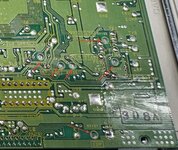
I checked and redid a few of the caps. It did not appear to make much difference. However, I noticed six pots on the reverse of the board. I'd missed these before.
One is called FCS GAIN. So I gave it a try with very small turns. Now I can get the disk to do one of the following:

  1. It takes a lot longer before it spits out the disk.
  2. It never spits out the drive, but neither does it mount it. At this point I cannot shutdown either.
  3. Once (and once only!) I got a message that the disk was unreadable and needed to be initialised!
So I reckon this is progress!


3B18439E-EE95-4724-89A2-0093B2ED4C0A_1_201_a.jpeg
 
... usually the pot to adjust CD lens laser strength is positioned around the lens assembly - can you see anything there?
 
Back
Top