Hi all, and thanks for existing. This forum has helped me many times repairing old stuff.
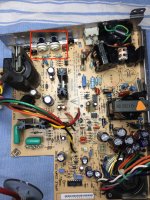
I have just bought a Classic II in excellent conditisions, and the previous owner said that it smelled smoke. So without even powering it on I took it apart and started cleaning/recapping the analog and digital boards. I saw that a large leak was present in the low voltage part of the power transformer, so I ordered the new caps and cleaned it all. Also the power MOSFET was shorted, so I replaced it along with the controller and the fuse.
After reassembling everything it actually started working! It boots to the desktop, no smell of smoke, lasted for two hours perfectly working. Then I turned it off and on again, and it never came on. Hard disk spinned, but no startup sound nor screen. Everything works except for the logic board.
Shortly after it started working again.
Tried resoldering some chips that were partially flooded with capacitor leaks, cleaned with demineralized water and alcohol, nothing changed, it sometimes starts and sometimes not. It works after a while, so it must be something related to heat expansion.
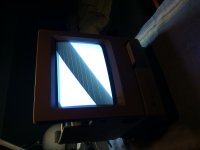
When using it I swapped many floppies, and it formatted them just fine. One dreadful floppy and... when it entered with a "clack" the screen started increasing brightness and scanlines appeared. Panic, switched it off immediately.
I'll make it short, searched everything on the internet, the problem is documented, and Larry Pina's book (page 173, Mac Classic) said it's related to some solder cracks (it makes sense after all).
So I took it apart again and checked nearly every solder point in the analog board, I saw some cracks only on the yoke connector (which isn't related to brightness), but soldered everything anyway. The diode DL6 seems non-existant on the Classic II board.
It's still the same. Washed the MLB again, nothing changed. Checked the contacts, they are perfect. It MUST be something mechanic, like a contact, but I cannot think of anywhere else where to look. Hitting it when powered on doesn't make a change.
So... I'm here asking for desperate help. One thing I didn't do is a TOTAL recap of the analog board, I only changed the brown (defective) caps, the others seemed fine. I tested some of them.
Removed the RAM, reseated the ROM, the blue (brightness) cable goes directly to the VLSI chip with no shorts, the system boots even with the monitor defective. The variable resistor that controls the brightness cutoff works but has no effect. All other guides refer to SE or Plus macs, so the boards are different.
I'm currently stuck. There is no circuit diagram for this board, and I'm not extremely good at reverse engineering live 15kV circuits.
Please help xx(
Mc128k
I have just bought a Classic II in excellent conditisions, and the previous owner said that it smelled smoke. So without even powering it on I took it apart and started cleaning/recapping the analog and digital boards. I saw that a large leak was present in the low voltage part of the power transformer, so I ordered the new caps and cleaned it all. Also the power MOSFET was shorted, so I replaced it along with the controller and the fuse.
After reassembling everything it actually started working! It boots to the desktop, no smell of smoke, lasted for two hours perfectly working. Then I turned it off and on again, and it never came on. Hard disk spinned, but no startup sound nor screen. Everything works except for the logic board.
Shortly after it started working again.
Tried resoldering some chips that were partially flooded with capacitor leaks, cleaned with demineralized water and alcohol, nothing changed, it sometimes starts and sometimes not. It works after a while, so it must be something related to heat expansion.
When using it I swapped many floppies, and it formatted them just fine. One dreadful floppy and... when it entered with a "clack" the screen started increasing brightness and scanlines appeared. Panic, switched it off immediately.
I'll make it short, searched everything on the internet, the problem is documented, and Larry Pina's book (page 173, Mac Classic) said it's related to some solder cracks (it makes sense after all).
So I took it apart again and checked nearly every solder point in the analog board, I saw some cracks only on the yoke connector (which isn't related to brightness), but soldered everything anyway. The diode DL6 seems non-existant on the Classic II board.
It's still the same. Washed the MLB again, nothing changed. Checked the contacts, they are perfect. It MUST be something mechanic, like a contact, but I cannot think of anywhere else where to look. Hitting it when powered on doesn't make a change.
So... I'm here asking for desperate help. One thing I didn't do is a TOTAL recap of the analog board, I only changed the brown (defective) caps, the others seemed fine. I tested some of them.
Removed the RAM, reseated the ROM, the blue (brightness) cable goes directly to the VLSI chip with no shorts, the system boots even with the monitor defective. The variable resistor that controls the brightness cutoff works but has no effect. All other guides refer to SE or Plus macs, so the boards are different.
I'm currently stuck. There is no circuit diagram for this board, and I'm not extremely good at reverse engineering live 15kV circuits.
Please help xx(
Mc128k
Last edited by a moderator: