• Hello MLAers! We've re-enabled auto-approval for accounts. If you are still waiting on account approval, please check this thread for more information.

Vinegar syndrome problems on powerbook 145b

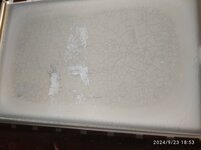
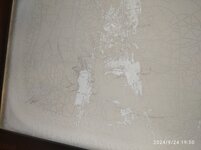
So I got a powerbook 145b with vinegar syndrome, when I removed the polarizer there was a ton of residue that I can't remove at all. The first pic is with a good polarizer so you can see and the other is without. Any tips what I can use to remove it?

 

Attachments

  • IMG_20240923_185726_1.jpg
    IMG_20240923_185726_1.jpg
    5 MB · Views: 11
  • IMG_20240923_185303.jpg
    IMG_20240923_185303.jpg
    4.1 MB · Views: 11
Hard to tell what’s going on from the photos - can you physically feel more residue left? If it’s smooth on front, that’s probably the rear polarizer film that’s also bad.
 
Has a rough texture. My theory is that a very thin layer of the polarizer is left and I can feel the cracks on the LCD and it still smells a lot

From what I can see with the good polarizer some bits look clean. Here is closer photo. Pretty sure I can clean it with something, is it ok to try with acetoneIMG_20240924_195013_1.jpg
 
It's probably the retarder layer that's been left behind. I'd recommend against acetone out of fear that it would melt the ribbon bonds around the screen. Liberal use of IPA, plastic scraper, and time should take care of it.
For the new film - make sure you get FSTN film as it includes the retarder layer needed for passive matrix displays.
 
It's probably the retarder layer that's been left behind. I'd recommend against acetone out of fear that it would melt the ribbon bonds around the screen. Liberal use of IPA, plastic scraper, and time should take care of it.
For the new film - make sure you get FSTN film as it includes the retarder layer needed for passive matrix displays.
Is it ok to use a scraper, wouldn't it scratch the matrix? Also I have panels from old TVs and I was able to peel of the polarizer from there and it seems to do the job
 
Back
Top