
I'm trying to get the Zulu scsi working on my Macintosh. Before i was using the regular HHD along with a floppy emu. The HHD seemed to keep getting slower so i bought a Zulu SCSI. When I installed it, its not recognized. I tried setting the right dip switch config, but no luck. I assumed I could just use it right out of the box. Do i need to preinstall something on the sd card? Here is the log

-
 Hello Guest! We're hosting a challenge to welcome vintage Intel macs to the MLA during the month of July! See this thread for more information.
 -
We've made some quality of life improvements to the Trading Post. More info here.
You are using an out of date browser. It may not display this or other websites correctly.
You should upgrade or use an alternative browser.
You should upgrade or use an alternative browser.
ZuluSCSI Help
- Thread starter ringo
- Start date


Looks like you might not have any image files on your SD card. Try dropping one of the files from this zip into your SD card. The mac should ask you to initialize the new disk it sees when you turn it back on. If so, initialize it, then you should be able to copy everything from your HD to the new zuluscsi drive.
Attachments
unfortunately it didn't work. Is it possible I need to set a SCSI ID number on itLooks like you might not have any image files on your SD card. Try dropping one of the files from this zip into your SD card. The mac should ask you to initialize the new disk it sees when you turn it back on. If so, initialize it, then you should be able to copy everything from your HD to the new zuluscsi drive.
The SCSI ID is part of the filename, so the "HD1" in the name of the images in the zip file tell it to present the image at SCSI ID #. Do you have another log file/picture of the SD card contents?unfortunately it didn't work. Is it possible I need to set a SCSI ID number on it
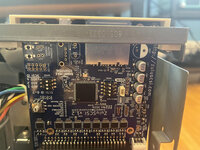
Hold on, so this is the configuration I have set, does anything of the switch configs look oddThe SCSI ID is part of the filename, so the "HD1" in the name of the images in the zip file tell it to present the image at SCSI ID #. Do you have another log file/picture of the SD card contents?
Attachments
Here is the sd card contentThe SCSI ID is part of the filename, so the "HD1" in the name of the images in the zip file tell it to present the image at SCSI ID #. Do you have another log file/picture of the SD card contents?
Attachments


For now I would turn DIP 3 off again, I don't believe debug mode needs to be on at this moment, and it makes the log files harder to read(and don't quote me on that, i believe debug mode being on could effect the performance slightly).
So it sees the disk image and has assigned it to SCSI ID 1, vs the first log file you posted where it couldn't find an image.
That HD1 20 MB.hda is a blank image, so you'll need to install an OS onto it if you haven't done so already
Or
take one of these images, rename it to be HD1.hda
https://macintoshgarden.org/apps/piscsi-rascsi
and see if that works(They're made for the RaSCSI but will work fine with other image based SCSI emulators
[59ms] Finding images in directory /:
[61ms] -- Opening /HD1 20 MB.hda for id:1 lun:0
[69ms] DBG ---- Image file is contiguous, SD card sectors 69696 to 110751
[69ms] ---- Configuring as disk drive drive
[70ms] DBG ---- Valid Macintosh disk image detected.
[71ms] ---- Read prefetch enabled: 8192 bytes
[72ms] SCSI ID: 1, BlockSize: 512, Type: 0, Quirks: 1, Size: 20528kB
[172ms] SCSI PHY operating mode: DMA_TIMER
[181ms] Initialization complete!
So it sees the disk image and has assigned it to SCSI ID 1, vs the first log file you posted where it couldn't find an image.
That HD1 20 MB.hda is a blank image, so you'll need to install an OS onto it if you haven't done so already
Or
take one of these images, rename it to be HD1.hda
https://macintoshgarden.org/apps/piscsi-rascsi
and see if that works(They're made for the RaSCSI but will work fine with other image based SCSI emulators
That looks good to me. I thought I had these pre-partitioned so all that was necessary was to initialize it, but perhaps not, you may need to use disk tools to do so. Here's an image for that.Here is the sd card content
Attachments

Ok, so I have never personally used one of this version, but I thought about getting one to experiment with by putting it in an external case (since it has a configurable SCSI ID available ) On the web page for this, which you might want to check out, it states... (bold emphasis is mine)
"Differences between ZuluSCSI V1.1 and V1.2
Raw mode
By default, ZuluSCSI V1.2 uses raw/passthrough mode, and the firmware does not look for image files.
All you need to do to change this behavior is flip DIP switch #2 on the SW301 switch block to ON. SW301 is directly above the SD card. After a power cycle, the ZuluSCSI firmware will look image files on your SD card.
When raw mode is disabled, the SCSI device type rotary DIP switch SW301, and the SCSI ID DIP switch SW403, are disabled, and their settings have no effect."
From my reading, it looks like you will need to set your dip switches accordingly to use the images.
Once we get you running, we may explore why you purchased the least-user-friendly version they offer, but that is for another thread/time.
"Differences between ZuluSCSI V1.1 and V1.2
Raw mode
By default, ZuluSCSI V1.2 uses raw/passthrough mode, and the firmware does not look for image files.
All you need to do to change this behavior is flip DIP switch #2 on the SW301 switch block to ON. SW301 is directly above the SD card. After a power cycle, the ZuluSCSI firmware will look image files on your SD card.
When raw mode is disabled, the SCSI device type rotary DIP switch SW301, and the SCSI ID DIP switch SW403, are disabled, and their settings have no effect."
From my reading, it looks like you will need to set your dip switches accordingly to use the images.
Once we get you running, we may explore why you purchased the least-user-friendly version they offer, but that is for another thread/time.
DIP2 is already on in the photo/log filesOk, so I have never personally used one of this version, but I thought about getting one to experiment with by putting it in an external case (since it has a configurable SCSI ID available ) On the web page for this, which you might want to check out, it states... (bold emphasis is mine)
"Differences between ZuluSCSI V1.1 and V1.2
Raw mode
By default, ZuluSCSI V1.2 uses raw/passthrough mode, and the firmware does not look for image files.
All you need to do to change this behavior is flip DIP switch #2 on the SW301 switch block to ON. SW301 is directly above the SD card. After a power cycle, the ZuluSCSI firmware will look image files on your SD card.
When raw mode is disabled, the SCSI device type rotary DIP switch SW301, and the SCSI ID DIP switch SW403, are disabled, and their settings have no effect."
From my reading, it looks like you will need to set your dip switches accordingly to use the images.
Once we get you running, we may explore why you purchased the least-user-friendly version they offer, but that is for another thread/time.
Oh that worked, thanksThat looks good to me. I thought I had these pre-partitioned so all that was necessary was to initialize it, but perhaps not, you may need to use disk tools to do so. Here's an image for that.
Similar threads
- Replies
- 5
- Views
- 382


- Replies
- 4
- Views
- 2K
