

You are using an out of date browser. It may not display this or other websites correctly.
You should upgrade or use an alternative browser.
You should upgrade or use an alternative browser.
The Sonnet Card Drivers Thread
- Thread starter Trash80toHP_Mini
- Start date

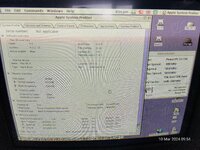


It's either wrong, or the cache might be disabled (doubt the latter, but it is possible). System Profiler wasn't great in that era. It reports incorrect CPU speeds, wrong processors, doesn't show USB or FireWire busses... All sorts.One other question why does system profiler only state 256k in the external L2 Cache?
Gauge Pro reports 1MB.
Yep and so does Metronome
Oh forgot to mention I tried that G4 enabler its in the sonnet installer if you select custom install and there was no change so defo a G3
Oh forgot to mention I tried that G4 enabler its in the sonnet installer if you select custom install and there was no change so defo a G3
It is technically possible to swap a G4 in (CPU core voltage is different, but otherwise the 7400 interfaces are very similar), but like I said, in OS9 it isn't worth it.Yep and so does Metronome
Oh forgot to mention I tried that G4 enabler its in the sonnet installer if you select custom install and there was no change so defo a G3
Almost the only stuff that probably take advantage will be Adobe and Apple software like Photoshop, Premiere, iMovie and iTunes.
Truth is, I tend to buy faster G3s rather than slower G4s, because G4s cost a premium and for my interests (I don't run Mac OS X much) the clock bonus is worth more to me.
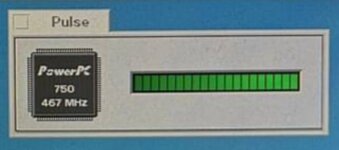
Photo is BeOS running on a 466MHz G3.
Weird, looking at your cards, I also wouldn't expect there to be a 400/512k. The 400MHz cards were fairly premium and all the ones I've seen have 1MB of cache. Although I can see other 400/512s on eBay, so that must have actually been a thing.Little update from me
Here is pictures of the 2 cards I have side by side
I did notice the serial number on both starts BG3 so maybe the wrong sticker was stuck on it?
the major difference I see is the component on one side (Capacitors I believe) and the Xilinx chip has a different version stated on the sticker that's about it.
View attachment 70936
Did these two cards come together? Did you get them from the UK or were they from somewhere like Japan? Do you own a sticker printer?

The G3 minitower is a Encore rather than a Crescendo:I didn't realize you need software for the upgrade cards. What would I need for the 500mhz Sonnet Crescendo in my G3 minitower?

I get a 403 error on that link. What's the software called, so I can search it?The G3 minitower is a Encore rather than a Crescendo:
Edit: found it.
Weird, looking at your cards, I also wouldn't expect there to be a 400/512k. The 400MHz cards were fairly premium and all the ones I've seen have 1MB of cache. Although I can see other 400/512s on eBay, so that must have actually been a thing.
Did these two cards come together? Did you get them from the UK or were they from somewhere like Japan? Do you own a sticker printer?
 No as i said the one marked as a G4 came in a bundle of Mac OS CD's I bought, I wasn't expecting it to be there but at the time I didn't have a computer for it to test with.
The G3 400/512k came with my Performa 5400/180
This G4? 400/1MB is in my Powermac 5500/275 which is actually a 250 because the 275 Mobo that came with it isn't very well sadly.
Oh, BTW... You can software overclock those Sonnets.
The G3 400/512k came with my Performa 5400/180
This G4? 400/1MB is in my Powermac 5500/275 which is actually a 250 because the 275 Mobo that came with it isn't very well sadly.

Interesting it there a thread on this?Oh, BTW... You can software overclock those Sonnets.
Interesting it there a thread on this?
Here you go - this only works with Cards fitted with a version 3.0 (or higher? If they exist) G3 chip, which your photo of Gauge Pro shows you have. Store the original extension from System Folder>Extensions and replace it with with the attached and your card should run at 500MHz. If it can't handle it (too fast/hot), booting with shift held down will disable it so you can swap them back.
That's all that is needed.
Previous discussion on this site from when the original site dropped off the internet :
The linked archived page goes through the history, and the application I attached in my old post lets you pick the clock speed (if you can't get it to run at 500 stable, perhaps it has a 450 setting? Or add a fan).
Attachments
Sadly it doesn't work for me it gives an illegal instruction error when loading the extension.
But it could be my setup missing something important
But it could be my setup missing something important
Could be just too much overclock - 25% is not a small speed bump. I usually aim for 20%, its just the pre-made extension already existed.Sadly it doesn't work for me it gives an illegal instruction error when loading the extension.
But it could be my setup missing something important
You could see if 450MHz works by making a copy of the /original/ extension you previously had installed, and using the application shared on the thread I linked to modify it. Just delete the 500MHz version, its either faulty or too fast.
Or just use it at 400MHz, which is pretty fast to be fair. My 6500 isn't that fast

Yeah I think it's gonna stay as a 400mhz it crashes with every over clock attempt I try. but as you said 400mhz is quite speedy
Similar threads


- Replies
- 2
- Views
- 433

- Replies
- 40
- Views
- 6K
