• Hello MLAers! We've re-enabled auto-approval for accounts. If you are still waiting on account approval, please check this thread for more information.

Quicksilver 733Mhz + Newertech G4 1.6Ghz

patatas

6502
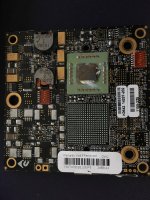
I have recently obtained a working 1.6Ghz CPU upgrade for my quicksilver.

Currently it is running firmware 4.2.5f1.

I applied all patches from the Newteck firmware patch disk.

However on boot I get a black screen with no chime.

When I revert back to the stock CPU it works.

The new CPU is considered working as it was removed from a working unit.

Any ideas?

 
Yes I have....this the symptom.

I have patched everything.

A boot sucessfully into 10.5 with the stock CPU the shutdown the Mac.

I replace the CPU with the Newtech one.

I prese the CUDA switch once.

I power on the Mac, I get a chime but no video and Cinema Display does not get power.

Now...

If I do the same as above but omit the CUDA switch, the Mac will power on with chime, no video but does power the Cinema Display

Idea?

Have you tried hitting the CUDA reset switch with the system turned off?
 
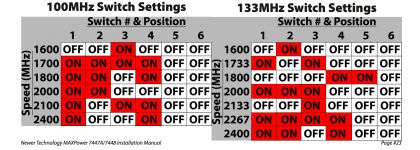
Yes. It has 2 sets of dip switches. I have set on the both #2 to ON which as per the docs is for 133mhz bus speed which I believe is the correct speed. I also tried with all set to OFF.

 
Looking at old Newertech pages, your ROM is fine. Taken from here, "*Not compatible with QuickSliver Boot ROM versions 4.2.3f1 or 4.2.3f4" and yours is 4.2.5.

Also looking at the install manual, they don't actually mention resetting the NVRAM or CUDA unless you're not getting any video. They also mention: "Make sure you have installed the 7447A patch. If the Firmware Update was not performed, the Mac will power on, but not display video." I'd go ahead and try to run the patcher again, install the CPU but don't reset anything and see what happens.

 
what was the 1.6Ghz CPU tested in? if it was tested in a Sawtooth or Gigabit ethernet G4 then it has probably been set to a x16 multiplier for the 100Mhz bus. so for a DA or QS you would have to change that , (16x133 is 2.1Ghz LOL) for a 133Mhz bus you want the 12x multiplier BTW you can also use Sonnets firmware patch just fine as well

 
I dont know the dip switch settings off the top of my, head you will have to google for those or check the box it came in if it has one. but yeah if its showing up as 1.6Ghz in a GigEthernet G4 then your going to have to adjust the dip switches for a quicksilver otherwise it would run too fast and not boot. also for the love of please clean that CPU and put fresh thermal paste on it :)

 
Attached is the dip settings from manual. 

I will definitely cleanup the CPU once I got it working as I keep switching it out and I loose the paste ;)

Screen Shot 2017-03-30 at 17.55.18.png

 
Bumping this thread as I have come back to tackle this issue once again....anyone out there has a QS and would volunteer to test my Newertech?

 
Back
Top