• Hello MLAers! We've re-enabled auto-approval for accounts. If you are still waiting on account approval, please check this thread for more information.

LC III no chime, no video, HDD and fan spins

jeznav

6502
Hello,

I am new here and I recently obtained a bunch of Macintosh IIs and LC III. The owner that gave me the LC III said that it was working recently but then it stopped working. When I power it on, there is no chime and no video output, but the hard drive and fan spins. So I didn't think it's a power supply issue. So, I have recapped all the offending capacitors and nothing changed.

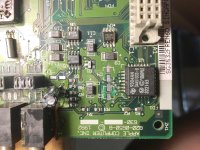
I was thinking that something could be wrong near the chip at the top left corner, even though I could hear a tick in the speaker when I power it on.

So I am planning to wash the board and clean off the gunk, but out of curiosity, I checked the power supplies' input voltage.  The 12v and +5v were fine but the -5v read at 0.6 volts. 

Could this be a power supply issue?

EDIT: I forgot to mention that I've also replaced the battery and resetted PRAM.
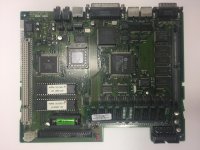
IMG_1705.JPG

 
Last edited by a moderator:
Welcome - it sounds like you are on the right track.  In addition to washing the MB, be sure to recap it as well.  It also sounds like there are power supply (capacitor?) issues as well.  At this age the electrolytic caps are going to need replacing.  When I get a computer of this age, I don't even power it on anymore (I figure I can do more damage) until after I have replaced the caps, washed the board and checked the power supply.

 
Yes LC are notorious for PSU troubles, something is definitively missing in this area.

the HD only needs 12v and 5v to be happy, so this is the reason for spinning ok.

If you have several LC to play with, test another PSU and give it a go.

 
Oh man... this is REALLY REALLY starting to grow a beard...... 

caps caps caps caps. Once thats outta the way, then troubleshoot any possible open traces/vias from... guess what? CAP LEAKAGE!

We almost need a sticky that says any 68K mac besides a very select few models need recapped by now. 

 
Last edited by a moderator:
Oh man... this is REALLY REALLY starting to grow a beard......

caps caps caps caps. Once thats outta the way, then troubleshoot any possible open traces/vias from... guess what? CAP LEAKAGE!

We almost need a sticky that says any 68K mac besides a very select few models need recapped by now.
He's new to this community, and probably new to vintage Macs. What right do you have to be snarky? He's here seeking knowledge and repair tips. I feel like your response is worthy of ruining one's enthusiasm. I do agree that a sticky should exist since this is a common topic.

 
Ok, I finally got the startup chime! But I hear the death of chime afterwards and no video. I've checked the PSU and its getting the proper voltage readings. Right now I am just following traces blindly without a schematic.

Edit: Here is a photo that is washed and being recapped. 

fullsizeoutput_1e4.jpeg

 
Last edited by a moderator:
As others have said, there is a really good chance that the logic board capacitors are toast. If you're skilled with a soldering iron or hot air station, you'll want to recap the board before proceeding any further. If you aren't comfortable with doing such a repair, others here may have recommendations on where you can send your board.

 
Do you have both RAM and VRAM in the system? If I remember correctly the LCIII has 4MB on the board but it needs a 256K, 512K or 1MB VRAM SIMM in the RAM Slot. The VRAM Slot is the bigger RAM Slot on the board.

 
Ok, I finally got the startup chime! But I hear the death of chime afterwards and no video. I've checked the PSU and its getting the proper voltage readings. Right now I am just following traces blindly without a schematic.

Edit: Here is a photo that is washed and being recapped.
Looks like you may have a couple of corroded traces.
 
Last edited by a moderator:
You're correct. The LCIII has 512K of VRAM on the logic board- none needs to be installed in the slot for the system to boot.

 
Looks like you may have a couple of corroded traces.
i agree

You're correct. The LCIII has 512K of VRAM on the logic board- none needs to be installed in the slot for the system to boot.
yes, the LC III doen't need a VRAM stick, only the LC needs one and not sure about the LC II

 
Last edited by a moderator:
The LCIII and LCIII+ have 512K of VRAM on the logic board and a single VRAM SIMM slot that accepts an additional 256K. The LC, LCII, and LC475/Performa 475/Quadra 605 have two VRAM SIMM slots and no soldered VRAM.

 
He's new to this community, and probably new to vintage Macs. What right do you have to be snarky? He's here seeking knowledge and repair tips. I feel like your response is worthy of ruining one's enthusiasm. I do agree that a sticky should exist since this is a common topic.
Yep.. but there is a search button :)

Sure sometimes I miss older threads that already answered what I had in mind, but most of the time search function will catch similar topics. 

And there should be a sticky that no further troubleshooting should be done until the board is cleaned and recapped. Period... 

 
Last edited by a moderator:
Looks like you may have a couple of corroded traces.
I'm going to repair those traces near C2, C4 area. I'm having trouble finding the datasheet on the U1 chip, Not sure if pins 28,27 has a broken trace leading to nearby vias.

Does anyone know where I can find an LC III schematic?

 
Last edited by a moderator:
One potential issue is the NVRAM battery, my 475 have some difficulty to boot because the battery is empty (in fact I even removed it as it was empty and wasn't able to find a good one..)

In my case the LC need a "reset" after being powered up because of the missing battery, the cap will probably need to be replaced but apart from that it still works well!

 
Some machines will boot without an NVRAM (or PRAM) battery, others will not.  I don't know offhand which side of that line the LCIII falls, but the "reset" mentioned above is an easy test.

Power up the Mac, leave it attempting to boot for say 20 minutes, then quickly turn it off and straight on again.  If it then boots, you need a new PRAM battery.  If 20 minutes doesn't work, try leaving it for a couple / a few hours to get some charge into the PRAM circuit.

 
Back
Top