
You are using an out of date browser. It may not display this or other websites correctly.
You should upgrade or use an alternative browser.
You should upgrade or use an alternative browser.
TashIO: Clone of BeeHive Technologies's ADB I/O
- Thread starter Tashtari
- Start date



Build an automated brewery and run it from an SE.Well, I accidentally an original Beehive (15EUR). Wonder what to do with it.
This is not optional.
Meh, you could do that with a timer relay. Or did you mean actually making the bread and toppings?... I don't drink and I don't like compacts! How about a pizzabox-driven pizza maker?
Automated cookie maker?


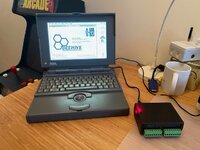

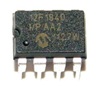
Nice build!Here we are... I built the nice kit sent by @aladds

Has anyone managed to use C to set port values?
Port A works... I can set values, but I need to set values in port B, configured as output.
The library strangely only has function ADBIOSetPortA but not an ADBIOSetPortB.
I tried to copy the function for port A and make the equivalent for B, but it didn't work.
This is the function...
I tried changing ADBReg to 1 (or B), as in the header I can see...
Port A works... I can set values, but I need to set values in port B, configured as output.
The library strangely only has function ADBIOSetPortA but not an ADBIOSetPortB.
I tried to copy the function for port A and make the equivalent for B, but it didn't work.
This is the function...
Code:
pascal OSErr  ADBIOSetPortA(Byte theAddress,long theChannel,enum value theValue,long theTime)
{
OSErr            myErr;
Byte            dataTransmitted;
Byte            DataBuffer[3], Listen,ADBReg;
unsigned short    ADBIOCompletionPPC[3] = {0x14BC, 0x0001, 0x4E75};

    ADBReg = 2;                // set the port to enumerated A

    dataTransmitted = 0;                                    //set up completionflag
    DataBuffer[0] = 2;
    DataBuffer[1] = (theValue == high) ? theChannel - 1 & 0x03 | 0x40 : theChannel - 1 & 0x03 ;
    DataBuffer[2] = theTime;
    if (CountADBs() == 0) return errAINoADBs; //no devices connected to the bus
    Listen = (theAddress << 4) + 8 + ADBReg;

    #if GENERATINGPOWERPC
     myErr = ADBOp ((Ptr)&dataTransmitted,(UniversalProcPtr)ADBIOCompletionPPC,(Ptr)DataBuffer,Listen);
    #else
     myErr = ADBOp ((Ptr)&dataTransmitted,(ADBServiceRoutineUPP)ADBIOCompletion68k,(Ptr)DataBuffer,Listen);
    #endif

    if (myErr != noErr) {
         return myErr;
    }
    while(!dataTransmitted);             // Loop until ADBOp has completed
    return noErr;
}
I tried changing ADBReg to 1 (or B), as in the header I can see...
Code:
enum port    {
        A        = 2,        //Port A
        B        = 1            //Port B
};Aren't there only two ports?Has anyone managed to use C to set port values?
Port A works... I can set values, but I need to set values in port B, configured as output.
The library strangely only has function ADBIOSetPortA but not an ADBIOSetPortB.
I tried to copy the function for port A and make the equivalent for B, but it didn't work.
This is the function...
Code:pascal OSErr ADBIOSetPortA(Byte theAddress,long theChannel,enum value theValue,long theTime) { OSErr myErr; Byte dataTransmitted; Byte DataBuffer[3], Listen,ADBReg; unsigned short ADBIOCompletionPPC[3] = {0x14BC, 0x0001, 0x4E75}; ADBReg = 2; // set the port to enumerated A dataTransmitted = 0; //set up completionflag DataBuffer[0] = 2; DataBuffer[1] = (theValue == high) ? theChannel - 1 & 0x03 | 0x40 : theChannel - 1 & 0x03 ; DataBuffer[2] = theTime; if (CountADBs() == 0) return errAINoADBs; //no devices connected to the bus Listen = (theAddress << 4) + 8 + ADBReg; #if GENERATINGPOWERPC myErr = ADBOp ((Ptr)&dataTransmitted,(UniversalProcPtr)ADBIOCompletionPPC,(Ptr)DataBuffer,Listen); #else myErr = ADBOp ((Ptr)&dataTransmitted,(ADBServiceRoutineUPP)ADBIOCompletion68k,(Ptr)DataBuffer,Listen); #endif if (myErr != noErr) { return myErr; } while(!dataTransmitted); // Loop until ADBOp has completed return noErr; }
I tried changing ADBReg to 1 (or B), as in the header I can see...
Code:enum port { A = 2, //Port A B = 1 //Port B };
Actually I meant "C language", sorry
The command
I haven't used C to control one, but usually you have to set up the port direction and mode before using "set". Are you sure there aren't more commands to set up the port?
I don't have the C library to hand.
Hah, sorry, my bad. I got muddled.Actually I meant "C language", sorry
I haven't used C to control one, but usually you have to set up the port direction and mode before using "set". Are you sure there aren't more commands to set up the port?
I don't have the C library to hand.
Setting port A with the included function works fine (I can hear the relays) but I don't manage to set port B... I wonder why they only gave a function to set port A in the library...The command
Hah, sorry, my bad. I got muddled.
I haven't used C to control one, but usually you have to set up the port direction and mode before using "set". Are you sure there aren't more commands to set up the port?
I don't have the C library to hand.
Using the hypercard tool all works fine.
Only one of the ports has relays, the other uses transistors that won't click.Setting port A with the included function works fine (I can hear the relays) but I don't manage to set port B... I wonder why they only gave a function to set port A in the library...
Using the hypercard tool all works fine.
Yeah… I’m testing port B with LEDs, which I can light with the HyperTalk tool.Only one of the ports has relays, the other uses transistors that won't click.
In port A I don’t have anything connected, but I know it works from C as I can hear the relays.
I did some more tests and it's clear that the function ADBIOSetPortA does some magic tricks I don't fully understand...
Checking these lines:
And considering that Port A is an enum = 2, I tried this:
As "B" is an enum value = 1.
Then I can get to start changing values in port B, but it's not working right. I think the other lines which do some bit-wise operations need to be changed.
Bottom line: I'm lost
Checking these lines:
Code:
    ADBReg = 2;   // set the port to enumerated A
    dataTransmitted = 0;   //set up completionflag
    DataBuffer[0] = 2;
Code:
    ADBReg = B;   // set the port to enumerated B
    dataTransmitted = 0;   //set up completionflag
DataBuffer[0] = B;Then I can get to start changing values in port B, but it's not working right. I think the other lines which do some bit-wise operations need to be changed.
Bottom line: I'm lost
I keep digging... I see that this must be always like this:
As this means that we're sending 2 bytes of data.
EDIT: I think there's no direct command for setting port B and what the Hypercard tool does is to use the command to configure the port, which allows too to set values.
DataBuffer[0] = 2;As this means that we're sending 2 bytes of data.
EDIT: I think there's no direct command for setting port B and what the Hypercard tool does is to use the command to configure the port, which allows too to set values.
Last edited:
Similar threads

- Replies
- 0
- Views
- 1K

- Replies
- 22
- Views
- 6K

- Replies
- 5
- Views
- 2K
- Replies
- 23
- Views
- 8K
- Replies
- 52
- Views
- 15K
