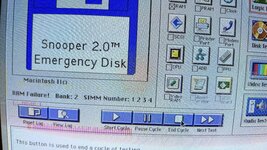
I think they only have 1MB SIMMs.Have you tried with the larger SIMMs in Bank A only?
Hold up, we've already swapped them and a fault remained in Bank B.The only thing you can do here is swap them between banks until you get no errors - but it's possible there are issues with both banks.
Fair point. I forgot that sometimes people don't actually do what you said.Has he swapped them? I don't see a post where he says he's tested with Bank A only, he just posted a diagnostic again that shows an error with Bank '2' which I assume is what Snooper shows when it means Bank B.
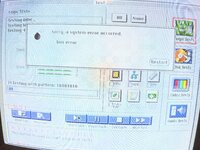
Excellent, now it's important to know what happens with nothing in bank B. This tells us if it is just testing Bank B first, and you have a more global issue.Sorry I was not clear. After swapping the RAM to Bank B still gave error.
I suspect you have a more general logic board fault. Sorry, but it will be a nightmare to find. This type of fault that doesn't stop the machine from working is really hard to locate.With nothing on bank B get this error.
Oh, one last thing, do you have any cards in the machine? Pull them out. All nubus and cache cards.Okay. I will keep and eye out for iici board. I will use this until it stops working. Thank you for your help on this.