
-
Hello MLAers! We've re-enabled auto-approval for accounts. If you are still waiting on account approval, please check this thread for more information.
You are using an out of date browser. It may not display this or other websites correctly.
You should upgrade or use an alternative browser.
You should upgrade or use an alternative browser.
Replace logic board - Mactest result after recapping mac iici.
- Thread starter crazyben
- Start date

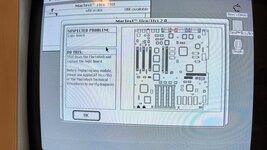


Try running Snooper as well, it's another testing suite, and it usually gives pretty specific results.

No issue with computer everything works as expected. @MrFahrenheit suggested to run a test just to check everything is good after recapping.
I ran the snooper test and it showed RAM and SCSI Bus test failed. Internal SCSI HDD works as Mac boots from it. I will reseat the RAM and run the test again.
I ran the snooper test and it showed RAM and SCSI Bus test failed. Internal SCSI HDD works as Mac boots from it. I will reseat the RAM and run the test again.
Did you test external SCSI?

Try MacTest Pro instead.
I believe the first link on the page (MTP68k_Feb96.ZIP) is the one you want. It should provide more specific information.
Apple MacTest Pro - Macintosh Repository
Apple MacTest Pro (Mac abandonware from 1996)
www.macintoshrepository.org
I believe the first link on the page (MTP68k_Feb96.ZIP) is the one you want. It should provide more specific information.


Hum.I wouldn’t trust software to diagnose hardware issues in vintage Macs. If your RAM is properly detected, HD booting and it’s not crashing you don’t need to be reliant on anything else.
Not sure I agree. If it is reporting a RAM issue, it means it wasn't able to set and clear some RAM.
That isn't an ignorable situation. Especially if the only reason it boots is because they have a ROMinator and it skips the hardware test.
@crazyben - are you using a ROMinator?

MacTest is a program rarely used because it's not very good beyond normal hardware troubleshooting - physical checks over software will always win. A error result of "logic board" sounds like a red herring when the OP as noted it appears to be working well post recap, and maybe shuffing some RAM might be the next step if not fully detected, or crashing.
The vanilla MacTest program's issue is that it lacks detail in reporting. It does flag real issues though.MacTest is a program rarely used because it's not very good beyond normal hardware troubleshooting - physical checks over software will always win. A error result of "logic board" sounds like a red herring when the OP as noted it appears to be working well post recap, and maybe shuffing some RAM might be the next step if not fully detected, or crashing.
If MacTest says there is a RAM issue, there is a RAM issue. That issue might be failed / failing RAM, dirty contacts, bad sockets, broken traces or whatever, but it isn't just making it up. It works by writing patterns to RAM and reading them back, a failure means that it didn't read back what it wrote - that is a real, very real, issue. If you use that RAM, you'll have data corruption. Perhaps it is high up the address space and doesn't get used as often, but it isn't a good thing.
The weird thing is why it isn't caught by the ROM RAM test routine, but that could be because they're using a ROMinator.
I'm not sure about this.physical checks over software will always win.
How can OP verify bank B physically, beyond cleaning the contacts? And without a SIMM tester that takes 30 pin SIMMs, which are impossible to find?
What simms do you have in it? What size, and how are they arranged? Do you have any spares?i did contacts cleaning it gave same result. I will test the scsi bus once u get the bluescsi external.
Do you have a ROMinator (3rd party ROM) installed, or a stock ROM?
Concentrate on the RAM first because the SCSI issue could be caused by either not having an internal terminator, or the RAM issue, so we'll come back to that later, once RAM tests pass.
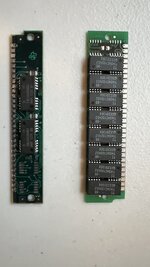
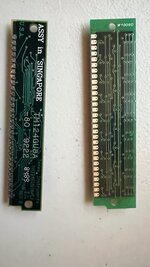
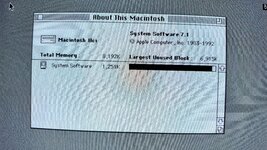
If you switch them over between bank A and B, does the reported problem follow the RAM, or stay in the same bank?4 of the right (bigger) ones on Bank A. 4 if left(smaller) ones on Bank B. System is showing 8,192K but i am not sure how much they are. How can I check that? Stock ROM.
They're probably 1MB SIMMs. I wouldn't worry about that specifically ATM.How can I check that
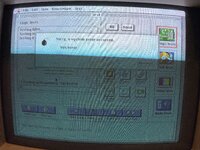
OK, so remove the 4 SIMMs that are possibly the bad ones (now in Bank A??) And put them to one side.Now as soon as run the test I get this error.
View attachment 61848
Put the good SIMMs back in bank A.
Boot while holding the shift key to disable extensions, and run the test again.
Do you have any spare SIMMs at all?
Similar threads


- Replies
- 11
- Views
- 560

- Replies
- 13
- Views
- 779

