
Working on a powerbook 2400c I thought it had a bad backlight so I replace the bulb but still no backlight bought a tester for the bulb and confirm it's working so I supect it's the inverter board so I figured I ask a few questions. in the attach picture does anyone know if F1 is a fuse? It look like it marked 1.25A ? 73 I checked and it doesn't have continuity. Second question second picture on transformer should I have conitunity between the two right soldered connection. lastly open to any suggestion on things to check/testing. Thanks in advance.

-
 Hello Guest! We're hosting a challenge to welcome vintage Intel macs to the MLA during the month of July! See this thread for more information.
 -
We've made some quality of life improvements to the Trading Post. More info here.
You are using an out of date browser. It may not display this or other websites correctly.
You should upgrade or use an alternative browser.
You should upgrade or use an alternative browser.
Powerbook 2400c inverter
- Thread starter jlindsay26
- Start date
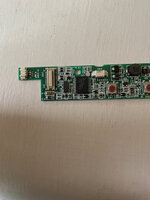
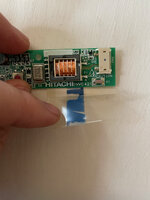


Following in case you figure this out, I've got several of these that could use repair. Seems to be a failure-prone part.
I think your right since I have two and both aren't working. I'm almost wondering if I could wire-in a replacement inverter or I guess I could permanently attach the tester to the powerbook.


Where did you find a replacement bulb? Trying to track down similar issues on mine.Working on a powerbook 2400c I thought it had a bad backlight so I replace the bulb but still no backlight bought a tester for the bulb and confirm it's working so I supect it's the inverter board so I figured I ask a few questions. in the attach picture does anyone know if F1 is a fuse? It look like it marked 1.25A ? 73 I checked and it doesn't have continuity. Second question second picture on transformer should I have conitunity between the two right soldered connection. lastly open to any suggestion on things to check/testing. Thanks in advance.
Parts for these are pretty much unobtanium, you have to just grab them when they come up which is rarely, I have a pretty large stash of parts for these machines I'll be liquidating at some point when I have time to go through and build out the best units.Where did you find a replacement bulb? Trying to track down similar issues on mine.
eBay 10.4 inch 2mm diameter came from china worked fine get the one without the connector just leads and reuse the from from the old bulb.Where did you find a replacement bulb? Trying to track down similar issues on mine.
I’ll mention replacing the bulb isn’t too difficult but I would suggest getting a tester if your not positive the bulb is bad
Thank you for the info - super helpful. I did verify the bulb on mine is bad. Has a really pronounced red tint to it, indicating it's on its way out.I’ll mention replacing the bulb isn’t too difficult but I would suggest getting a tester if your not positive the bulb is bad
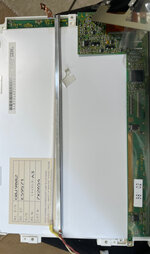
I take it the controller board has to be moved out of place to access the bulb? Trying to avoid messing with this panel as much as I can due to how rare they seem to be.
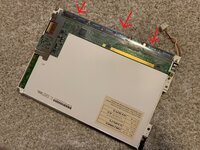
I'll take a few picture and post them later today I bought bulbs from this seller tvrepairledtester listed as follows I have extras if you want a couple send me a PM I'll be happy to send you two if you cover the shipping.Thank you for the info - super helpful. I did verify the bulb on mine is bad. Has a really pronounced red tint to it, indicating it's on its way out.
I take it the controller board has to be moved out of place to access the bulb? Trying to avoid messing with this panel as much as I can due to how rare they seem to be.
View attachment 59581
220mm*2mm CCFL Backlight Lamps for 10.4'' Laptop LCD Monitor Brand New
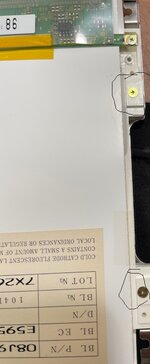
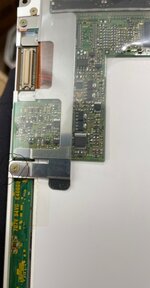
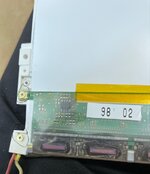
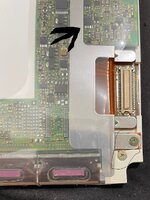
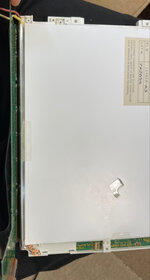


Removed, sorry
I just got a 2400c/240 and it’s display is smashed. The backlight doesn’t turn on through and brightness controls don’t change it either. I was wondering could this be a bad inverter or backlight? Is there any way to know which without a bulb tester?
Not PowerBook specific but I seen videos where people hook up backlights to a working laptop’s inverter to test. The tester I got was pretty cheap on Amazon currently $10 but you need to use you own 12volt power supply.I just got a 2400c/240 and its display is smashed. The backlight doesn’t turn on through and brightness controls don’t change it either. I was wondering could this be a bad inverter or backlight? Is there any way to know which without a bulb tester?
I don’t think I have any other inverters that would work. Voltage is 0v going to the backlight. I need to try to get a display and inverter now it seems which is going to be difficult.
It does it seems like this is a point of failure for this model and finding parts is difficult. I’m in the same boat.I don’t think I have any other inverters that would work. Voltage is 0v going to the backlight. I need to try to get a display and inverter now it seems which is going to be difficult.
Would there be any way to use a new inverter or wire direct power to the backlight? I’m not sure what else the inverter does but I Might just do that if it only powers the backlight
here's a link that describes the inverter https://www.techwalla.com/articles/what-is-an-lcd-inverter
Found this link, figure I'll try the tests they recommended https://jestineyong.com/test-lcd-inverter-transformer/
not sure if there would be enough space but you might be able to squezze a second inverter in an open portion of the screen housing or maybe switch to LEDs haven't really explored that option, but it might be the only option given rarity of these laptops
Found this link, figure I'll try the tests they recommended https://jestineyong.com/test-lcd-inverter-transformer/
not sure if there would be enough space but you might be able to squezze a second inverter in an open portion of the screen housing or maybe switch to LEDs haven't really explored that option, but it might be the only option given rarity of these laptops
Similar threads

- Replies
- 8
- Views
- 1K


- Replies
- 1
- Views
- 325

