• Hello MLAers! We've re-enabled auto-approval for accounts. If you are still waiting on account approval, please check this thread for more information.

Beige Power Mac G3 Problems

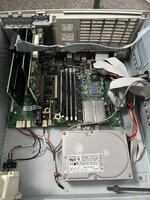
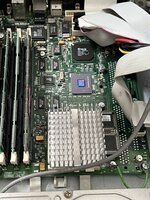
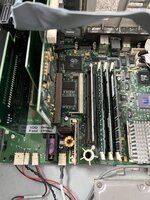
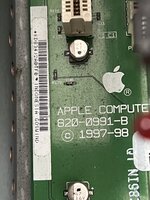
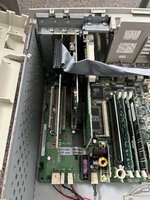
Hi I recently picked up an untested beige desktop Power Macintosh G3 300mhz computer. It powers on, the green LED is lit and the hard drive sounds like it's working. Unfortunately there's no boot chime or display output.

I have tried reseating everything inside but with no luck. Does anyone have any ideas?

In the troubleshooting section of the service handbook I found online it suggests it may be the ROM module but I don't have a spare and can't find any online.
 
Hi I recently picked up an untested beige desktop Power Macintosh G3 300mhz computer. It powers on, the green LED is lit and the hard drive sounds like it's working. Unfortunately there's no boot chime or display output.

I have tried reseating everything inside but with no luck. Does anyone have any ideas?

In the troubleshooting section of the service handbook I found online it suggests it may be the ROM module but I don't have a spare and can't find any online.

Try spraying contact cleaner in the CPU socket and reseating it.
 

Attachments

  • 2500E346-BC63-419D-858A-B035626FE8E2.jpeg
    2500E346-BC63-419D-858A-B035626FE8E2.jpeg
    4.3 MB · Views: 29
  • 27336038-CAC4-4975-ABCB-A08105B3B934.jpeg
    27336038-CAC4-4975-ABCB-A08105B3B934.jpeg
    2.8 MB · Views: 30
  • C561471A-FCD9-4647-9B3B-6DFE52BA03CC.jpeg
    C561471A-FCD9-4647-9B3B-6DFE52BA03CC.jpeg
    3.2 MB · Views: 25
  • B5499899-A1B5-48D6-95C3-6E0453E72065.jpeg
    B5499899-A1B5-48D6-95C3-6E0453E72065.jpeg
    2 MB · Views: 23
  • 8762D97F-3474-4CBF-A794-076C3427E2A2.jpeg
    8762D97F-3474-4CBF-A794-076C3427E2A2.jpeg
    2.5 MB · Views: 25
Hum, it's a late one with a Rage Pro.

That battery looks original, you'll want to remove that before it leaks.

For testing, remove the PCI cards (but not the Personality card (the inner most card). Remove all but one RAM SIMM.

More generally, that's filthy, you might want to clean it!
 
Hum, it's a late one with a Rage Pro.

That battery looks original, you'll want to remove that before it leaks.

More generally, that's filthy, you might want to clean it!
Don’t worry I’ve cleaned it and changed the battery since the photos were taken. I’ve also swapped the scsi card and FireWire card around because the service manual suggests it go in the 1st PCI slot. Other than that everything is the same.
 
I'd zap PRAM.
I'm cribbing off my Blue and White G3 service pdf here page 228. (there might be one for the beige g3 on the internet, too!)
Verify power switch on correct voltage (120/220. 120 for u.s. pretty sure.
Check jumper block for CPU speed, make sure it's right.
Reseat cpu.
Reseat memory.
Replace logic board.
Replace CPU.

Mebbe try resetting logic board also ... on the b&w you power the mac down, unplug it, then press the power button.
Can also try pressing that CUDA button if it's got one.

Make sure the RAM is the correct type. On my B&W it's PC100; not sure of the Beige.
 
The RAM also needs to not use "high density" chips, and needs to be "low profile". Basically, newer simms with a high capacity but small number of individual chips don't fully work, and if the simm is too tall, the "outrigger" rests on it. A good check is to place a thin piece of blutak on top of a SIMM and see if the outrigger contacts it. If it does, your RAM is too tall.

256MB maximum for SIMMs.
 
Back
Top