• Hello MLAers! We've re-enabled auto-approval for accounts. If you are still waiting on account approval, please check this thread for more information.

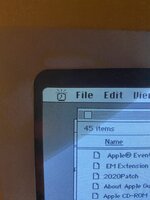
Strange alarm clock icon/alert

What’s this charming little alarm clock icon that’s flashing in my menu bar? I don’t recognise what it’s from. I don’t think I installed any kind of alarm clock either (System 7.5.5).

C1039B4F-9017-457C-ACF6-040B4BDC5928.jpeg
 

Attachments

  • Screenshot_20230209_210616_Mini V II.jpg
    Screenshot_20230209_210616_Mini V II.jpg
    38.7 KB · Views: 7
  • Screenshot_20230209_210738_Mini V II.jpg
    Screenshot_20230209_210738_Mini V II.jpg
    104.5 KB · Views: 3
  • Screenshot_20230209_210804_Mini V II.jpg
    Screenshot_20230209_210804_Mini V II.jpg
    37.2 KB · Views: 8
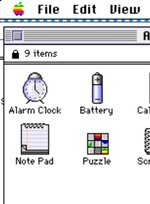
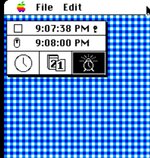
That’s interesting. But I don’t have an alarm clock under 7.5.5. Must be some residual code somewhere in the OS being triggered.
 
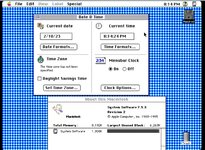
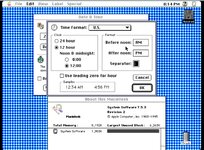
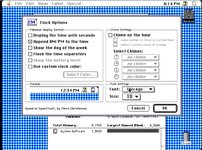
I think in 7.5.x, the alarm clock functionality was included in the Date & Time control panel, wasn't it?

c
 
I think in 7.5.x, the alarm clock functionality was included in the Date & Time control panel, wasn't it?

c
Can't see it and can't think where it would be :
 

Attachments

  • Screenshot_20230210_201424_Mini V II.jpg
    Screenshot_20230210_201424_Mini V II.jpg
    435.3 KB · Views: 9
  • Screenshot_20230210_201437_Mini V II.jpg
    Screenshot_20230210_201437_Mini V II.jpg
    415.6 KB · Views: 9
  • Screenshot_20230210_201405_Mini V II.jpg
    Screenshot_20230210_201405_Mini V II.jpg
    372 KB · Views: 8
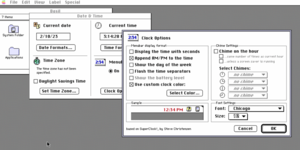
Not sure I'm seeing that. This is a screenshot of the 7.5.3 Date & Time clock options pane from my M1 iMac... and I don't see it there.

Screen Shot 2023-02-10 at 3.14.58 PM.png
 
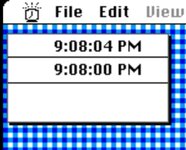
My take is thus: I think the alarm clock alert is built into the system in 7.5.x and it’s able to be triggered even without the desk accessory. It’s residual code from System 7.1 that has been left even though the DA is no longer included.

I’ve manually installed the Alarm Clock DA just so I’m able to turn the damn alert off!
 
Back
Top