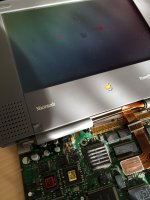
• Hello MLAers! We've re-enabled auto-approval for accounts. If you are still waiting on account approval, please check this thread for more information.

PowerBook 190 strange behavior

It is not advisable to use ceramic capacitors in DC-DC switching circuits to replace electrolytics. Tantalum is ok. 

Ceramics will vary their capacitance based on the applied voltage. Since the voltage is a ripple, the capacitance will ripple with it, creating odd and strange effects. This will also wreck havok in the feedback circuit that regulates the output, exacerbating the problem. 

Ceramics are usually designed to decouple the inductance of the power supply output, while electrolytics decouple the resistance of the power supply output. 

Also, you dont hand-solder those capacitors down with a wand. 

You have to use solder-paste, and reflow new ones in place of the old ones. 

 
Last edited by a moderator:
spectra_refurb_11.gif.acdc1dcb987e8e52fe0251dc6ea321ec.gif


Too bad you "HAD" that 5300, Bibilit. Not only is there problems with the power connection on the 190/5300 but sometimes when the battery leaks, the PSU Area (under the trackpad) is affected and needs to be cleaned up and some areas resoldered. It depends on how big the leak was.
Yes, the previous owner left the battery in the bay for too long, and the leaking was really bad, the 5300 worked for a while though.

Then the hinges started to break off the soft plastic screen surround support, i repaired those but soon after it happened again... in the end i kept it as spares and found a far better one.

I had a broken pin also...

 
It is not advisable to use ceramic capacitors in DC-DC switching circuits to replace electrolytics. Tantalum is ok. 

- - - - - - - - - -

Also, you dont hand-solder those capacitors down with a wand. 

You have to use solder-paste, and reflow new ones in place of the old ones. 
So Tantalums are OK? I'll keep that in mind.

I do use solder paste, so depending on the task and cap physical sizes, lets see how it goes. I'll try it out on a busted up Duo230 first.

 
I recapped a couple of PB Duo, it is not that hard. I used a soldering pencil with a tiny tip,  no hot air required.

The best way to go is SMD electrolytic, if possible smaller in diameter, they make the job easier

Remember that the Duo MiniDock is also filled with the same kind of caps

IMG_3259.jpg

This was my first recapped Duo 230 Logic Board

Also, if I remember correctly, the caps are the same type as the ones you find inside an early SE/30.

 
Last edited by a moderator:
Had time to look at this boy more closely today.

I've washed the board completely over again, and now it's really shiny clean - unfortunately no luck with the problem.

So I've decided to do a few measures - I don't know anything about how this thing works or what are the best places to look for voltages, but I tried anyway.

The AC power supply is giving out a nice 23,6V stable as a rock. I've analyzed the group of 7 capacitors near the battery connector: the top two and the two on the left have voltages rising and falling between 6V and 10V, the two on the right between 5,5V and 6,5V, and the one on the bottom between 7V and 11V.

I also noticed that the two capacitors ranging between 5,5V and 6,5V seems to get a lot hotter to touch than the others.

Where should I look for the voltage rails? Or the resistance to ground? Is there some known schematics for this board?

Thanks!

 
When I did mine taking them all off and putting in 1 by 1 worked well for me.

And I did that with a radio shack special 3 years ago , I'm pretty sure that makes me crazy also lol.

 
I decided to take a few resistance measures between the pads of the capacitors in the battery area of the logic board. 
Among the top 6 capacitors, the two on the left and the two on the top show values ranging from a few hundred to a few thousand kOhms, increasing over time as they charge up - however, the two on the right actually show an almost inexistent electrical resistance. I believe they may be at fault here, they may have leaked or shorted internally and now the two pads are electrically bridged, resulting in the boot failure I'm experiencing. 
Does this makes sense at all? 
I think it's time to attempt a recap...

 
Last edited by a moderator:
Here's an update: I've actually found the culprit! (I think)

There was a chip in the battery area named T548 whose function I don't know. This chip had developed a short, probably because of the leaking acid that corroded the protective layer of the case and exposed the copper underneath. 

I tried to remove it and hope for the best - now the system occasionally chimes, but it seems to continuously power cycle, it keeps on chiming all over again. I'm not even sure it's fixable at this point, but I'd like to understand what that chip does, if anyone knows, and if it can be "bypassed" so to say. I feel it's got something to do with battery management, but I'm not quite sure.

 
Hi,

First of all: great forum! I have spent literally nights reading.

Sorry for reopening an old thread, but I have a Powerbook 190 with similar problems:

When I got it, it booted (off of a CF card in the card slot) but with an almost invisible screen. I decided to fix it from the "top" and recapped the screen. Maybe that was a mistake. After that it did nothing.

Meanwhile I recapped the AC adaptor and the motherboard but all it does is making a faint clicking sound from the region of what I believe is a transformer.

Have you got any more hints or maybe even schematics?

 
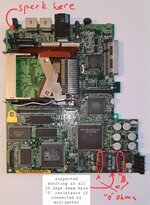
Hi, found this old thread as try to bring back to life Powerbook 190 motherboard that i picked up at a local ewaste. May be someone can give me an advice? I had similar symptoms suggesting a short: when power supplied made a chime and then after couple of seconds went off with a spark on the back of power port (also making a iodine like smell). After that if attach power either hear clicking or see spark again. otherwise board and laptop is very clean. no leaks etc.
I have no big experience but after reading forums tried to look if any of the elements make multimeter indicate short. All seems fine except the big element next to capacitators (with 5x5 legs and letters on the back 157SO166 BI 9525 M) all those legs seem to bridge as per multimeter which seems weired. Any thoughts what this element is and if it may be a root cause? Any suggestions what to do next?
 

Attachments

  • 20230106_153417.jpg
    20230106_153417.jpg
    1.7 MB · Views: 9
157S0166 appears to be the transformer for the DC-DC circuit. Reading a DC short between the pins of the transformer is to be expected.

Is the clicking noise coming from around that part of the board, or from the charger/power brick?
 
157S0166 appears to be the transformer for the DC-DC circuit. Reading a DC short between the pins of the transformer is to be expected.

Is the clicking noise coming from around that part of the board, or from the charger/power brick?
Thank you! No, clicking was not from the charger, it was somewhere within the laptop, felt like it was coming from the speaker.
but when i tried again now it just consistently gives a short spark at the back of the 'power in' port and nothing happens after.
I wonder if there is a way to find and fix the short? or motherboard is toast and unrepearable? Never done that so would greatly appreciate any "kindergarden" level guidance.

PS: Interestingly when we found this laptop first it had same spark when we turned it on. we blamed the charger. we got a different one (with adjustable voltage) after couple months, and it went to the chime but then after 10 secs since powered up got spark again.
I wonder also is there an alternative way to power it via contacts in battery compartment? would that be an alternative to bypass smth shorted?
 
Thank you! No, clicking was not from the charger, it was somewhere within the laptop, felt like it was coming from the speaker.
but when i tried again now it just consistently gives a short spark at the back of the 'power in' port and nothing happens after.
I wonder if there is a way to find and fix the short? or motherboard is toast and unrepearable? Never done that so would greatly appreciate any "kindergarden" level guidance.

PS: Interestingly when we found this laptop first it had same spark when we turned it on. we blamed the charger. we got a different one (with adjustable voltage) after couple months, and it went to the chime but then after 10 secs since powered up got spark again.
I wonder also is there an alternative way to power it via contacts in battery compartment? would that be an alternative to bypass smth shorted?
The 190/5300 PowerBooks are infamous for the power connector pulling loose from the logic board, so from your description it is possible it needs re-soldering, and checking that it isn't shorting out.

It might not be this, but it's a good place to start.
 
The 190/5300 PowerBooks are infamous for the power connector pulling loose from the logic board, so from your description it is possible it needs re-soldering, and checking that it isn't shorting out.

It might not be this, but it's a good place to start.
thank you! yes, read that too. i did check with multimeter the 'power in' at soldering points and seems '+' and 'gnd' do not short at least where they connect to the motherboard.
I can also see gnd pin fom power in being conductive to the "chassis" (?metal frame?, i.e. no resistance here). And '+' is not conductive to any 'gnd' points around power in or to chassi. Would that be proper way to eliminate this "area" from list of suspects? (again, sorry if sound too stupid ;)
Just in case, I just "reheated" them with a soldering iron to make sure they did not crack. Still same "sparkling" outcome... :(
 
Back
Top