• Hello MLAers! We've re-enabled auto-approval for accounts. If you are still waiting on account approval, please check this thread for more information.

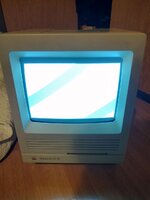
SE/30 not functioning: white/blank screen and no startup chime

photo_2022-12-27_19-48-14.jpg
photo_2022-12-27_19-48-14 (2).jpg
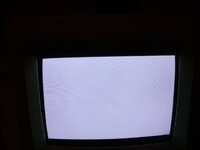
(the best pictures I could take, it looks evenly white in real life)

So I have recently recapped my Macintosh SE/30. Before recapping, it was functioning well, although it had no startup chime. This is for as far as I know a symptom of a mac needing to be recapped, coupled with the fact that the contacts on some of the IC's had green stuff on them.Fast forward to recently, I have finally recapped the motherboard after first cleaning it with alcohol (I did not submerge it in alcohol, as I did not have enough to do so). However, turning it on now, there is still no bootup chime. worse yet, the compter no longer boots and the screen is completely white, with no cursor appearing.For as far as I know, I put the rom chips back in in the right places; I removed them for the cleaning and put them back according to a photo). The RAM is a bit difficult, as I did not take a picture of the ram configuration before taking those out (this is before I knew the SE/30 is picky about it's ram). It should be mentioned that certain ram configurations lead to black snow appearing on the crt (although it would always dissapear after a while), although I could not get this on camera.
So what could be the issue? Is there a broken trace? A broken component? Is it an analog board problem? Could I fix it by putting it in the dish washer or the oven, or should I submerge it in alcohol? How can I figure out what kind of problem it is?
 
Don’t know how to fix but I can say this, dishwasher is a bad idea. It can easily cause damage that’s really difficult to notice due to how it does get everything clean. Bad idea.
 
Where are you located? Do you have experience recapping?? Cleaning the board is as important as recapping. After removing old caps, cleaning, prepping pads for recap you should check continuity to everything. You might have damaged something removing old caps. Any pictures of board?
 
Where are you located? Do you have experience recapping?? Cleaning the board is as important as recapping. After removing old caps, cleaning, prepping pads for recap you should check continuity to everything. You might have damaged something removing old caps. Any pictures of board?
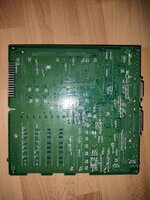
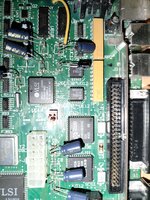
I am in the Netherlands. I have a lot of soldering experience (10+ years, although this is the first time recapping). One of the pads did get loose, a when desoldering the new capacitor (I put it in backwards, so it had to be desoldered and resoldered in the right way). I installed a jumperwire to fix that issue.
 

Attachments

  • photo_2022-12-27_21-44-52 (3).jpg
    photo_2022-12-27_21-44-52 (3).jpg
    304.9 KB · Views: 16
  • photo_2022-12-27_21-44-52 (2).jpg
    photo_2022-12-27_21-44-52 (2).jpg
    326.8 KB · Views: 19
  • photo_2022-12-27_21-44-52.jpg
    photo_2022-12-27_21-44-52.jpg
    309.3 KB · Views: 33
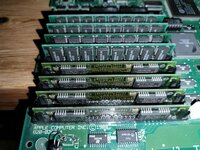
Could you show the ram configuration you used for testing?

I am also from the Netherlands, maybe I can help if you don't succeed.


This pic alone is nasty.. all that cap goo.. looks like it had really good leakage from old caps..
 

Attachments

  • DAA2B0B2-BFF7-4DAF-869A-82BF4EBFE6D3.jpeg
    DAA2B0B2-BFF7-4DAF-869A-82BF4EBFE6D3.jpeg
    2.3 MB · Views: 36
And yeah, you need to thoroughly clean that board with 91-99% isopropyl.. tooth brush on everything. Even remove and chips that can be removed.
 
Could you show the ram configuration you used for testing?

I am also from the Netherlands, maybe I can help if you don't succeed.


It looked like this. From some photo's I could see that the taller SIMMS where in bank B. Unfortunately, only 1 of the SIMMS actually says what it's capacity is, the rest does not.
Also, thanks a lot for the help offer^^
 

Attachments

  • photo_2022-12-27_23-50-04.jpg
    photo_2022-12-27_23-50-04.jpg
    290.1 KB · Views: 31
Those chips @imactheknife are super sensitive to cap goo, UE8 especially. Often times they need to be removed for cleaning or even replaced. I'll bet that's at least part of it, they're part of the video circuit.
 
Ok, the problem has been fixed!
Apparantly one of pins of the rom chips (all rom chips where removed for cleaning) was bend and as such did not make contact with the socket hole. Bending the bin back and reinsterting the rom chip fixed it!
 
Back
Top