
You are using an out of date browser. It may not display this or other websites correctly.
You should upgrade or use an alternative browser.
You should upgrade or use an alternative browser.
Rethinking my bridge/server setup
- Thread starter LaPorta
- Start date



Just happened to be my solution: I am sure there are many more possible. In fact, I now have the little guy ridding piggyback on my PT Pro, and doing very well with the SSD fun of Classic Mac Software, and a nice wired ethernet connection.Reading this thread makes me regret selling off my G4 mini (purchased on the day it was announced!) for like $80 ~15 years ago... Didn't see that regret coming! Thought there was no way I'd have a use for it again!
I used a G4 mini as my bridge machine until it started to have issues starting (RAM problem I think, but I never found time to look into it), so that was passed onto another MLAer to take care of. I also had an Intel mini I was going to use for this purpose, but it ended up being one that someone had upgraded the CPU on, so it would not run the version of OS X I wanted, so that was sold on. I did find the G4 mini ran quite hot so I also wonder if that factored into its demise, so I still think a Pi is the lowest maintenance solution you can get.

I also use a G4 mini with 10.4.11 as my bridge machine - it just tucks away on my desk here, no need to plug a monitor or peripherals into it, just turn it on when I need to pass stuff through. I also use it for Basilisk and Sweet 16, I guess just to keep things compartmentalized. Icing on the cake: got it for $30 a couple years ago because the seller figured it was broken, but turns out these don't like the kind of DVI-to-HDMI cable he was using.
@LaPorta I'm curious about your ability to get machines with > 7.5.3 to connect to 10.4; what exactly are you doing on either end? Is 7.1.1 the floor?
@LaPorta I'm curious about your ability to get machines with > 7.5.3 to connect to 10.4; what exactly are you doing on either end? Is 7.1.1 the floor?
So, I'll give you the rundown on exactly what I did to make this work:@LaPorta I'm curious about your ability to get machines with > 7.5.3 to connect to 10.4; what exactly are you doing on either end? Is 7.1.1 the floor?
1. In OS X 10.4, I used the SharePoints program version 3.5.1 (the version is important), because the later version that is supposed to be for 10.4 omits the option to enable AppleTalk for AFP (even though it is still possible to enable it).
2. In System 7.1, I installed OT and upgraded to the newest version that would run
3. On the same machine, I replaced the built-in AppleShare extension with version 3.7.4 to allow AppleShare IP to work.
I can't take all the credit for this, I got the info from multiple sources. But, that is really all there was to it. As stated before, this will not work on 68000 equipped machines because OT cannot run on it, and I don't think OT runs on System 6, either.
Ah, interesting - Sharepoints is the key.. thanks, I'll try this out!So, I'll give you the rundown on exactly what I did to make this work:
1. In OS X 10.4, I used the SharePoints program version 3.5.1 (the version is important), because the later version that is supposed to be for 10.4 omits the option to enable AppleTalk for AFP (even though it is still possible to enable it).
2. In System 7.1, I installed OT and upgraded to the newest version that would run
3. On the same machine, I replaced the built-in AppleShare extension with version 3.7.4 to allow AppleShare IP to work.
I can't take all the credit for this, I got the info from multiple sources. But, that is really all there was to it. As stated before, this will not work on 68000 equipped machines because OT cannot run on it, and I don't think OT runs on System 6, either.
What exactly is the tricky required? I am trying to setup a similar server. It looks like a Mac Mini running 10.4 covers my 7.5.3 to 10.11 machines. I just need that 7.1 solution.There is trickery that can be accomplished. With OT installed and a far newer AppleShare stolen from a newer system, my IIfx with 7.1.1 can connect to AppleShare over IP with my Quicksilver running 10.4.11 that has AppleTalk re-enabled. Can't connect to it with SE, though, because AppleShare over IP requires OT, and OT will not run on a 68000.
See three posts above.What exactly is the tricky required? I am trying to setup a similar server. It looks like a Mac Mini running 10.4 covers my 7.5.3 to 10.11 machines. I just need that 7.1 solution.
I missed that. Sorry. What specific version of OT did you use?See three posts above.
1. In OS X 10.4, I used the SharePoints program version 3.5.1 (the version is important), because the later version that is supposed to be for 10.4 omits the option to enable AppleTalk for AFP (even though it is still possible to enable it).
2. In System 7.1, I installed OT and upgraded to the newest version that would run
3. On the same machine, I replaced the built-in AppleShare extension with version 3.7.4 to allow AppleShare IP to work.
I think you're still using AFP over IP.
It's my understanding that 10.4's AFP server doesn't have necessary bits (as in program code) to work over AppleTalk, the way the servers from 10.2/3 do.
And, in 7.1, if you install the OT/AS from 7.5.x or 7.6.x you're... getting the IP functionality on your 7.1 machines. (Incidentally I think you tested this and found the same works for vtools? without any special effort to bridge AppleTalk over the Internet...)
The real test would be if system 6 can connect.
The good news is, I don't think anyone needs SharePoints for 10.4 on either Intel or PPC to be a viable part of this chain.
OpenTransport 1.3 or 1.3.1 should work. You may need to export and place the files by hand or lift it out of a working 7.5 install. A few people have reported good luck doing this.What specific version of OT
The only thing Cory is that SharePoints does do something. If I activate AppleTalk in the Network pane of 10.4, my IIfx can't connect, it instead throws an error. Once, I use SharePoints to enable AppleTalk via its method, connecting works. I have absolutely no idea what is taking place, but I do know that I am unable to connect without using it.
Wild. It's my genuine understanding the AppleTalk portion of the file server in 10.4 is literally removed, so the button in SharePoints should do literally nothing.
However, it's possible that that button was an "enable AppleTalk and also do these three other things" button, and one of those three other things is what's making this work.
Looking at the SharePoints page -- all the stuff it does is already built into the OS, but this is one of many utilities from this era designed to make accessing built-in features easier or uncap limits Apple put into the client version of the OS.
That's just guesses though.
Secondarily: My guess is that the confounding factor here is Mac OS X (client) vs. Server. It's pretty normal for Apple server products to support more/different versions of things, both via literally different binaries (although AFAIK that's not the case here) and default or unexposed settings.
(but, disclaimer: my only testing w/ OT+AS on either ASIP6.3.3 or OS X 10.4 has been people with accounts on vtools logging in and reporting it working, I don't have 7.1 set up on anything with ethernet right now.)
It's probably not worth re-doing your setup right now, but your collection skews much older than mine and with that in mind: 10.3 may have been a better OS for Mini G4s explicitly doing file sharing to significantly older Macs. (looking: 10.3 shares the same 16TB volume limit 10.4 has so you don't even lose big disks, necessarily.)
My own focus/experience with 10.4 is primarily from having an Intel mini I wanted to use for a similar role, and also vtools.
(EDIT: I'm aware I'm probably the one who cheerlead for 10.4, and I am glad it's working, I'm genuinely unsure as to why this specific combination of things was required, nor do I know of a good way to figure out what SharePoints is doing to see if we can document it separately.)
However, it's possible that that button was an "enable AppleTalk and also do these three other things" button, and one of those three other things is what's making this work.
Looking at the SharePoints page -- all the stuff it does is already built into the OS, but this is one of many utilities from this era designed to make accessing built-in features easier or uncap limits Apple put into the client version of the OS.
That's just guesses though.
Secondarily: My guess is that the confounding factor here is Mac OS X (client) vs. Server. It's pretty normal for Apple server products to support more/different versions of things, both via literally different binaries (although AFAIK that's not the case here) and default or unexposed settings.
(but, disclaimer: my only testing w/ OT+AS on either ASIP6.3.3 or OS X 10.4 has been people with accounts on vtools logging in and reporting it working, I don't have 7.1 set up on anything with ethernet right now.)
It's probably not worth re-doing your setup right now, but your collection skews much older than mine and with that in mind: 10.3 may have been a better OS for Mini G4s explicitly doing file sharing to significantly older Macs. (looking: 10.3 shares the same 16TB volume limit 10.4 has so you don't even lose big disks, necessarily.)
My own focus/experience with 10.4 is primarily from having an Intel mini I wanted to use for a similar role, and also vtools.
(EDIT: I'm aware I'm probably the one who cheerlead for 10.4, and I am glad it's working, I'm genuinely unsure as to why this specific combination of things was required, nor do I know of a good way to figure out what SharePoints is doing to see if we can document it separately.)
The simplest way to see how a shared server is connected to a host is to Get Info on the share via the client.
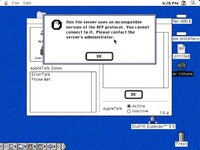
Connecting to my iBook running Tiger with Sharepoints 3.5.1, using Mac IIsi 7.5.3 without OpenTransport running gave me Picture a.jpg
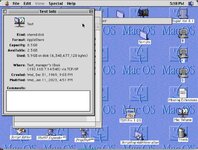
Connecting to my iBook running Tiger with Sharepoints 3.5.1, using Mac IIsi 8.1 with OpenTransport running gave me Picture b.jpg
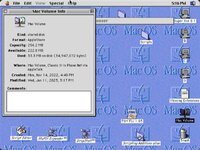
Connecting to Classic II running 7.1 over PhoneNet using Mac IIsi 8.1 with OpenTransport running gave me Picture c.jpg
Clearly SharePoints is Sharing via TCP. The server is showing in the list of servers in the chooser on the clients but that doesn't necessarily mean it's connected via AppleTalk. Sharepoints does allow you to select which TCP port to use.
Connecting to my iBook running Tiger with Sharepoints 3.5.1, using Mac IIsi 7.5.3 without OpenTransport running gave me Picture a.jpg
Connecting to my iBook running Tiger with Sharepoints 3.5.1, using Mac IIsi 8.1 with OpenTransport running gave me Picture b.jpg
Connecting to Classic II running 7.1 over PhoneNet using Mac IIsi 8.1 with OpenTransport running gave me Picture c.jpg
Clearly SharePoints is Sharing via TCP. The server is showing in the list of servers in the chooser on the clients but that doesn't necessarily mean it's connected via AppleTalk. Sharepoints does allow you to select which TCP port to use.
Attachments

Incidentally, Netatalk comes with a few handy CLI tools to help you analyze AppleTalk and ASIP services, regardless of whether they're served by real Macs or Netatalk:
The nbplkup binary app / command (complies and installs with Netatalk proper) which sniffs all the AppleTalk services that it can see on the network. Ex.
The contrib/shell_utils/asip-status.pl Perl script which can inquire a particular server what kind of ASIP service that it is providing. Below is an example of my Performa 6360 w/ OS9.1.
So from the above, you can clearly tell that my Performa 6360 is serving both an AppleTalk AFPServer at address 65343.140:251, as well as an ASIP server at address 10.0.0.156:548
The nbplkup binary app / command (complies and installs with Netatalk proper) which sniffs all the AppleTalk services that it can see on the network. Ex.
Code:
$ nbplkup
                         rasp32:ProDOS16 Image                     65280.242:3
                         rasp32:Apple //e Boot                     65280.242:3
                         rasp32:AFPServer                          65280.242:131
                         rasp32:TimeLord                           65280.242:129
                         rasp32:Apple //gs                         65280.242:3
                  Performa 6360:ShareWayIP                         65343.140:4
                  Performa 6360:AFPServer                          65343.140:251
                  Performa 6360:Multi-User Client                  65343.140:48
                  Performa 6360:  Power Macintosh                  65343.140:252
                  Performa 6360:Workstation                        65343.140:4
The contrib/shell_utils/asip-status.pl Perl script which can inquire a particular server what kind of ASIP service that it is providing. Below is an example of my Performa 6360 w/ OS9.1.
Code:
$ ./asip-status.pl -i 10.0.0.156
AFP reply from 10.0.0.156:548 via IPv4
Flags: 1  Cmd: 3  ID: 57005
Reply: DSIGetStatus
Request ID: 57005
Machine type: Macintosh
AFP versions: AFPVersion 1.1,AFPVersion 2.0,AFPVersion 2.1,AFP2.2
UAMs: Cleartxt passwrd,Randnum exchange,2-Way Randnum exchange
Volume Icon & Mask: Yes
Flags:
    SupportsCopyFile
    SupportsChgPwd
    SupportsServerMessages
    SupportsServerSignature
    SupportsTCP/IP
    SupportsSuperClient
Server name: Performa 6360
Signature:
0f aa bb 60 0f aa bb 60 0f aa bb 60 0f aa bb 60  ...`...`...`...`

Network address: 10.0.0.156:548 (IPv4 address and port)
Network address: 65343.140 (ddp address)
  ##            #   #########
##  ##         # #  #       ##
# ##  ##  ##  #   # #       # #
#   ##  ##  ##   #####      ####
#     ##      # ########       #
#       ##    ####    ###      #
#         ##  #####   ####     #
#           # #### #  ####     #
#           # ### ##   # ##    #
#           # #####     ###    #
#           # #####    ####    #
#           # #### #   ####    #
##          # # ##      ###    #
 ###        # ## ####   ##     #
   ###      # ## ####  ###     #
   # ###    # ##  ##  ##########
  #    ###  # ############   #
 #       ###############      #
#          ####                #
################################
#                              #
################################
              # #
              # #
             #####
             #   #
             #   #
             #####
             # # #
    #########  #  ############
              # #
    ##########   #############
So from the above, you can clearly tell that my Performa 6360 is serving both an AppleTalk AFPServer at address 65343.140:251, as well as an ASIP server at address 10.0.0.156:548
Last edited:
So we're having a deep freeze here so I decided to return to my winter hobby. It's the reason I hang on to all this stuff....
I recently setup my G4 Mac Mini 1.25 with Mac OS 9 for the purpose of using it for a bridge Mac. I had been using an iMac G3 400 DV previously as a file server. I'm not having good results with Mac OS 9 in this G4. There are still stability issues with the install I used so I was wondering if any more progress on this has come through at all. I thought it would be interesting to be able to use my recently acquired Microtech XpressSCSI USB to SCSI purchased from a fellow member, to mount my collection of SCSI drives in Mac OS 9 on the Mac Mini. Apparently USB use in this hacked Mac OS 9 version does not work well so that won't work. Mac OS X 10.2.8 on the same Mac however can use this SCSI converter with no issue without even needing to install the driver which is a good thing since there isn't a Mac OS X installer on the CD.
Aside from installing a hacked version of OS 9, It seems that even the genuine Mac OS 9 install in general is very picky about the hardware it is installed on. Also, it seems that there were very specific versions of Mac OS 9 for different Mac models. Also it seems Mac OS 9 was supported on previously released Mac models in retrospect (meaning Mac OS 9 was an afterthought since it was released after the machine was released )
After going through headache after headache trying to get a stable install of the supported version of Mac OS 9 for various Mac OS 9 capable Macs that I have here, one of the biggest issues that came up after the install and a reboot was a dreaded bus error. This has occurred in my G3 iBooks in which I found and used the Ibook Restore CD to no avail. It has also occurred in the Machine specific Mac OS 9.0.4 I obtained which was pre-installed in the iMac DV 400, also this same error happens with a retail CD of Mac OS 9.1 for my Power Macintosh 8600.
So, either every Mac model I own that is capable of installing and booting some specific version of Mac OS 9 has serious hardware issues that prevent a decent version of the OS from running correctly or I'm doing something wrong. How could it be that every Mac has the same Bus issue? These same Macs run other Mac OS versions without issue. In the PowerMac 8600 Mac OS 8.1 and 8.6 and other previous versions install and boot without issue. In the iMac DV Mac OS X 10.2.8 Server installs and boots without issue and in the Ibooks Mac OS X 10.2 through 10.4.11 boot without issue. Any insight would be appreciated.
I recently setup my G4 Mac Mini 1.25 with Mac OS 9 for the purpose of using it for a bridge Mac. I had been using an iMac G3 400 DV previously as a file server. I'm not having good results with Mac OS 9 in this G4. There are still stability issues with the install I used so I was wondering if any more progress on this has come through at all. I thought it would be interesting to be able to use my recently acquired Microtech XpressSCSI USB to SCSI purchased from a fellow member, to mount my collection of SCSI drives in Mac OS 9 on the Mac Mini. Apparently USB use in this hacked Mac OS 9 version does not work well so that won't work. Mac OS X 10.2.8 on the same Mac however can use this SCSI converter with no issue without even needing to install the driver which is a good thing since there isn't a Mac OS X installer on the CD.
Aside from installing a hacked version of OS 9, It seems that even the genuine Mac OS 9 install in general is very picky about the hardware it is installed on. Also, it seems that there were very specific versions of Mac OS 9 for different Mac models. Also it seems Mac OS 9 was supported on previously released Mac models in retrospect (meaning Mac OS 9 was an afterthought since it was released after the machine was released )
After going through headache after headache trying to get a stable install of the supported version of Mac OS 9 for various Mac OS 9 capable Macs that I have here, one of the biggest issues that came up after the install and a reboot was a dreaded bus error. This has occurred in my G3 iBooks in which I found and used the Ibook Restore CD to no avail. It has also occurred in the Machine specific Mac OS 9.0.4 I obtained which was pre-installed in the iMac DV 400, also this same error happens with a retail CD of Mac OS 9.1 for my Power Macintosh 8600.
So, either every Mac model I own that is capable of installing and booting some specific version of Mac OS 9 has serious hardware issues that prevent a decent version of the OS from running correctly or I'm doing something wrong. How could it be that every Mac has the same Bus issue? These same Macs run other Mac OS versions without issue. In the PowerMac 8600 Mac OS 8.1 and 8.6 and other previous versions install and boot without issue. In the iMac DV Mac OS X 10.2.8 Server installs and boots without issue and in the Ibooks Mac OS X 10.2 through 10.4.11 boot without issue. Any insight would be appreciated.
Last edited:
How could it be that every Mac has the same Bus issue?
Side note here, but it is very unlikely to be the same issue. A bus error is a very low level error that basically means that some code somwhere has tried to access some memory or something that basically doesn't exist. But what this means in user terms is that the Apple (or the application's authors, if it's a third party bit of code) didn't do error handling properly, and a bus error is a kind of generic result for 'welp, something's broken and the system has failed to cope with it properly'. There was a lot of that about in classic MacOS.
So I can assume from this that it isn't a hardware problem at all so I should ignore it and keep suing the versions that do work?
Last edited:
In concrete terms, I would say that most of these classic Mac OS bus errors mean that you're running slightly incompatible software for the hardware, or a combination of software that don't play well together.
Try disabling as many Extensions and Control Panels as possible and see if the system gets stable, then add back the ones you need one by one until you have equilibrium.
At least this was my MO back in the days.
Try disabling as many Extensions and Control Panels as possible and see if the system gets stable, then add back the ones you need one by one until you have equilibrium.
At least this was my MO back in the days.
So I can assume from this that it isn't a hardware problem at all so I should ignore it and keep suing the ones that do work?
Bus errors are often "the software is disagreeing with the hardware in some way", so if you have other media that *does* work, the odds are pretty good that it's a software issue rather than a hardware issue and the disagreement is the software's fault. I wouldn't worry too much about it. In fact, nearly all the bus errors I've ever seen have been software issues rather than hardware issues.
The kinds of bus error that indicate hardware issues tend to be either more consistent across different installation media, or more inconsistent; it's the ones that pop up every two days with no apparent pattern that are the ones to worry about...
Similar threads


- Replies
- 3
- Views
- 318


