No. On a LC475, Apple system SCSI bus.It's not connected to a 3rd party SCSI card, is it?
I am also trying on a G3 beige, logic board onboard SCSI bus, Mac OS 9.1. FWB HDT 4.5.2 freezes when initializing the volume, once it comes to mounting it.


No. On a LC475, Apple system SCSI bus.It's not connected to a 3rd party SCSI card, is it?

FWIW, I have several 5.25" MO drives (Sony, an IBM one, another I can't recall the make of) that I used back in the day (90s!)... I remember some challenges getting them working, but once set up, they were great. I *think* I was using Silverlining?
Fast-forward to recent months and I've tried and tried and failed to find the magic formula to get any of them working again! I can't remember which it was, but I did get one working far enough to recognize and read one of my cartridges, but all attempts to format or even write to them have failed. Mine are 2.?Gb or smaller, some you can flip over.
Watching with interest and sending positive thoughts!
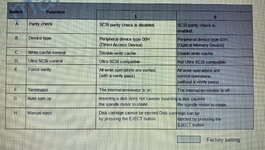
Determine which operating mode you need (optical memory device or direct access device) and whether you want write verify ON or OFF
The following are the selections available on the mode switch:
2 - optical memory device with write verify ON (default).
0 - optical memory device with write verify OFF.
1 - direct access device with write verify OFF.
3 - direct access device with write verify ON.
Ooo... well done! I do remember Drive TuneUp from back in the day - maybe that was the secret sauce I used back when? I'll see if I can find some Mac-time this coming weekend and give it a spin!I have the complete working solution for my situation ... I successfully installed Software Architect’s Drive TuneUp

I’d love to hear of your experience! Good luck!!Ooo... well done! I do remember Drive TuneUp from back in the day - maybe that was the secret sauce I used back when? I'll see if I can find some Mac-time this coming weekend and give it a spin!
If SCSI DVD drives were hypothetically bootable on system 7 and/or system 7 had a UDF driver or we could make HFS/HFS+ formatted DVDs -- we'd still need to balance between DVD and MO in terms of what type of longevity we're looking for. The same is true of CD-ROMs and CD-ROMs have the advantage of that there are a lot more of 'em hanging around.


That’s awesome! Thanks for the info.Hi!
Sorry I'm late in the topic but this reminds me when I was young and my father had to backup regularly its powerbook 170 hdd (then LC630 hdd). His computer seller sold him a 3.5" SCSI 230MB MO drive and it was so wonderfull !! (before, we had a SyQuest 44 ...)
Few years later, to go with its brand new B&W G3, he bought a 640MB SCSI MO drive which was backward compatible with 230 so he could go back and forth between its older macs and the G3 using 230 media.
Now, I got all MO disks, the 640 drive and ... the 640 drive functions sometimes and, today, I did not find the right way to make it working reliably so I've bought a second hand 1300MB USB-2 MO drive to be able to make backups of my old disks to emulate them in my BlueSCSI.
The USB model works flawlessly on my 2010 MBP and still able to read/write 230/640 MB disks.
The day I find the way to use my 640 flawlessly, I will have an easy way to transfert files without using network.
[Edit]
I forgot to mention that the drivers we used and that were sold with the drives are: Formac Manager 6.5 and Drivor but I'm sure that I also used Intech's HardDisk SpeedTools (which has the option to install a specific driver for MO drives) and maybe Disk Drive TunUp too. About Drivor, it is a software suite made in France and only available in French.
Yeah that one doesn’t work with the 9.1GB drives I have. I need to use an actual SCSI disk formatter, or which I’ve only found Disk Drive TuneUp! to be reliable.I assume you tried it with the Fujitsu MO driver + Fujitsu Formatter?
Update on the batch of bad disks:Update on the used 9.1GB MO disks I bought that were not working.
As a test, I took a handful of them and physically cleaned the disk surface using a clean q-tip for each side, and then did a security erase on Mac OS X to write zeros to the disk. I then inserted into my Mac G3 running OS 9.x and Disk Drive TuneUp! 3.1.4 and I did a Format, and those handful of disks seemed to work just fine. Two of the 8(?) still showed write errors so I set those two aside for now.
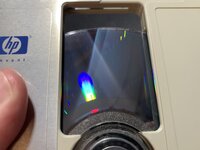
This is what the disk surface on these looks like in one particular spot, which seems to correspond to an open area at the top of the cartridge where the shutter moves. Some environmental contaminants were seemingly vaporized and blown in here.
View attachment 47440
Update on the batch of bad disks:
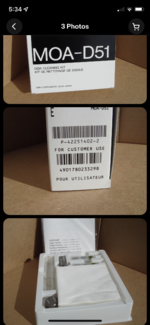
I purchased a MO disk cleaning kit, made by Sony. I then cleaned a disk that refused to work, did a security erase (wrote all zeros), then formatted it, and then copied data on both sides to completely fill it.
It works just fine now. I don’t know what’s in the cleaning kit but the tube of fluid is toxic according to the bottle.
That's interesting. I don't have any currently but a nice MO drive is on my list, so I have been quietly following this thread.
What kit did you use and what did the process entail to clean the disks?