• Hello MLAers! We've re-enabled auto-approval for accounts. If you are still waiting on account approval, please check this thread for more information.

SE/30 does not boot from SCSI, but drives are accessible

timtiger

6502
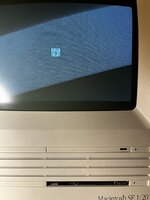
Hello, I‘ve got an SE/30. The previous owner said, that it does not boot from scsi but shows the questionmark disk. After a short test I saw that the logic board does not work anymore. Luckily I cannot see any damages by leaking caps or battery sauce.

I recapped it and now it behaves as described: It boots to the disk. Any attached scsi device with blessed partition is not being recognized. I tried an internal hdd, that works on my se as well as various scsi devices: both zip and external hdd are not being recognized. All are properly terminated.

What I see are repeatly flashing status leds on the scsi devices.

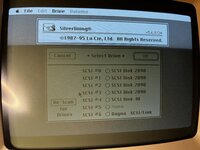
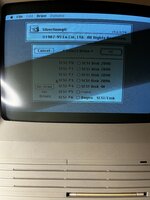
Booting from floppy works very well. On the desktop all scsi drives are shown. They can be initialized and can be used as install targets. Reading and writing works as well. SCSI Probe and Silverlining don’t show any errors.

What does not work is System Switcher. Not one Systemfolder is being recognized.

I am wondering, what could be the problem - the ROM SIMM, the ROM Slot, maybe the SCSI Controller or the RTC-Chip?

Do you have any ideas what to look for guys?

Thank you - would be nice to get that machine back to life :)
 

Attachments

  • BB319488-68BB-4D1C-8E7E-8665E062F3C0.jpeg
    BB319488-68BB-4D1C-8E7E-8665E062F3C0.jpeg
    2.2 MB · Views: 35
  • 4519CC1F-B0BA-4F8E-925A-F2C835B79830.jpeg
    4519CC1F-B0BA-4F8E-925A-F2C835B79830.jpeg
    2.9 MB · Views: 34
  • 54668FDC-DB01-4199-9E99-30AC5B6ADAD3.jpeg
    54668FDC-DB01-4199-9E99-30AC5B6ADAD3.jpeg
    3.8 MB · Views: 35
  • IMG_0208.MOV
    IMG_0208.MOV
    23.3 MB
Sounds a lot like RTC issues. When the VIA can’t access the PRAM the board won’t boot from SCSI drives.
I’d start by checking all connections to/from the RTC.
 
Hi @Bolle I've check the connections 10<>6,12<>7,13<>5 and 43<>1 between VIA1 on UK12 and RTC on UK4. All connections are okay. Any other ideas? Thanks a lot...
 
Just in case someone other is experiencing the same behavior I‘ll continue to log my debugging steps and insights.

So, after checking some more connections, I dig a little bit deeper into debugging the scsi bus to see what happens.

During boot/seeking for boot device the bus reports a sense key error 5 with asc code 24 - that seems to be a controller error: „Illegal Request - invalid field in CDB“. The error stops right after inserting a boot floppy.

The specific Command Descriptor Block should be 6 bytes log. Maybe I find
out more details on how the the cdbs are formed and by what part of the machine. Interesting is that all cdbs logged later on (when accessing the hdds after boot) are 10 bytes long.
 
I'm guessing you may have seen this already, but here are some of the causes for that error:
If a logical unit validates reserved CDB fields and receives a reserved field within the CDB that is not zero, then the logical unit shall terminate the command with CHECK CONDITION status, with the sense key set to ILLEGAL REQUEST, and the additional sense code set to INVALID FIELD IN CDB.
If a logical unit receives a reserved CDB code value in a field other than the OPERATION CODE field, then the logical unit shall terminate the command with CHECK CONDITION status, with the sense key set to ILLEGAL REQUEST, and the additional sense code set to INVALID FIELD IN CDB.

I guess the question is whether it's incorrectly deciding something is invalid (i.e. a program or ROM issue), or if something is happening to the signal on the way there.

I have to wonder if something is going wrong in the ROM, because I assume the Macintosh Toolbox is responsible for the initial SCSI operations. I'm not sure how this would affect blessing a system folder though.

Maybe you could try dumping the ROM using CopyRoms or something and compare it against a known good one.
 
Nope forcing a SCSI-ID does not work unfortunately.

Nice idea to dump the rom and diff it, because I don’t have any physical replacement rom simm to test with… I‘ll try.
 
Strange things happened. After pulling out the logic board out to test some connections and putting it into the case again, it starts from the internal scsi drive.

It connects to the network, can access all drives - BUT the time is ‚jumping‘ between random times and dates every time the screen redraws (I have superclock installed).

So the se/30 is still buggy and the problems seem to related to the rtc as @Bolle expected. As I already mentioned, I’ve checked all connections from and to the rtc twice…?
 
@SuperSVGA In the meantime I‘ve dumped the rom installed on the es/30 and compared it using with serval dumps from macrepo. It’s hash matches with the MacII Roms. Seems to be good.
 
Can you test the clock crystal to rule it out? If you don't have an oscilloscope you should be able to use a multimeter set to frequency mode.
 
Can you test the clock crystal to rule it out? If you don't have an oscilloscope you should be able to use a multimeter set to frequency mode.
I have checked Y1 (it’s the clock crystal, right?) with the multimeter and it shows the right frequency. At Y3 it shows zero.
 
I have checked Y1 (it’s the clock crystal, right?) with the multimeter and it shows the right frequency. At Y3 it shows zero.
Yes, Y1 should be the clock at 32.768KHz. Y3 shouldn't be zero as far as I know, I think the 16MHz might be too high for your multimeter. Y3 is just for sound I think.
 
That really is bizarre. If I recall on the SE/30, the RTC chip is in close proximity to a bunch of surface mount caps...anything as simple as some capacitor liquid underneath is affecting the RTC itself?
 
That really is bizarre. If I recall on the SE/30, the RTC chip is in close proximity to a bunch of surface mount caps...anything as simple as some capacitor liquid underneath is affecting the RTC itself?
I‘ve cleaned the board a week ago with an deep iso bath and brushed it. Maybe I don’t got all dirt although the board looked good right from the beginning. I don’t know if the previous owner cleaned it before…
 
Hello, me again. After the hint of @LaPorta I decided to clean the board once again. After cleaning the board within an iso bath again, it now does no more boot from scsi - same behavior where I started from.

Anyway, I did the Snooper tests @craig1410 recommended with the following results:
- I can’t detect an 1Hz pulse, I assume I am using my Multimeter maybe the wrong way. It displays 50Hz all the time.
- The RAM Test quits with an Error, but it’s unspecific. After that the system hangs and says „bus error“ - I tested the RAM with Snooper on the SE: No error reported.
- PRAM Test reports no error
- Clock-Test reports an error (but also unspecific)

In the meantime I got a Rominator from BMOW delivered. With the Rominator installed the se/30 shows directly a say Mac, although the stock rom works.
 
Back
Top