• Hello MLAers! We've re-enabled auto-approval for accounts. If you are still waiting on account approval, please check this thread for more information.

Macintosh Classic Sad Mac RAM expansion error

wintr

6502
Morning all,

I've tried a few searches on this site and on Google directly, but I can't seem to find a reference for Sad Mac error codes for the Macintosh Classic. For the SE and Plus yes, but not the classic directly. Or, perhaps I have misinterpreted what I was reading and maybe just need to have someone nudge me in the right direction? I have one Classic that will boot fine without the RAM expansion installed. With the RAM expansion installed I get a Sad Mac with the following code:

00000005

00100000

Following this document here: https://udcf.gla.ac.uk/~gwm1h/Error_Codes/Sad_Mac_Codes.html

It says: "$05    - RAM external addressing test failed. Minor error code indicates a failed address line." which follows that this only happens when the RAM expansion is in. The lower numbers should be the address line that I should be checking.  But how do I translate 00100000 into a trace on the motherboard that I should be checking for continuity? 

Any advice would be welcome. Thanks in advance.

 
Hi, 

I've got a similar problem, but without the second line (00000000)

Did you fix your problem, and (if yes) how ?

My recapped classic boots fine without the ram expansion in, but boot with this memory error when inside. 

Regards, 

 
I have the same error at boot; no sound for me, but sad Mac error shows immediately with 00000005  and address of 00080000.  If I pull the memory board out, I can get past this error and boot from the built-in system rom, but System 7 on the hard drive doesn't have enough memory to boot.  I've examined the motherboard for any damage and so far cannot find anything... it looks pristine.   I cleaned it anyway in case of capacitor leakage, but no difference in behavior.  So far I can't find a clue to the cause, but I'll post a follow-up here if I figure it out.

 
Last edited by a moderator:
I would start buzzing out all the memory lines per the schematic. If there is good continuity, there are a few chips related to memory that are generic and are cheap enough it’s worthwhile to just replace them. Of course that’s assuming the memory cards are good.  I fixed my Classic that was only showing 512k ram that way (search here for Classic 512k ram or something similar)

 
Just an idea:

00000001 A0? ; 00000002 A1?; 00000004 A2? 00000008 A3?

00000010 A4? ; and so on?

00100000 would be A20?

00080000 would be A19?

Do not know, if I am right, but could be possible.

 
Last edited by a moderator:
I would start buzzing out all the memory lines per the schematic. If there is good continuity, there are a few chips related to memory that are generic and are cheap enough it’s worthwhile to just replace them. Of course that’s assuming the memory cards are good.  I fixed my Classic that was only showing 512k ram that way (search here for Classic 512k ram or something similar)
Just emphasizing this — I don't have a lot of experience with replacing ram chips, but if I learned anything from watching Adrian's Digital Basement, it's that ram chips fail very often (even new chips!)

 
Morning all,

I've tried a few searches on this site and on Google directly, but I can't seem to find a reference for Sad Mac error codes for the Macintosh Classic. For the SE and Plus yes, but not the classic directly. Or, perhaps I have misinterpreted what I was reading and maybe just need to have someone nudge me in the right direction? I have one Classic that will boot fine without the RAM expansion installed. With the RAM expansion installed I get a Sad Mac with the following code:

00000005

00100000

Following this document here: https://udcf.gla.ac.uk/~gwm1h/Error_Codes/Sad_Mac_Codes.html

It says: "$05 - RAM external addressing test failed. Minor error code indicates a failed address line." which follows that this only happens when the RAM expansion is in. The lower numbers should be the address line that I should be checking. But how do I translate 00100000 into a trace on the motherboard that I should be checking for continuity?

Any advice would be welcome. Thanks in advance.

Necropost....

I just ran into a Classic doing the exact same thing.

I am suspecting the 74LS174, I will know further when i get back to it.
 
Me too...

Did you happen to find a solution to this?

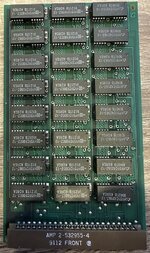
My Classic with an AMP 2-532955-4 RAM card gives me a 00000005 / 00010001 error when booting but is fine with a regular Apple RAM card or none.

The Classic is recapped on both boards and has no other issues AFAICT.
 

Attachments

  • IMG_9420.jpeg
    IMG_9420.jpeg
    208.7 KB · Views: 8
  • IMG_9443.jpeg
    IMG_9443.jpeg
    232.2 KB · Views: 7
Back
Top