• Hello MLAers! We've re-enabled auto-approval for accounts. If you are still waiting on account approval, please check this thread for more information.

Craigslist Mac SE, Mac SE, and Mac Plus

PotatoFi

6502
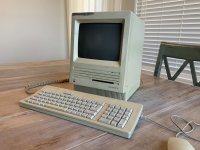
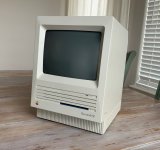
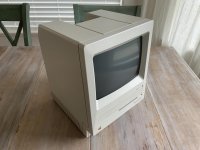
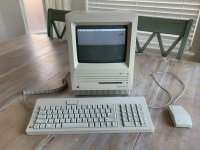
Check out what I picked up on Craigslist today!
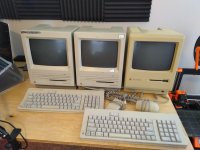
IMG_20190412_134928.jpg

Macintosh SE

  • 2.5 mb of RAM
  • Boots to desktop
  • ADB keyboard and mouse


Macintosh SE

  • Sad mac (undiagnosed)
  • ADB keyboard and mouse


Macintosh Plus

  • Boots to desktop
  • Appears to have a System disk in the drive, since it booted up


He had them all for sale separately, but I sent him a photo of my restored Mac SE, and made him an offer for all three. After a bit of haggling, he accepted my offer. He was excited that someone was interested in restoring them, and was interested in my retrobrite methods.

I had something similar happen with a car a couple of months ago... I have a nice 3-series BMW that I rebuilt and polished up. I found a manual 5-speed of the same car on Craigslist, and ultimately, the seller accepted my offer over others because I was an enthusiast with a car that was well-cared for. I think some sellers like assurance that the things they're selling will be enjoyed and taken care of.

I just got them home and haven't even powered them on yet. I'll pop the backs off shortly to see if there is any battery damage. I do worry that the sad mac unit could have a leaky battery. Will post updates as I have them!

 
Great progress on these yesterday! "Macintosh SE One" as I'm calling it supposedly would boot up, but I decided to skip trying to boot it up and go straight to restoration.

IMG_0248.JPG

On the outside, this thing was a REAL mess. In two places, someone had written something in Sharpie, and then scribbled all over the sharpie. There were lots of black marks, adhesive left over from stuff, and Scotch tape left from taping things to it over the years. There was even a very stubborn tape residue on the CRT, which has medium burn-in (on a scale of light, medium, and heavy).

IMG_0249.JPG

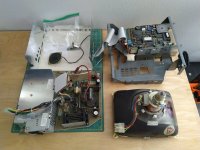
I removed the logic board and rinsed it off under tap water, scrubbing it with a soft toothbrush. It probably didn't need it, but it's nice to know that it's clean. I let it dry overnight, and out in the sun the next morning. The only surprise inside was the "squirrel cage" fan on the analog board. This is only the third Macintosh SE that I've had apart, so I'd never seen one before.

IMG_20190413_125053.jpg

I also removed the Apple logo from the front by gently pressing on it from the rear with a small screwdriver. I don't do this when I Retrobrite with a UV lamp (low temperature), but since I was going to Retrobrite outside in the sun, I didn't want to risk bleaching the yellow color out of the logo.

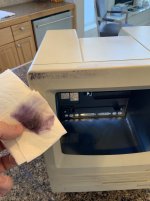
I took Isopropyl alcohol to the Sharpie, it got it 90 percent off but there was still some left. In the background you can see two SE logic boards drying in front of the fireplace (no fire).

IMG_0253.JPG

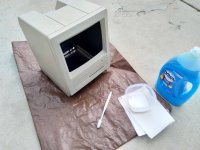
I took it outside and gave it a good scrub with Dawn and a toothbrush, and then went back to the tougher stuff with a damp paper towel and baking soda. I try not to scrub too hard with baking soda, as I've noticed that it acts as a light abrasive. It did completely remove the Sharpie and just about everything else. This step is always the most impressive, imo.

IMG_20190413_130351.jpg

I forgot to get a picture of the Retrobrite... but I just used a Sterilite plastic container, one gallon of 30 proof liquid Hyrogen Peroxide (Salon Care), and the rest with water. Using the sun is WAY faster than my UV lamp, which typically takes a couple of days. It wasn't even full sun... scattered clouds.

No pictures of this part, but I blew the dust out of all the internal components, and cleaned out the floppy drive. Compressed air, alcohol on cotton swaps to remove the old lithium grease, and then a few drops of Dupont Teflon Silicone Lubricant. I use this stuff on the linear rails on my 3D printer, and figured it would work fine here. Lithium grease seems too thick and gooey to me. I also checked the eject gears and they looked great, but I added a couple drops of Teflon lubricant. Disks basically fly out of the drive now!

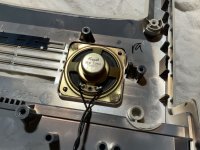
I used a couple dabs of hot glue on the speaker. I didn't do this on my Macintosh SE FDHD so the speaker moves around in there... why didn't I think of this before?

IMG_0259.JPG

So one more time, here is before:

IMG_0249.JPG

And here is after!

IMG_0260.JPG

Not bad for one day of work.

IMG_0261.JPG

I was not surprised when it happily booted up, but there are two outstanding issues:

  1. The fan is SUPER NOISY, it's awful. I need to replace it, but it's that "squirrel cage". Any advice on replacements? Perhaps get a Noctua and 3D print a mount for it?
  2. The video "shimmers" a bit - it's not super stable. Bad capacitors on the analog board?
 
Last edited by a moderator:
Great job there. It looks magnificent. 

I personally use scotch tape to stick the speaker back in. Doesn't look elegant but at least it's easy to remove it for future retr0bright sessions. 

This is an early SE: stepper motor HD and squirrel-cage fan. Those are loud but they're period correct. If I were you, I would upgrade both or leave it as is. It's up to you though. My M5010 SE (twin floppy model) once had the squirrel-cage fan but the previous owner upgraded it. I might go for a Noctua and a SCSI2SD to make it completely silent.

As for the video issue... could be a number of things. Something as simple as a bad solder joint can cause this. I would refresh every single one before moving on to recapping it. Those boards kinda need it nowadays anyhow. 

 
For next time and for others tuning in.

edit: also give baking powder a try for a less abrasive cleaner than baking soda. Baking soda is pure alkaline/base PH, baking powder is a finer grade (abrasive) of baking soda mixed with an acidic ingredient and stabilizer. It'll give an acid/base foaming reaction when mixed with water while you're cleaning. Cream of Tartar is commonly the acidic additive and it can be used for cleaning on its own when you need only acidic properties

 
Last edited by a moderator:
Beautiful work! Nice those black marks cleaned up on the top of that SE, too. Good score on the units, you worked very quickly on restoring the first one

 
I'm jealous of that fan, it looks awesome to me. I've never been bothered by the sound level of computers and I've never seen that kind of fan before.

 
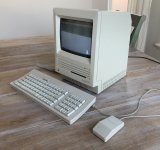
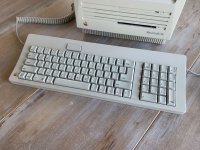
Thanks for the kind words everyone! Here's another update: I've finished restoring the keyboard and mouse.

IMG_0278.jpg

IMG_0280.jpg

I was also very happy to discover that this isn't just any ADB keyboard... this is an M0116 with ALPS Orange switches! A proper mechanical keyboard!

IMG_0279.jpg

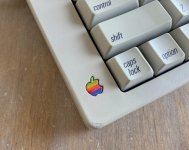
Sadly, there were a couple of hiccups during the keyboard restoration. First, when I retrobrighted the case, I did it in full submersion in sunlight. It bleached the red out of the Apple logo a bit:

IMG_0281.jpg

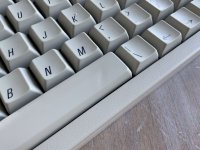
Needless to say, I will be removing logos from now on. Next, I broke a piece of plastic on the space while removing it, and had to superglue it back on. Somehow, somehow, I managed to get superglue on the TOP of the key. I feel like an idiot. I did get it removed, but it left a tiny divot in the spacebar.

IMG_0282.jpg

But hiccups aside, I think it turned out pretty good and I learned some hard lessons for the next one. Speaking of the next one... next up is the Macintosh Plus! But I will break that out into another post.

 
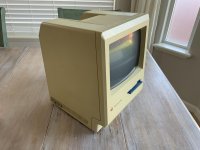
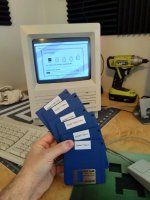
The Macintosh Plus looks to be a pretty straightforward project. It had a bootable floppy disk in the drive, and I was able to test pretty much everything on it. I only started it up twice, as I wanted to avoid floppy disk ejects until I could clean and lubricate the drive. Here's what it looked like before teardown:

IMG_0272.JPG

I decided to tear it completely down and retrobrite it, as it seems a bit yellow:

IMG_0273.JPG

...but overall, it is in really nice shape:

IMG_0274.JPG

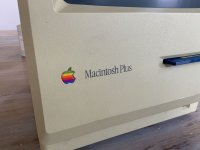
So, I tore it completely down, blew all of the dust and dirt out (nothing remarkable there), scrubbed the case with dish soap and water, and scrubbed off the black marks with baking soda. Today, the front shell spent the day submerged in hydrogen peroxide (Apple logo removed this time :/ ), but it didn't make much progress. It was only 60F, so I don't think it got warm enough to make real progress. What's left is to finish retrobrite, clean and lube the floppy drive, make a new boot disk for it, and consider recapping the analog board.

More to come!

 
Today, the front shell spent the day submerged in hydrogen peroxide (Apple logo removed this time :/ ), but it didn't make much progress. It was only 60F, so I don't think it got warm enough to make real progress.


Submersable aquarium heater for under $30:

https://www.thatpetplace.com/aquatop-submersible-heater-150w-10-5-in-up-to-40-gal

Probably something similar at the local Pestmart.   

Of course, one can just wait for warmer days, but if you want control of the process a heater might be a nice addition.

 
I've always wanted to do a turntable kluge using the equivalent of heat lamps combined with misting sprinkler heads for controlling the process indoors. Set up tray in tub, add aux shower curtain liner. Explain to any concerned that it's a dual purpose prototype for testing automated cleaning of said enclosure. [}:)]

 
Submersable aquarium heater for under $30
I've definitely considered doing this. I think it would make the process a lot more predictable... but we should have some warmer weather soon.

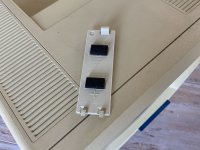
So at this point, the Macintosh Plus is mostly reassembled. One thing I need to figure out: what's the best way to reattach the analog board shield, since it originally used foam tape? I'm thinking maybe adhesive-backed velcro squares? Anyone have a recommendation?

 
I used to buy adhesive foam rectangles in the same width as those squares from Radio Shack, but since they're gone...   I don't know.  Velcro would probably be okay.   I bet 3M has an adhesive foam in the correct width.

 
Yikes, I haven't updated this thread in forever! I kinda got pulled away from 68k Macs for awhile, but today I'm finally able to put some more work into them, and summarize what I've done. I have to look through my photo album to remember... it's been awhile since I've touched these.

Macintosh SE #1

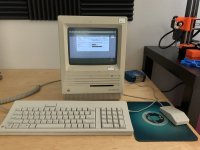
I'm calling this one "finished":

Done:

  • Cleaned and retrobrighted
  • Battery removed, new battery tray and battery installed
  • Floppy drive cleaned and lubricated
  • System 7 and some software installed
  • Replaced a missing rubber foot
Things it could use, but I won't fix:

  • Squirrel cage fan is noisy
One set of System 7 install disks consumes almost every DD floppy that I have! I'm very glad for LocalTalk to move files and applications once System 7 is installed. This one is spoken for - one of my friends asked to buy it.

IMG_20190419_161408.jpg

Macintosh SE #2

This one was previously exhibiting a "sad mac" on boot, and I stole the brightness potentiometer from it to fix my prized Macintosh SE FDHD. Since the pot was desoldered from the analog board, I thoroughly rinsed it out with isopropyl alcohol, rinsing, turning, and rinsing until I was satisfied. I soldered in into the analog board.

It came with two 1mb 8-chip sticks of RAM, and I wondered if one of them had failed. At some point, I must have tried installing some 3-chip RAM that I have... that didn't work. The SE requires 8 or 9-chip sticks (I have no idea why). So today, I installed four 256kb 8-chip sticks that came out of my SE FDHD, and no more sad mac! Also, the brightness knob works 100 percent now!

Sadly, the floppy and HDD didn't work... UNTIL I PLUGGED THEM BACK IN. Sh'yah! Plugged them in, and it booted right up to System 6.0.8! So the hard drive even works (for now). Fantastic.

Done:

  • Installed a cleaned screen brightness potentiometer
  • Installed working RAM (1mb total)
To-Do:

  • Clean and retrobrite case
  • Clean and lubricate floppy drive
  • Dust logic and analog board
  • Install battery tray and battery
  • Sell it to recoup my investment
IMG_0366.JPG

Macintosh Plus

This one is done!

Done

  • Cleaned and retrobrited the case
  • Cleaned and lubricated the floppy drive
To-Do

  • Nada. It's done. Maybe recap the analog board? But it's working fine, so I think I'll leave it
  • Sell it to recoup my investment
IMG_0367.JPG

So yeah, I'm proud to say that every single Mac I own is now assembled! Only one does not work, but they're all completely put together and there are no random screws floating around in my office!

 
Very nicely done!

Is the one that doesn't work the free Plus for which you need a flyback?
Thank you! The Plus you are seeing here is a different one; both of these Mac SE's and the Mac Plus were picked up on Craigslist. The dead Mac Plus was given to me by a friend (it was their family computer).

 
Back
Top