• Hello MLAers! We've re-enabled auto-approval for accounts. If you are still waiting on account approval, please check this thread for more information.

Macintosh Plus won't boot from rare HDD

I would open up the case, remove the drive and try it in your IIfx.  If you open up the case, take a picture of the hard disk inside.

It's possible the power supply in the external hard drive case isn't working - You could test for 5V and 12V with the drive turned on.  Even with a SCSI cable issue, termination etc., I'm not sure why you would get those weird bars on the Mac.

 
I've got some more clarity:

1. I found out that the Mac Plus also gives the fat white and black stripes when the SEAD80 drive is NOT turned on, but when the SCSI DB25-cable (non Apple) is in the back of the Plus. So @Gsbtom was right, it is the cable that is not ok for the Plus. Unfortunately I do not have an original Apple DB25 cable. I also do not have DB25 terminator, that could be a problem too.

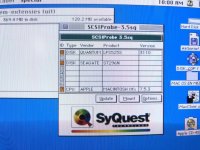
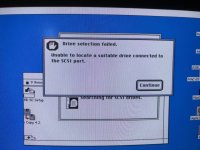
2. @LaPorta hooked the SEAD80 up with my IIfx, with the DB25 (non Apple) SCSI cable I've got. The IIfx recognises the SEAD80, but won't mount it (see first pic). I've tried to reach the drive with Apple HD SC Setup (I think it is version 2.03), but that won't do it either (see second pic). Probably because I do not have termination?

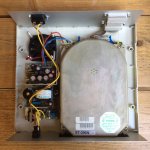
3. @superjer2000 There is no power problem with the SEAD80. I can also hear it boot. While trying to mount it on the IIfx I found out that the hard drive is a Seagate 296N (it is also on the sticker). Here are the specs: https://stason.org/TULARC/pc/hard-drives-hdd/seagate/ST296N-85MB-5-25-HH-SCSI1-SE.html
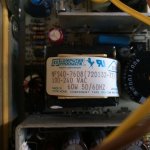
I also posted some pics of the internals

IMG_3732.jpg

IMG_3733.jpg

IMG_8054.jpg

IMG_8055.jpg

 
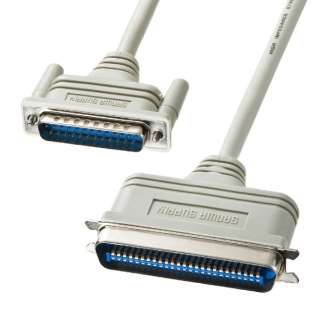
Oh it was @Dog Cow actually about the cables and pins. Does a SCSi DB25 cable for the Plus have less pins? Do you have a picture for me that shows it?

 
The volume/partition map and/or drivers on the disk itself could be corrupted. I'd try Lido or other similar utility to reformat (unless it is the hacked version, Apple HD SC Setup will not work). If it worked with the IIfx and not the Plus, it could also be an issue with the Plus itself still, despite the cable doing it without the drive attached, so you may have two problems (Plus SCSI and drive too).

 
Does a SCSi DB25 cable for the Plus have less pins? Do you have a picture for me that shows it?
No, it has 25 pins on the Plus side, and 50 pins on the peripheral side. This cable was called the Apple SCSI System Cable. Find a pinout in Inside Macintosh, volume IV, or check this page: Macintosh Plus SCSI Pinouts

But of course this Apple cable won't work for your hard drive, because the hard drive also has a DB25 port. I don't think your hard drive was designed to be used with a Macintosh. Apple's guidelines for SCSI was to use a 50 pin Centronics connector on all peripherals.

1606893072.jpg.19d8e2a80e303aacb2f608c9a87e5139.jpg


Last edited by a moderator:
The volume/partition map and/or drivers on the disk itself could be corrupted.
Most likely it's the device driver on the disk that is incompatible with the SCSI Manager in the Macintosh Plus. I don't believe that this hard drive was ever used with a Macintosh computer. It's not designed like a Macintosh SCSI peripheral.

 
It probably could be made to work with the Mac Plus. I think it needs to have the device driver updated. There are a couple of formatting utilities that can do this job.

 
The lack of proper driver still doesn't explain the bars when just the cable itself is attached. But I also don't think the cable is the issue, especially since it worked on the other Mac. I just don't know if the lack of termination even with only an open cable plugged in could cause that or not? The Plus can be more picky than later systems about SCSI termination. (EDIT: Actually, was it still plugged into the turned off drive? I might have misread that)

Regarding the cable, many computer systems used the same 25-pin connector for SCSI as Apple did, and there are also many peripherals didn't use the 50 pin Centronics. The SCSI Zip drive comes to mind, as it also had a DB25 connector and passthrough. I don't have any Apple SCSI cables but I have dozens of generics, DB25 to Centronics, DB25 to DB25, DB25 to HD50, Centronics to HD50... they all work just fine on Macs ranging from the Plus to G3, Amigas, PCs, and Suns. As long as the bus is terminated properly, anyway.

Heck, I'm pretty sure I was using a Belkin RS232 serial cable when I used the ZIP drive to boot a system up last week.

 
Last edited by a moderator:
Back
Top