
-
 Hello Guest! We're hosting a challenge to welcome vintage Intel macs to the MLA during the month of July! See this thread for more information.
 -
We've made some quality of life improvements to the Trading Post. More info here.
You are using an out of date browser. It may not display this or other websites correctly.
You should upgrade or use an alternative browser.
You should upgrade or use an alternative browser.
TAM Twentieth Anniversary Macintosh LCD replacement
- Thread starter glay78
- Start date


Yes - you're in luck, as it's the same LCD found in PowerBook 3400 and Kanga G3 models. If the LCD displays lines or other unusual corruption, it could be the analog to digital adapter that runs between the LCD --> adapter --> TAM motherboard. My TAM came with a faulty adapter, and it was near impossible to find a replacement, I couldn't repair it.


Define "rotten" please? As Byrd said, there's an LCD interface hooked up to what would be the Audio/Monitor Subassembly on a 6500/5500. So no video out connection is available and a possibly very serious problem. Is the screen itself somehow so jacked up it's clear that it's the only problem?

Removing the screen is not easy, a lot small clips and weak plastic.
https://68kmla.org/forums/index.php?/topic/27661-tam-no-display/
https://68kmla.org/forums/index.php?/topic/27661-tam-no-display/

Wow great to see that you have saved a TAM. Hope I can achieve that too.Removing the screen is not easy, a lot small clips and weak plastic.
https://68kmla.org/forums/index.php?/topic/27661-tam-no-display/
"Rotten" = sounds like the LCD is cracked, hopefully an easy fix. Taking apart the TAM isn't that bad, it's the curved perforated plastic at the top that's the hardest to remove as you have to flex it off, but take your time on this and others and it's doable.
Yeah, starting to sound like that. "Rotten" is one of those vague/equivocal adjectives that make for difficult troubleshooting. Anybody have a link handy to mcd's take apart?


I'll take "rotten" to mean bubbled/warped/scuffed/bashed as seems to be the trend among LCD panels from the '90s lately.
If you don't have ready access to a parts PowerBook, try removing the LCD panel and reading the model number from the back of it. Putting this info into an online reseller of some sort will often yield a replacement display for a reasonable sum. I have found replacement panels for my 5300ce and 550c this way.
If you don't have ready access to a parts PowerBook, try removing the LCD panel and reading the model number from the back of it. Putting this info into an online reseller of some sort will often yield a replacement display for a reasonable sum. I have found replacement panels for my 5300ce and 550c this way.
Cool info, I'll try to post a photo of the screen later.I'll take "rotten" to mean bubbled/warped/scuffed/bashed as seems to be the trend among LCD panels from the '90s lately.
If you don't have ready access to a parts PowerBook, try removing the LCD panel and reading the model number from the back of it. Putting this info into an online reseller of some sort will often yield a replacement display for a reasonable sum. I have found replacement panels for my 5300ce and 550c this way.
Thank you so much. I ordered a 3400c LCD and swapped out the TAM. It’s working now but the HDD is dead. Time to go flash memory and reinstall the OS.Yes - you're in luck, as it's the same LCD found in PowerBook 3400 and Kanga G3 models. If the LCD displays lines or other unusual corruption, it could be the analog to digital adapter that runs between the LCD --> adapter --> TAM motherboard. My TAM came with a faulty adapter, and it was near impossible to find a replacement, I couldn't repair it.
By the way after installing OS 8 or 9 does all the TV and radio works? Or I have to get the recovery disk?
Cool and thank you. Yes keep the LCD well, hopefully it doesn’t comes handy.Wonderful! I’ve a spare junker 3400c with good LCD should my TAM LCD decide to die one day.
Yes, installing vanilla OS 8.x or 9 installs the requisite TV/radio functions as needed for the TAM
Do you you have any fix recommended for the broken door if CD drive?
Where is the break? The door has different clips, perhaps post a picDo you you have any fix recommended for the broken door if CD drive?
Haha i broke the left side when opening the case. For that I can stick back, how about the part that holds the tray when open?Where is the break? The door has different clips, perhaps post a pic


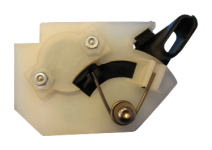
Are you talking about the damper mechanism (the piece that smoothly opens the door as opposed to just letting it fly open)?
Similar threads

- Replies
- 3
- Views
- 1K

- Replies
- 3
- Views
- 1K


- Replies
- 1
- Views
- 2K
- Replies
- 5
- Views
- 2K
