• Hello MLAers! We've re-enabled auto-approval for accounts. If you are still waiting on account approval, please check this thread for more information.

LCIII restored - It's Alive! + Questions for uniserver and people that know stuff

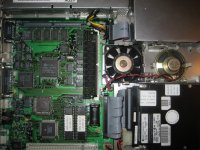
My LCIII is running once again!  Had lots of issues with this one, bad caps (obviously), a short on the +5 volt rail, and all that electrolytic stuff to clean up.  This one just didn't want to start.

First it was cleaned, and new caps for the board and power supply.  Nothing (except hdd turn on and fan spin-up).  So I cleaned it 5 more times... still nothing.  Recapped again with new caps.
Then I discovered a short to ground on the +5 rail.  Then I cleared the short.  Still nothing.  Then I replaced the caps again... and it finally started  :)    Lesson - never give up!

So my questions to uniserver and people that know stuff like techknight, bigmessofwires, mcdermd, etc.... 

Does anyone know what the normal operating temperature is on the cpu for the LCIII (not overclocked)?  Mine gets so hot that it almost burns my finger to touch it.  I am guestimating that it's about 110 - 120 degrees farenheit.  I don't remember them getting this warm - but it's been many years since I last had a working system. 

Second thing - caps c4, c5, c7 -  they all show about 3.3 volts is this normal?

Also cap c2 has no noticeable voltage - is this normal?  Maybe it's a high pass filter for the speaker or something?
IMG_4808.JPG

IMG_4810.JPG

 
Last edited by a moderator:
do me a favor and pop out that ram simm and see if the cpu still gets hot.

also you need to get a legitimate temperature from an IR temp gun or even a thermometer touched to the top. 

normally the LC-III cpu does not get that warm even when running @33 mhz Re-clocked.

120F probably at the most.

- sometimes in the washing process water can still pool under i/c's did you dry the board with a compressor before you tried it?

your cap job looks to be ok though.

 
Last edited by a moderator:
I did that...  without the 4mb simm, it still gets hot.  A human thermometer went all the way up to 108 degrees f.  I had to stop it there to keep the thermometer from breaking.  So it's at least 108deg f.  Weird.  I didn't remember it getting that warm.  Just slightly warm but not like this. Everything else feels cool.

It's been about 10 days since I've last washed it.  I used a bicycle pump with the special valve to shoot air at something (different from the one you use to fill up a ball).  No compressor yet!

Can one of you check the voltages for me on the c2, c4, c5, c7 caps?  I'm getting :

c2: 0v

c4: 3.94v

c5: 3.94v

c7: 3.94v

I think those voltages are low.  If so the problem might be in the audio section somewhere.  I'll keep hunting around in the schematic to see if I can narrow it down further.

It's definately the motherboard.  I've removed the hdd, hdd power, floppy drive, keyboard, monitor, speaker and fan cable... same issue.

do me a favor and pop out that ram simm and see if the cpu still gets hot.

also you need to get a legitimate temperature from an IR temp gun or even a thermometer touched to the top. 

normally the LC-III cpu does not get that warm even when running @33 mhz Re-clocked.

120F probably at the most.

- sometimes in the washing process water can still pool under i/c's did you dry the board with a compressor before you tried it?

your cap job looks to be ok though.
 
Last edited by a moderator:
Your probably just fine. 120f to 130f is fine anything above 110f will feel burning to your skin anyways.

c22

16v 47uf

-5.00

c21

16v 47uf

12.21

c19

16v 47uf

5.13

c18

16v 10uf

9.89

c8

16v 47uf

5.05

c13

6.3v 100uf

2.18

c7

16v 10uf

4.07

c5

16v 10uf

4.04

c2

16v 10uf

4.01

c4

16v 10uf

4.02

c20

16v 47uf

5.13

(Direct from PSU)

+5 /5.13

+12 /12.20

-5 /-5.00

 
That's the challenge!  Where??

Something is definitely shorted somewhere. Thing is - where?


Thank you Uniserver.  Really appreciated.  I tried cooking the board to remove any water left over - just in cse - but there was no change to the problem.  Interesting.  Most of my values were comparable to yours +- 0.10 volts.  Except C13 and C2 which both have a zero volt value. 

According to the schematic, they both connect to the sound chip - U1.  That may be the culprit.  There are caps/resistors/grounds inbetween though so I'm probing the traces looking for the problem.  If everything is connected up to U1, then U1 is probably to blame. The weird thing is that the audio works fine. 

I'll reply back in a day or so if I find anything.  If not, I'll have to get  a new heat gun as my last one broke due to a solder ball inbetween the microcontroller pins.  Then when I get it in, I'll remove U1 and see how the temps are on the cpu. 

Thanks you guys for all of your help.  After this, I'll owe you guys lunch.

Your probably just fine. 120f to 130f is fine anything above 110f will feel burning to your skin anyways.


c13
6.3v 100uf
2.18

c2
16v 10uf
4.01
 
Last edited by a moderator:
Thanks techknight.  I think you're right.  Uniserver and I were also half-right!

Well last night, I was concerned so I looked up the motorola 68030 cpu datasheet. 

I was looking up the max temperature ratings, to get an idea of what i should expect with a normally working cpu...  I happened to be glancing at the cpu when I noticed something odd.  It was a d'uh moment.  Apparently pin 50 was bent toward pin 49 to the point it was basically touching.  Well I was already in the datasheet so I looked up those two pins.  And what do you know - pin 49 is Vcc, and 50 is n/c.  I carefully seperated the pins, and started it up. 

The results are a definite improvement.  Instead of getting very hot very quickly, it now still gets hot as it did before - but instead of taking about 30 seconds or so - it now takes it around 5-10 minutes to get up to the same temperature.  I'm really lucky pin 50 was a no connection pin, and not something vital.

Also i measured caps c2 and c13 again - instead using the power supply metal case as ground - instead of the negative side of the capacitor - and I got the correct voltages that uniserver originally posted.  So I think it's ok...  Those caps negative side doesn't go to ground, at least directly.

looking at the datasheet for a cqfp package (as is on the lciii), the max temperatures are as follows:

                                                                   airflow in linear ft/min

                                                                       0               200               500

maximum - no heatsink (estimated)              46              28                 24  

typical (- no heatsink estimated)                    43              25                 21

Degrees Celcius.

So that means  no airflow would be at max 114.8 deg farenheit with a typical temperature of 109.4 degrees farenheit.  I'm reading at least 108 deg farenheit.  So that might be normal.  Yes there is airflow, but it's not directly over the cpu - I don't think the cpu sees much of the airflow from the fan.

I've got 3 other lciii boards to fix... I guess it's time I fixed another one so I have something to compare them to.  Once I have another board fixed, I'll be able to determine once and for all if it's ok (it probably is - but I like to verify).  At least pin 49 and 50 aren't connected anymore!  I might add a heatsink in the fututre to help it keep a little cooler.  Hopefully it will last longer that way.

Uniserver - when you measured caps c2 and c13 - where did you put the negative lead?  Specifically - did you use the negative side of the cap or did you use another ground?

I remember a few years ago the '020 in my LC was not very warm.  I think the '030's gets warmer and this might be normal.  I'll report back in a month or two when I get another board working...  Let everyone know my results.

If you have sound, then likely everything is ok there.
 
You could always throw a small heatsink on the processor with some thermal glue or a pad if you're worried about the heat

 
Congrats on the discovery and fix, lopaka1998! Maybe you should check the CPU and other large chips on the LCIII board and see if there is another bent pins touching. That took some real detective work to do!

 
Yeah.  I was really lucky I think.  Thanks uniserver for your help.  I looked at that cpu like 4 times.  I can't believe I overlooked that!

yeah bent cpu pins are a bad thing bud...    case closed.

I think I will eventually - just to keep it running cooler to help it last longer... hopefully.  I've already got the thermal paste from a previous project... just need to buy a heatsink.

You could always throw a small heatsink on the processor with some thermal glue or a pad if you're worried about the heat

Thanks Elfen.  I just did that and everything was ok as far as I could see.  I should re-check using a magnifying glass though.  That VLSI - glue logic chip has pins so small, it's hard to see.  I must have looked at the cpu several times before I spotted it. 

Ok, I'm happy now.  This was my "get the kinks out" board to practice on and get the routine down.  I picked it up about 6 months ago. Now I can get to the other boards and see if I can get them working also.  Thanks you guys for all of your help and support.

Congrats on the discovery and fix, lopaka1998! Maybe you should check the CPU and other large chips on the LCIII board and see if there is another bent pins touching. That took some real detective work to do!
 
Nah.  I don't believe in overclocking.  IMO, the extra heat isn't worth it, especially for a vintage item.  I'd rather keep them as cool as possible to keep them functioning as long as possible.  I know I'm odd man out here, but...  what can I say... I've always held the opinion that if I needed a faster machine that I would get a machine that was engineered for the speed rather than using overclocking.  It helps keep heat down - and keeps parts running longer.

Where you may be considering the 33 MHz boost ?
 
Last edited by a moderator:
Back
Top