• Hello MLAers! We've re-enabled auto-approval for accounts. If you are still waiting on account approval, please check this thread for more information.

wthww's conquests

wthww

Computer Janitor
Staff member
Hello, all!

I have not acquired anything partcularly interesting a quite a while now; that has changed. I was able to purchase this off of another long time member. Kudos to him, he sold it to me for a quite reasonable sum over eBaying it.
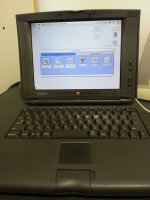
pb550c.jpg

One more thing...

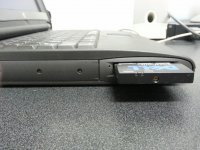
pb550c_side.jpg

Enjoy,

//wthww

 
The only limitation of this model, from what I can tell, is that it needs System J-7.5 at a minimum.

It was a Japan only release, as far as I'm aware (hence the J- prefixed to the System version). The keyboard also supports that, you can see all the Hiragana written on it.

Here's the Apple spec sheet for it: http://support.apple.com/kb/SP164 This also shows the J specific prefix, so I'd say it is def. a Japan only release. Nice size 750MB HD. An interesting hybrid between the 500 series and the 190 series that followed.

It apparently needs a model specific enabler (PowerBook 550c Enabler). I bet that's not easy to find. I've never seen it on the Apple legacy software website.

 
Thanks for all the replies, guys!

I thought the 550 was Japan-only?
It was. This machine was imported. It also has the rare-as-hen's-teeth revision c pcmcia cage, so I'm set as far as powerbooks for a good long while. I'm planning on installing NetBSD on it and making it a regular-use machine. Fun times!

//wthww

 
550c....check. PCMCIA card cage....check. Big HDD...check. How much RAM does it have? Either way...very nice! :O

 
Yo,

I've had time to spend with the machine and I've come to the conclusion it is now my favorite 68k powerbook. The dark plastics, larger screen & full '040 really make it for me. The machine sadly has a few issues, namely:

  • The floppy drive eats floppies. (Yeah, I know right? The head is scraping off the magnetic coating. :/ )
  • The machine has 28mb ram and a 750mb drive.
  • The install is broken in such a way that OT is disabled. Considering the broken floppy drive and my lack of a scsi adapter or pcmcia/cf adapter I'm in a bit of a chicken/egg problem.
  • The power adapter that came with it needs recapped; I can hear it screeching in agony.

To fix these issues I'll be transplanting a ram module, floppy drive, and apple 2.5" scsi > ide adapter from another 'book. The pesky power adapter will be put under the knife sometime in the next week. This is the most excited I've been about a 68k mac in quite a while and pretty much completes my 68kmla questing, except for either a Quadra 840av/950.

I'll take pictures when I open up the powerbook & power adapter. Thanks for looking!

//wthww

 
You almost certainly already have a scsi to ide adapter in the machine already. There were very few, if any, 750mb scsi 2.5" drives made, and my understanding is that the 550 was equipped with an ide drive on an adapter.

Anyway, it is easy to check. Take off the keyboard and you are basically there.

 
Allo,

Progress! I picked up another torx set and went about my business. Have you had three pb5XX strung out across your desk before? I have now! Working on the pb550c made me sort of nervous; getting replacement plastics would be next to impossible short of importing another. The 550c is now rocking a 1gb EIDE drive w/ the apple adapter. It's previous drive was in fact a 750mb scsi disk OEM'd by Apple from IBM; it is also equipped with 36mb of ram.

My to-do list for this machine is now quite a bit shorter, sadly not all of it is easy. Still to-do:

1. Get a pcmcia cellular/wifi combo card. (these exist, they were made by t-mobile USA. It would only work with NetBSD, but would make it possible for this machien to be my next take along mac.)

2. Get PCMCIA > cf adapter.

3. Get SCSI > centronics 50 adapter.

4. Take the machine to a nearby hackerspace. I'd like attempt scanning the upper body plastics (mostly the LCD assembly). If I can get high enough resolution scans fabbing a new part might be possible.

Thanks for reading!

//wthww

 
Back
Top